
How to Download a Shopee Video Without an App (3 Ways, 2026)


If you only need to save one product video for research, you really don't need to install anything. You can download a Shopee video without an app through three routes I use myself when gathering ad references: a Chrome extension, a paste-the-link online tool, and your phone's browser. Each gives a different result and carries a different risk, so I've split them below. Pick the one that fits.
One honest note first: screen recording isn't really "downloading." You get the Shopee watermark, lower quality, and often a stray notification sound. Fine for a quick rewatch, but if the clip is going into your own content or competitor research, the three ways below are far cleaner.
Way 1: Chrome extension (cleanest, original quality)
For sellers who grab videos often, a browser extension is the tidiest route. You open the product page in Chrome, the video gets detected, and you click to save. The file comes down in original quality, no watermark, and nothing to paste anywhere.
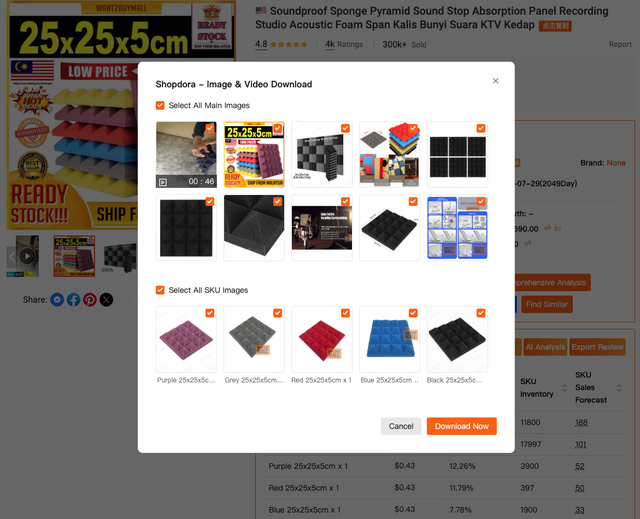
Here I use the Shopdora plugin. The flow is simple: open the Shopee listing in Chrome, click the Shopdora plugin, choose Download Image & Video, and the clip saves straight to your laptop. What keeps me on it isn't just the download. On the same product page the plugin also shows sales data and product signals through its Comprehensive Analysis. So while you're saving a competitor's video, you can see right away whether that product actually sells or just looks busy. If your work is product research, saving the video and reading its numbers in one click is a real time-saver.
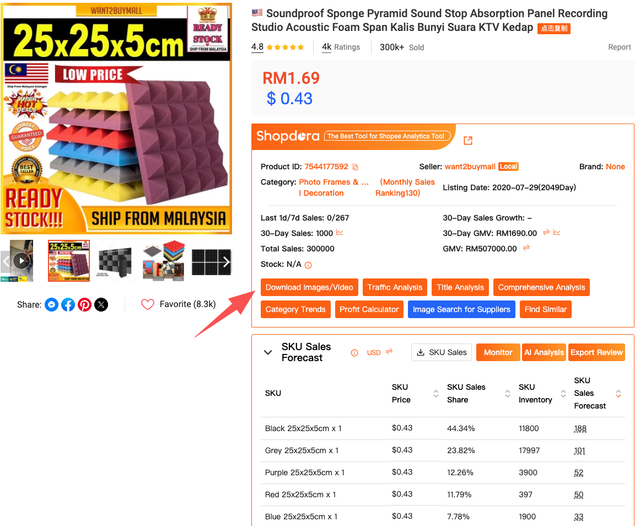
The honest drawback: the extension only runs in a desktop browser (Chrome on a laptop or PC), not inside the Shopee phone app. If you're out and only have your phone, jump to Way 3.
Way 2: Paste-the-link online tools (fast, with trade-offs)
The second route is an online downloader. You copy the product or video link from Shopee, paste it into the box on the site, and click download. Nothing to install, works from phone or laptop, and it's what most people reach for when they search for a Shopee video downloader with no app.
But there's a cost. Some sites add their own watermark, quality sometimes drops to a lower resolution, and you're handing a product link to a third-party server you know nothing about. For a one-off emergency grab, fine. For daily work, Way 1 is better.
A tip so you don't get burned: pick a site that doesn't ask you to log in, doesn't request odd permissions, and gives you a plain MP4. If a site pushes you to sign up or install a "helper app," that's the opposite of the no-app result you wanted.
Way 3: Phone browser mode (for emergencies)
If all you have is your phone and you won't install anything, open Shopee in your phone browser (Chrome or Safari) instead of the app. Switch on "desktop site" in the browser menu, then open the product page. From the desktop view, some videos can be saved through the press-and-hold menu on the video itself.
This is the least reliable of the three. Shopee's layout in a phone browser often differs from the app, and not every video can be pulled this way. Treat it as the backup for when you're away from a laptop. Once you're back at your desk, Way 1 is still the one to count on.
So which should you pick?
Simple version. If you're a seller gathering references every day, use the Chrome extension (Way 1): cleanest, original quality, and you get the product's numbers alongside it. If you just need one quick video and you're away from your laptop, an online tool (Way 2) is enough, as long as you're aware of the watermark and privacy trade-offs. Keep the phone browser (Way 3) for when you're stuck.
And remember, downloading the video is only the first step. A competitor's video is useful not to copy outright but to learn from: the camera angle, how they show the product, the hook in the first three seconds. Then you make your own, better version. This is where the data earns its place: before you wear yourself out imitating one product, check first whether it actually sells.
FAQ
Can you really download a Shopee video without an app? Yes. Through a Chrome extension in your browser, a paste-the-link online tool, or desktop mode in your phone browser. None of these needs a separate download app.
Which way gives no watermark and original quality? The Chrome extension (Way 1). It takes the original file, so there's no added watermark and the resolution isn't downgraded. Online tools sometimes add a watermark or lower the quality.
Does screen recording count as downloading? Not recommended. A screen recording carries the Shopee watermark, loses quality, and often picks up notification sounds. For content or research, use one of the three ways above.
Can the Chrome extension be used on a phone? No. The extension runs in a desktop browser (laptop or PC). If you only have your phone, use Way 2 or Way 3.
Is it safe to paste a product link into an online downloader? For a one-off it's relatively safe, but you are handing a link to a third-party server. Choose a site that doesn't ask for login or odd permissions. For routine work, an extension in your own browser is safer because nothing goes through an outside server.