
Shopee Analytics Tools: Boost Your Sales with Data-Driven Insights

Let’s be real—running a Shopee store without analytics is like navigating a maze blindfolded. You might eventually find the exit, but you’ll waste a lot of time and energy. In today’s competitive marketplace, intuition alone isn’t enough. Whether you’re launching your first product or scaling an established shop, leveraging a Shopee analytics tool isn’t just an advantage; it’s essential for sustainable growth.
The best part? You have options. Shopee provides built-in analytical features, and there are powerful third-party Shopee analytics tools designed to deepen your insights. But choice can lead to confusion. This guide cuts through the noise and shows you exactly how to use data to win.

Shopee’s Native Analytics: Your Free Starter Kit
Sales Performance Dashboard
Every seller has access to this core dashboard. It’s a robust free Shopee analytics tool that tracks gross sales, net sales, units sold, and average order value. In short, it shows you what’s hot, what’s not, and your true revenue drivers. Consider it your store’s regular financial health check.
Traffic and Conversion Tracking
This is where insights get actionable. See your total shop visits and, crucially, how many convert into purchases. Your conversion rate is your store’s performance scorecard. A low number signals it’s time to optimize listings or pricing. A high number? That’s your cue to celebrate.
The Limitation: Why Native Tools Aren’t Always Enough
Shopee’s built-in analytics are fantastic for foundational insights. However, they primarily tell you what is happening, not why it’s happening or what to do next. It’s like having a fuel gauge but no GPS—you know your level, but not how to reach your destination efficiently.
For instance, a sudden drop in sales could be due to a competitor’s promotion or a shift in keyword performance. Native tools might highlight the dip, but they rarely diagnose the cause. This insight gap is where advanced Shopee analytics tools become invaluable.

Meet Shopdora: Your Strategic Data Partner
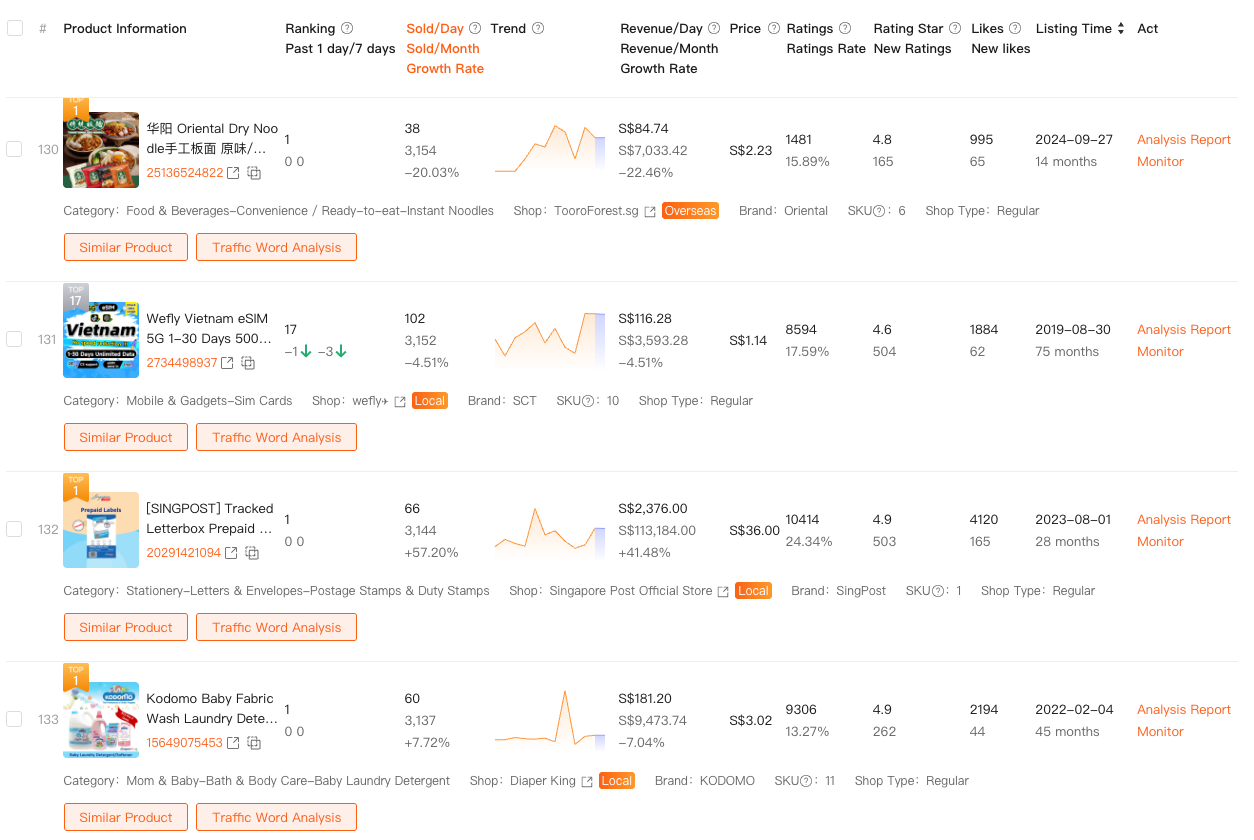
For sellers ready to elevate their strategy, Shopdora acts as a force multiplier. This Chrome extension integrates seamlessly, transforming your browser into a powerful Shopee analytics tool that reveals hidden data layers directly on product pages.
Real-Time Product Intelligence
Click on any listing to instantly view estimated sales, review velocity, and best-selling variants. Shopdora eliminates speculation, providing concrete data at your fingertips.
Advanced Keyword & Market Insights
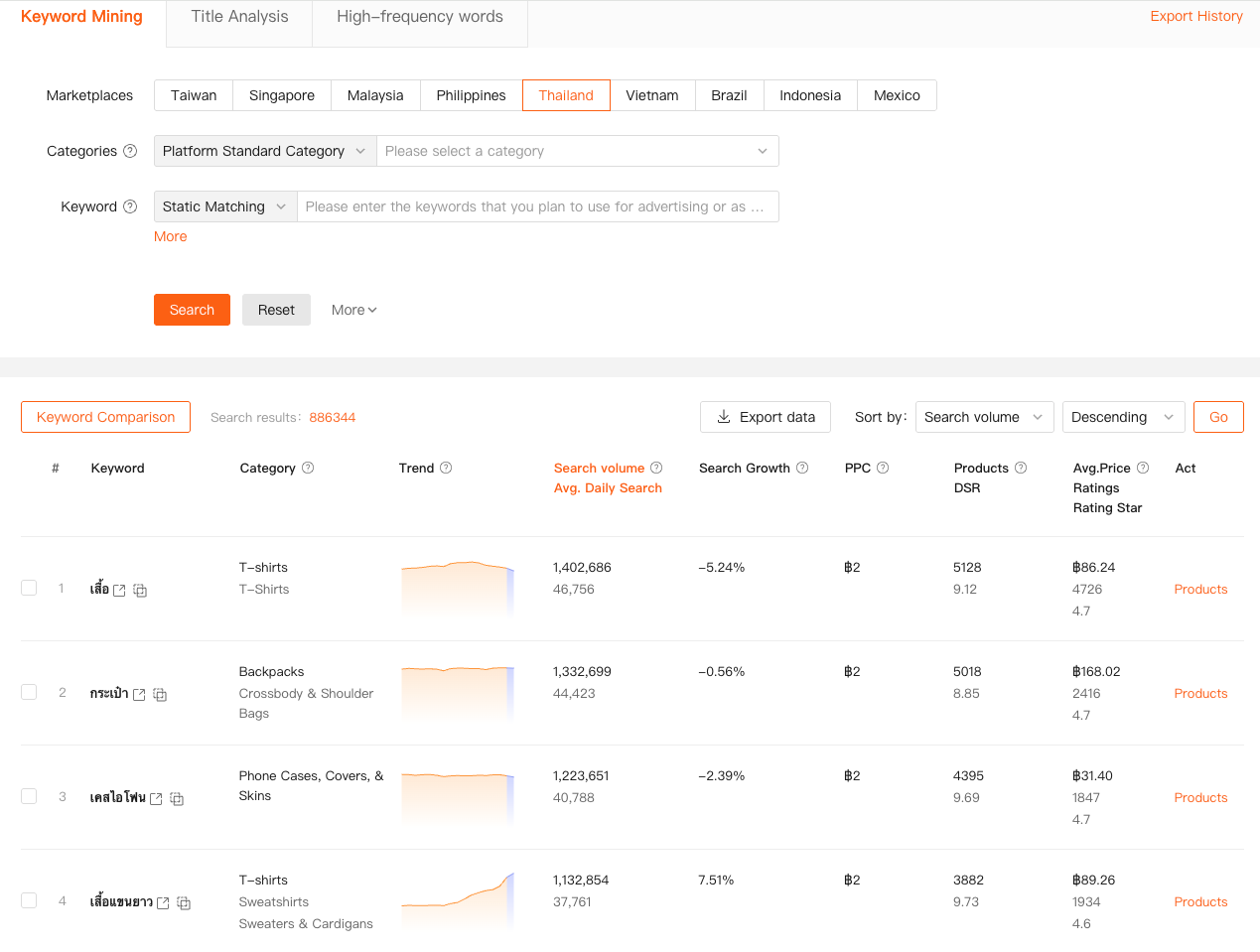
While Shopee shows basic search volume, Shopdora analyzes what’s truly driving success for top competitors, including keyword effectiveness and historical trend data. This allows you to identify opportunities ahead of the curve.
Historical Trends & SKU Analytics
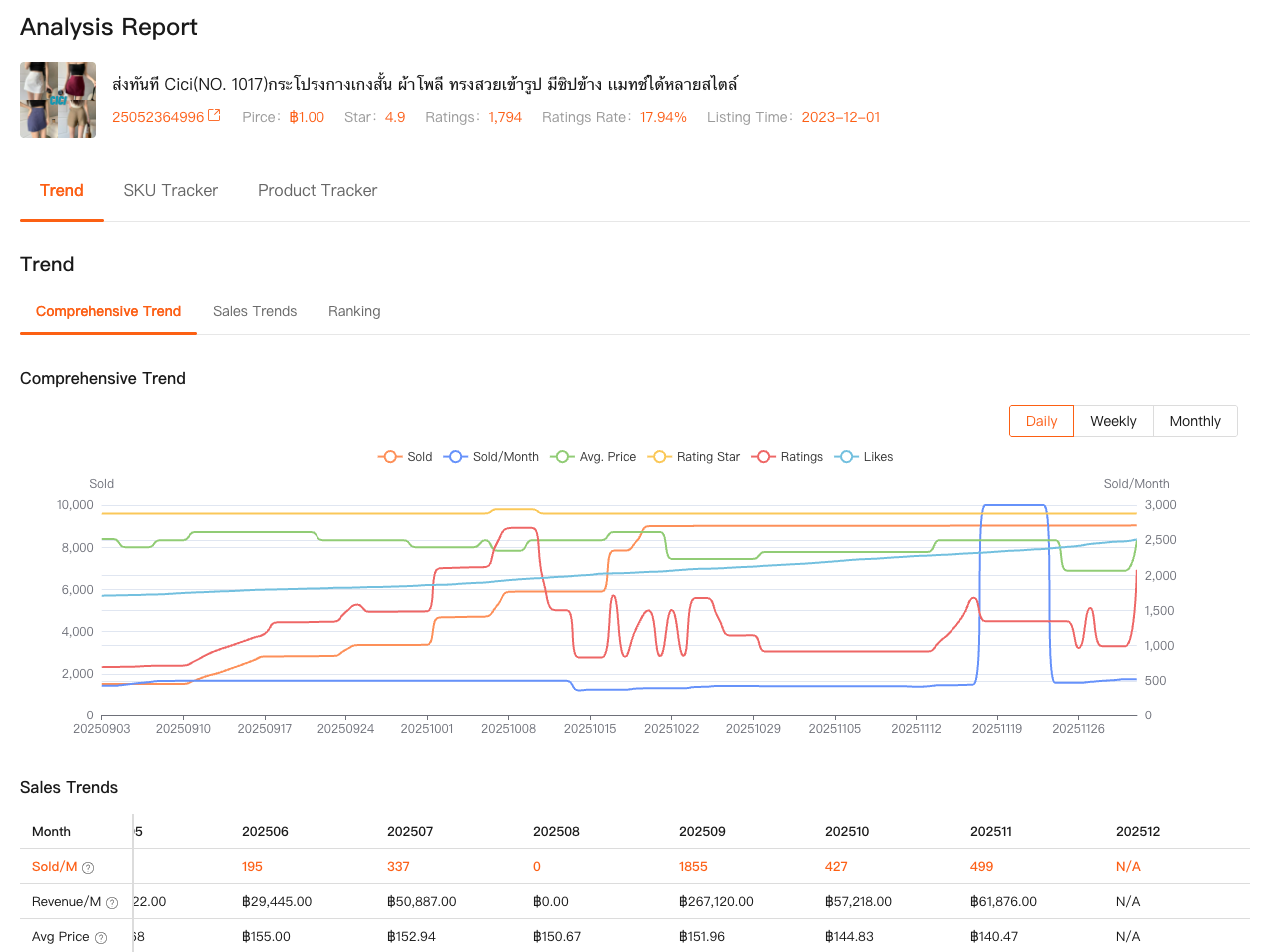
One of Shopdora’s standout features is its ability to track product performance over time. Distinguish fleeting fads from enduring winners. Granular SKU data reveals exactly which variations (like a specific color or size) are profit drivers, enabling precise inventory decisions.
Integrating Tools Without Complexity
View Shopdora not as a replacement, but as a strategic complement to Shopee’s native dashboard. Use Shopee for daily monitoring and Shopdora for deep-dive research, competitor analysis, and product validation.
Transforming Data into Strategy: Practical Applications
De-Risking Product Research
Use analytics to validate demand before investing in inventory. Look for products with consistent sales history and positive review trends. A tool like Shopdora helps you avoid hyped-up fads and invest in reliable winners.
Competitor Analysis for Strategic Advantage
Observe your competitors ethically. Analyze their pricing, keyword strategies, and promotional cycles. The goal isn’t to copy, but to identify market gaps and opportunities they’ve overlooked.
SEO for Conversion, Not Just Clicks
Optimize your listings with keywords that have proven commercial intent. Data from your Shopee analytics tool shows you the exact terms customers use before purchasing—integrate these into your titles and descriptions.
Data-Driven Inventory Management
Move beyond guesswork in stocking decisions. SKU-level analytics tell you precisely which variants are moving, helping you maximize working capital and minimize dead stock.

Your Action Plan: Start Simple, Scale Smart
Step 1: Master the Free Tools
Become proficient with Shopee’s native analytics. Understand every metric in your dashboard. This foundation will help you appreciate the value of advanced tools later.
Step 2: Identify Your Key Challenge
Pinpoint your biggest obstacle: Is it product sourcing, competitor pressure, or conversion rate optimization? Choose a Shopee analytics tool that directly addresses this pain point.
Step 3: Focus on One Growth Lever
Avoid data paralysis. Begin with one application, such as product research or keyword optimization. Master it, then expand your analytical focus.
Step 4: Establish a Data Routine
Schedule a weekly review session to analyze your metrics. Consistent analysis transforms raw data into actionable business intelligence.

Key Takeaways
- Start with Shopee’s native tools—they provide essential, free insights.
- Adopt advanced tools like Shopdora to overcome strategic blind spots and gain a competitive edge.
- Prioritize actionable insights—data should directly inform your decisions.
- Build a hybrid toolkit—use native analytics for operations and third-party tools for strategy.
- Commit to regular analysis—make data review a non-negotiable business habit.
Ultimately, top-performing Shopee sellers are guided by data. By effectively utilizing a Shopee analytics tool, you replace guesswork with strategy. Start leveraging your data today—your sales growth will be the clearest metric of success.