
Shopee Analytics Tools That Actually Help You Outsmart the Market
Hi, I’m David. I’ve been running my own Shopee store for a little over three years now, mostly as a solo seller. I’ve tested more products than I’d like to admit, burned money on ads that “should have worked,” and learned the hard way that most sellers don’t lose because they work less—they lose because they’re making decisions with incomplete information.
For a long time, my entire view of the business came from the Shopee Seller Center. And to be fair, it does its job: it tells you how your SKUs are doing. What it doesn’t tell you—and what actually matters once competition heats up—is what’s happening outside your own store. That blind spot is exactly why Shopee analytics tools exist, and why I eventually started relying on tools like Shopdora.
In this article, I want to talk about how Shopee analytics tools can solve one very real problem most sellers face: making product and strategy decisions without understanding the broader market. I’ll focus on a few specific capabilities I’ve personally found useful, all coming from Shopdora, and explain how they fit into real-world seller workflows—without hype, and without pretending analytics magically replace experience.
The Real Problem with “Dashboard-Only” Selling
If you’ve been selling on Shopee for more than a few months, you’ve probably felt this frustration: your sales slow down, competitors pop up everywhere, and you’re not sure whether the issue is pricing, demand, saturation, or just bad timing. Inside Seller Center, everything looks isolated. You see your own impressions, clicks, and orders, but none of that explains why the market is behaving the way it is.
This is where most sellers start guessing. Some slash prices. Others upload new listings blindly. A few increase ad budgets and hope the algorithm notices. Occasionally that works—but more often, it’s just luck. What changed my approach was realizing that good decisions require market-level context, not just store-level data. That’s the gap Shopee analytics tools are meant to fill.

Market Analysis: Understanding Where Demand Actually Lives
One of the first Shopdora features that genuinely changed how I think about Shopee was its Market Analysis capability. Instead of starting from my own product and working outward, I could start from the category itself and look at the bigger picture.
Market Analysis lets you explore a category across different Shopee sites and time ranges, showing how total sales, revenue, average prices, product counts, shop counts, and brand concentration evolve. In practical terms, this means you can answer questions like: Is this category growing or shrinking? Is demand concentrated among a few big players, or spread across many smaller sellers? Are new products actually gaining traction, or are they struggling to break in?
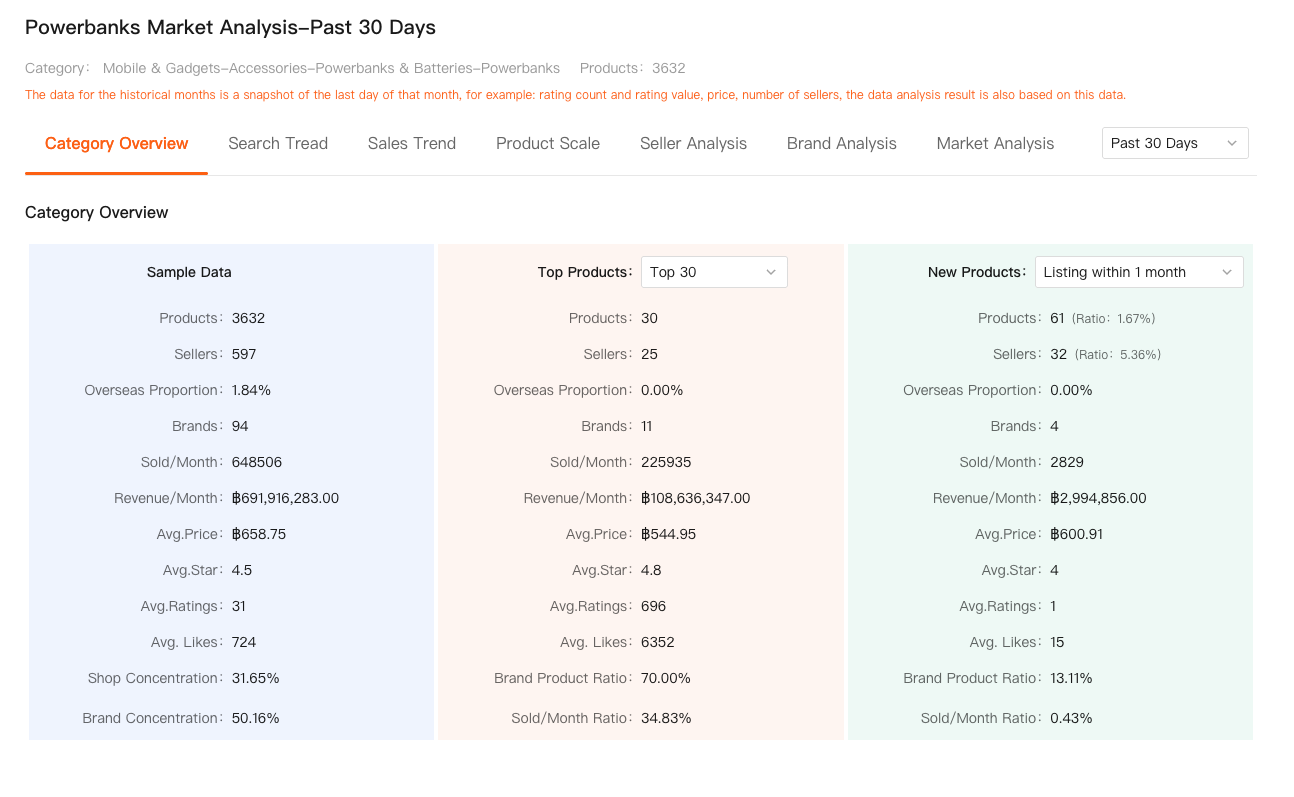
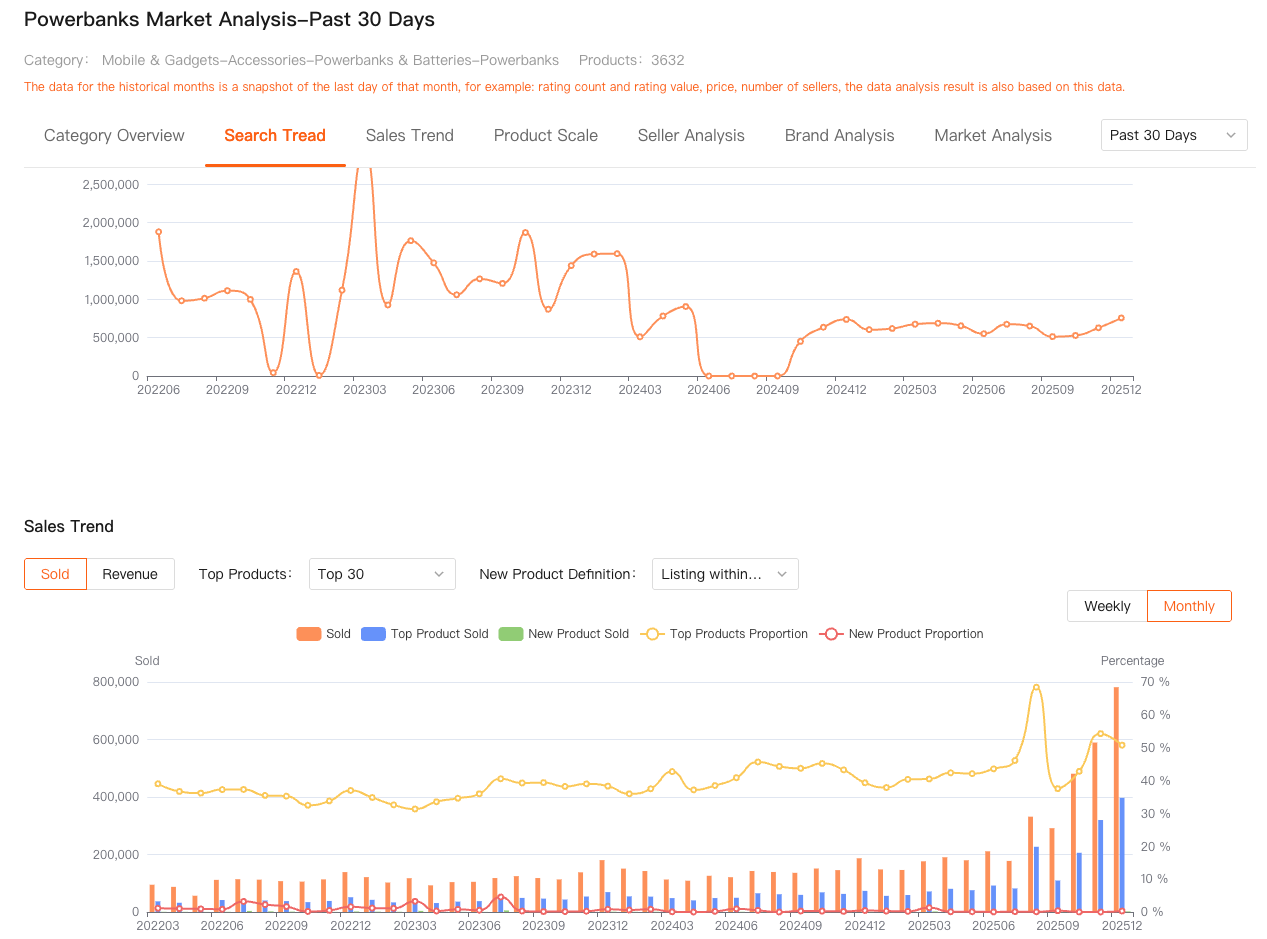
I remember analyzing a home storage category that looked attractive at first glance. Sales volume was high, and search interest seemed stable. But once I looked at the market data, it became obvious that most revenue was locked up by a small number of long-established products. New listings had a very low share of total sales. That insight alone saved me weeks of wasted effort.
This kind of perspective is impossible to get from Seller Center alone. As a Shopee analytics tool, Market Analysis isn’t telling you what to sell—it’s helping you avoid entering markets where the odds are stacked against you from day one.
Product Research: Seeing What’s Working for Other Sellers
After understanding the market structure, the next step is zooming in on actual products, not guesses or assumptions. Shopdora’s Product Research feature is built for this exact purpose. It allows you to filter products across multiple Shopee sites using conditions like sales volume, revenue, growth rate, price range, ratings, and time on market.
What I like about this feature is that it doesn’t just surface “top sellers.” It helps you spot patterns. For example, you might notice that mid-priced products with moderate ratings are outperforming premium listings, or that newer products in a niche are gaining sales faster than older ones. Those signals tell you where opportunity still exists.
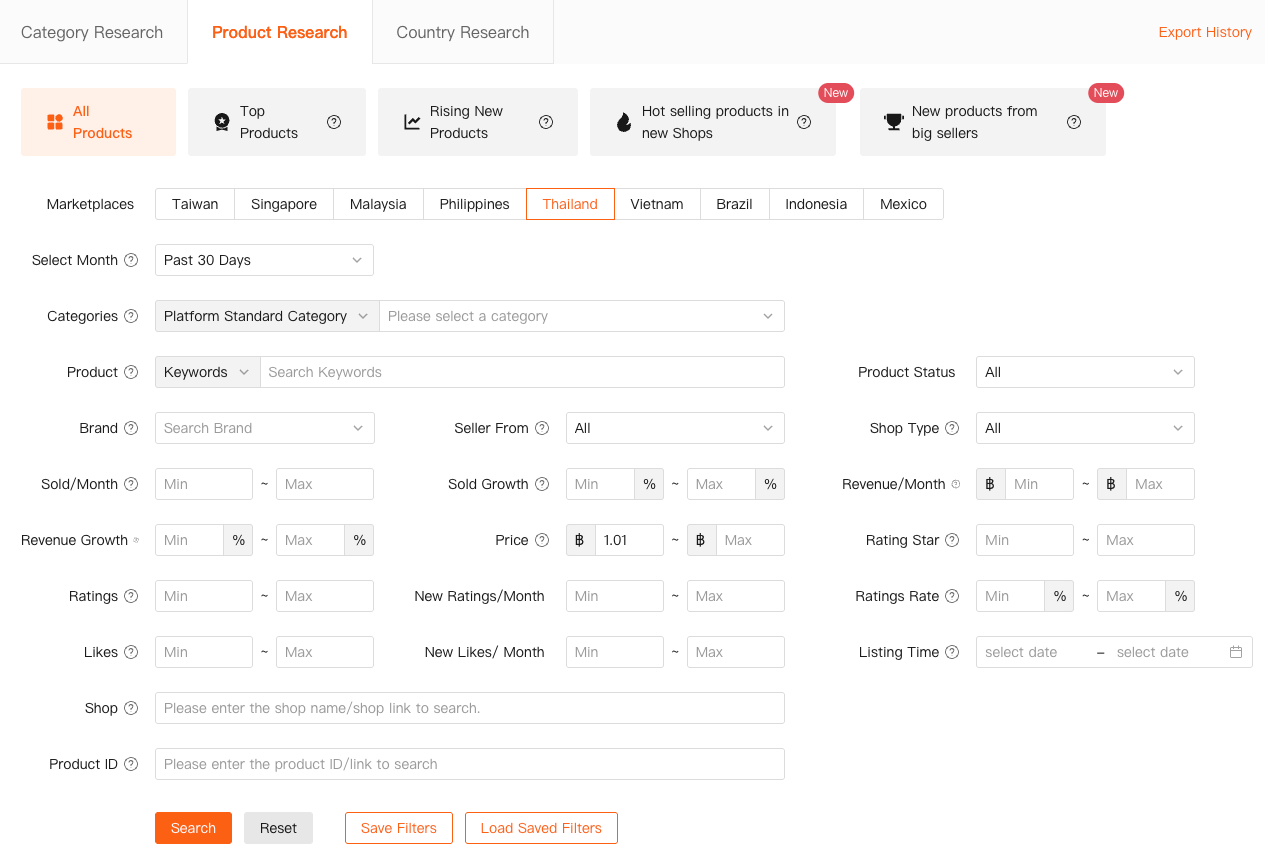
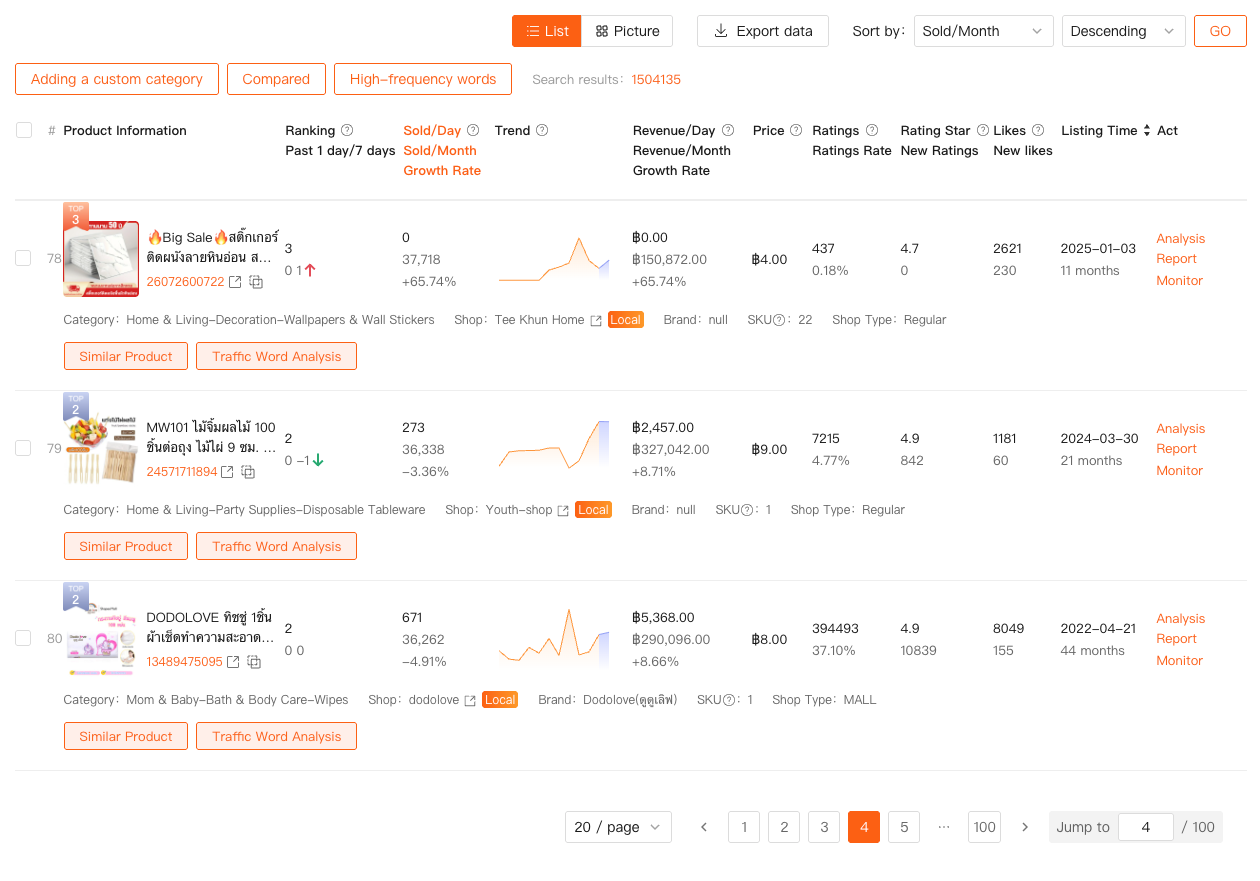
In one case, I used Product Research to compare several similar SKUs in a niche I was already selling in. On the surface, they all looked alike. But once I looked at their sales trends and pricing history, it became clear that only a few had consistent growth, while others were plateauing. That insight influenced how I positioned my own listing, from pricing to SKU structure.
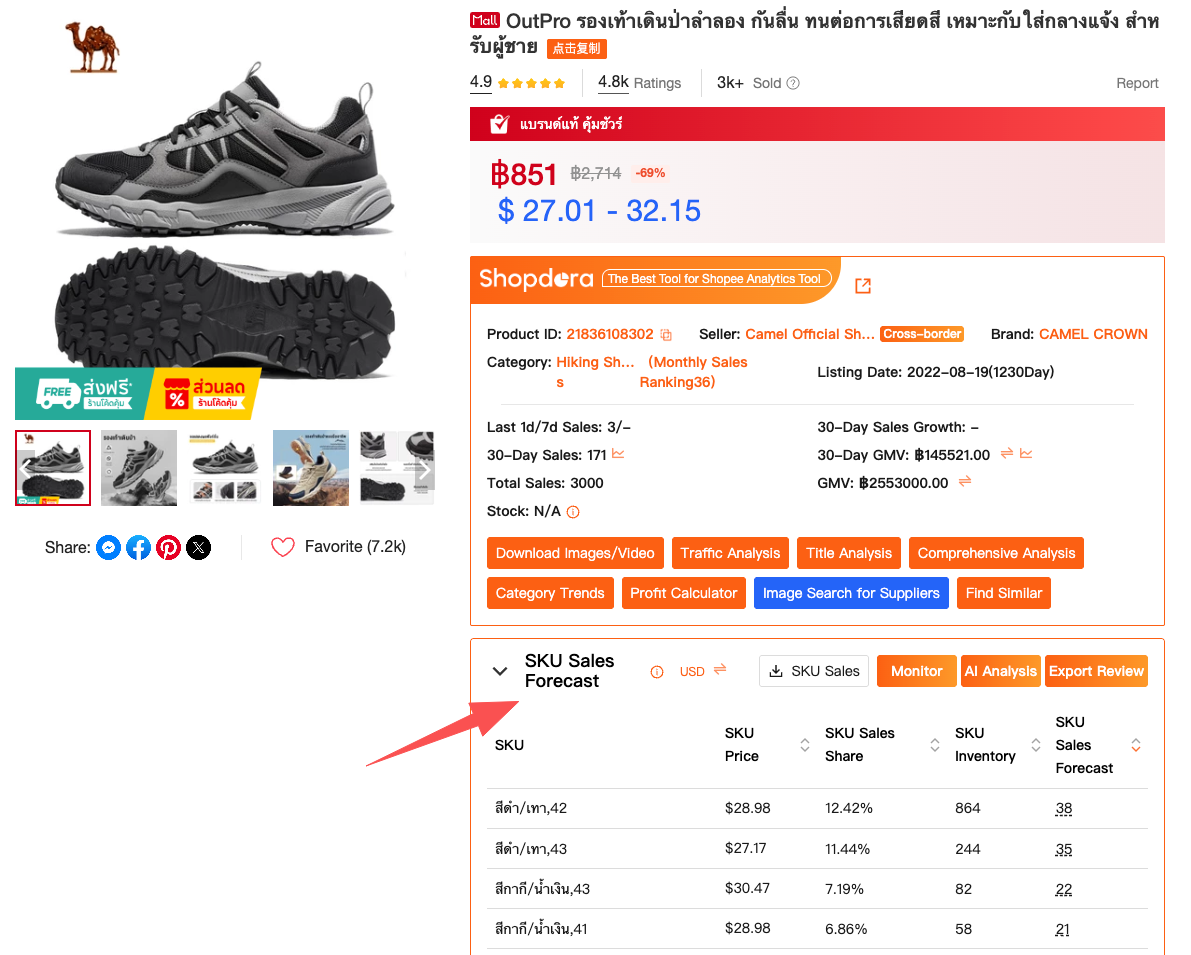
This is where Shopee analytics tools become more than just “data dashboards.” They become decision filters, helping you focus on ideas that are already validated by the market.
Comprehensive Analysis: Turning Data into Actionable Decisions
Data alone doesn’t help if it lives in separate tabs. One of the reasons I still use Shopdora regularly is its Comprehensive Analysis feature, which brings multiple dimensions together into a single, coherent view of a product’s performance over time.
Comprehensive Analysis combines elements like sales trends, revenue performance, ranking changes, and SKU-level behavior into one report. For sellers, this is especially useful when evaluating competitors or tracking a product category over time. Instead of jumping between charts, you can see how changes in rankings correlate with sales spikes or drops, and whether growth is sustainable or short-lived.
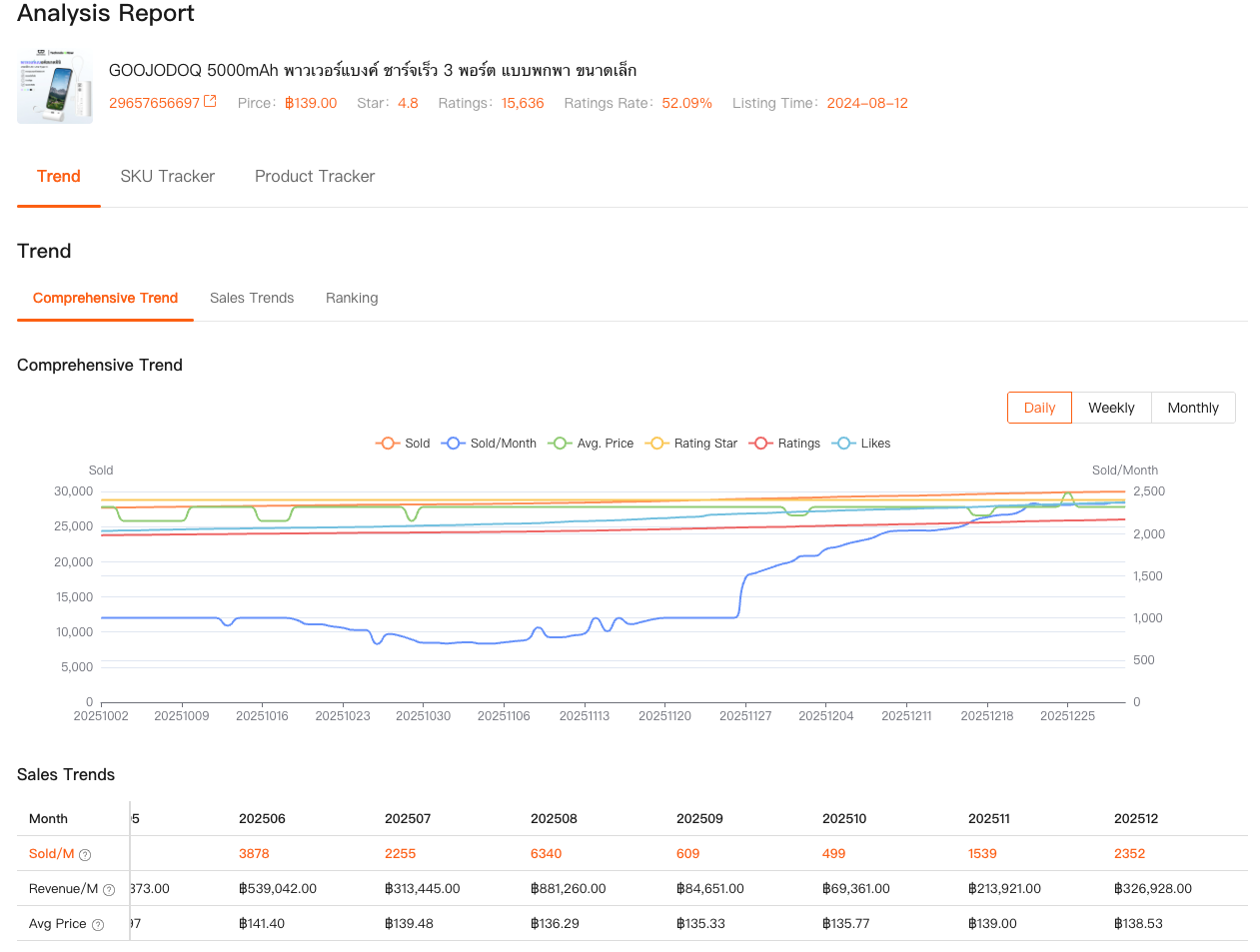
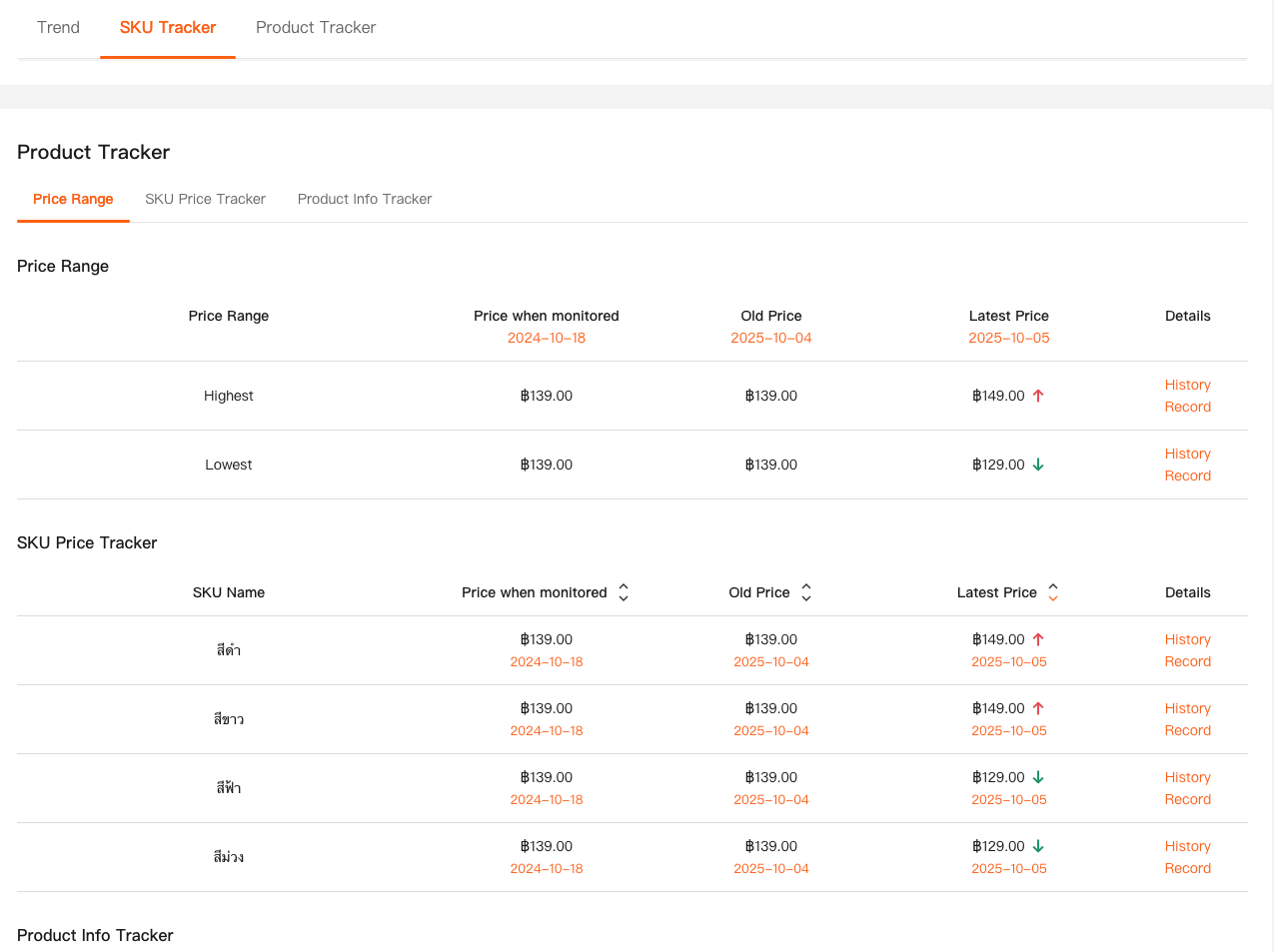
I often use this feature before committing inventory. If a product shows strong sales but extreme volatility, I treat it differently than one with slower but stable growth. Over time, these patterns become more intuitive, but having them visualized makes decision-making far more grounded.
From an SEO perspective, this is also why Shopee analytics tools matter: they don’t just answer “what is happening,” but help you interpret why it’s happening and what to do next.
Why Shopee Analytics Tools Are a Competitive Advantage
What all of these features have in common is that they focus on external visibility. Seller Center tells you how you performed. Shopee analytics tools tell you how the market performed—and where you fit into it. That distinction becomes more important the longer you sell and the more competitive your categories become.
Shopdora isn’t a shortcut to success, and it won’t replace solid operations or good products. But as a Shopee analytics tool, it fills a critical information gap that most sellers underestimate until it’s too late. Being able to see market structure, competitor behavior, and product-level trends gives you time—time to react, adjust, and plan instead of constantly chasing results.

Final Thoughts
If you’re early in your Shopee journey, you might feel like analytics tools are overkill. I used to think that too. But once you’ve launched a few products and realized how expensive trial-and-error can be, you start appreciating anything that reduces uncertainty.
From my experience, the real value of Shopee analytics tools isn’t in fancy charts. It’s in clarity. Tools like Shopdora helped me stop guessing and start making decisions that were aligned with actual market behavior. And in a marketplace as competitive as Shopee, that clarity is often the difference between scaling calmly and constantly putting out fires.
If you’re serious about growing as a Shopee seller, learning how to read and apply market-level data isn’t optional anymore. It’s part of the job.