
Shopee Data Analytics That Reveal Real Market Insights
Hi, I’m David.
I run my own Shopee store and have been doing this solo for more than three years. No data team, no outsourced analysts, no “internal dashboard magic.” Just me, Shopee Seller Center, and a lot of trial-and-error that cost real money before it taught real lessons.
For a long time, I thought I understood my business because I understood my own data. Orders, ads, CTR, ROAS — all neatly displayed in Seller Center. But something always felt off. I could explain what had already happened, yet I struggled to explain why the market moved before my store did.
That gap is exactly where Shopee data analytics and insights matter most — and it’s also where Seller Center stops short.
This is the story of how I started using Shopdora to understand Shopee data beyond my own shop, and how three specific features helped me fix one core problem: making decisions with incomplete market information.
The Invisible Wall in Shopee Data
Shopee gives sellers operational data, not market intelligence.
You can see:
- Your traffic sources
- Your keyword performance
- Your conversion rate
But you can’t clearly see:
- Which keywords are driving traffic across the market
- Where demand exists but competition is weak
- Whether traffic growth comes from ads or organic search
- Which categories are expanding quietly before they explode
I realized this during a campaign where my ads performed well, but organic growth stayed flat. My first instinct was to optimize creatives. The real issue, though, had nothing to do with my listing.
The problem was traffic structure, not execution.
That’s when I began relying on Shopdora’s Traffic Analysis.
Seeing Real Traffic Structure with Traffic Analysis
The first feature that truly changed how I look at Shopee data is Traffic Analysis.
Unlike Seller Center, which only shows traffic coming to your store, Traffic Analysis helps you understand how traffic flows at the product and market level.
With this feature, I can analyze:
- Natural vs. ad-driven traffic
- Traffic keywords actually bringing exposure
- Keywords that generate traffic but don’t convert
- High-demand keywords that products aren’t using yet
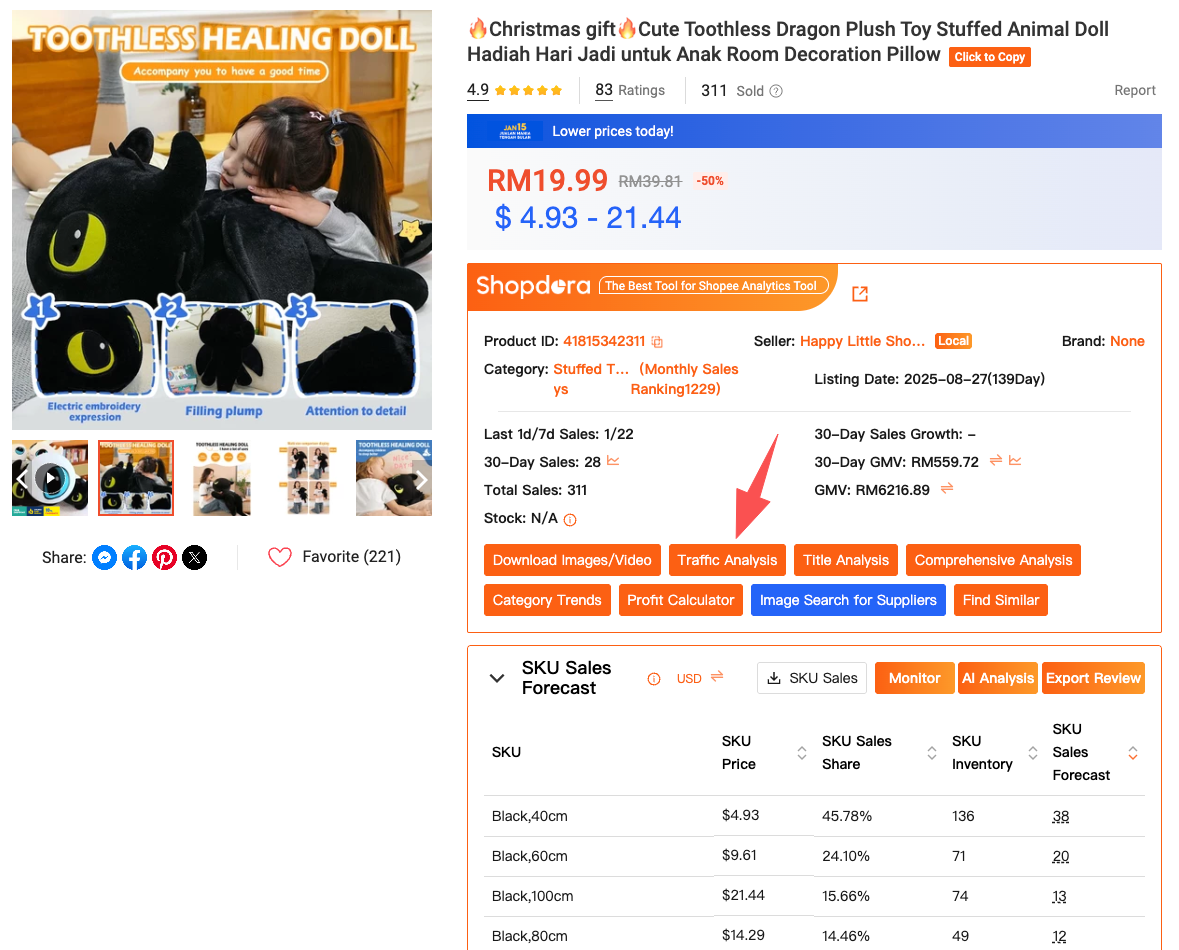
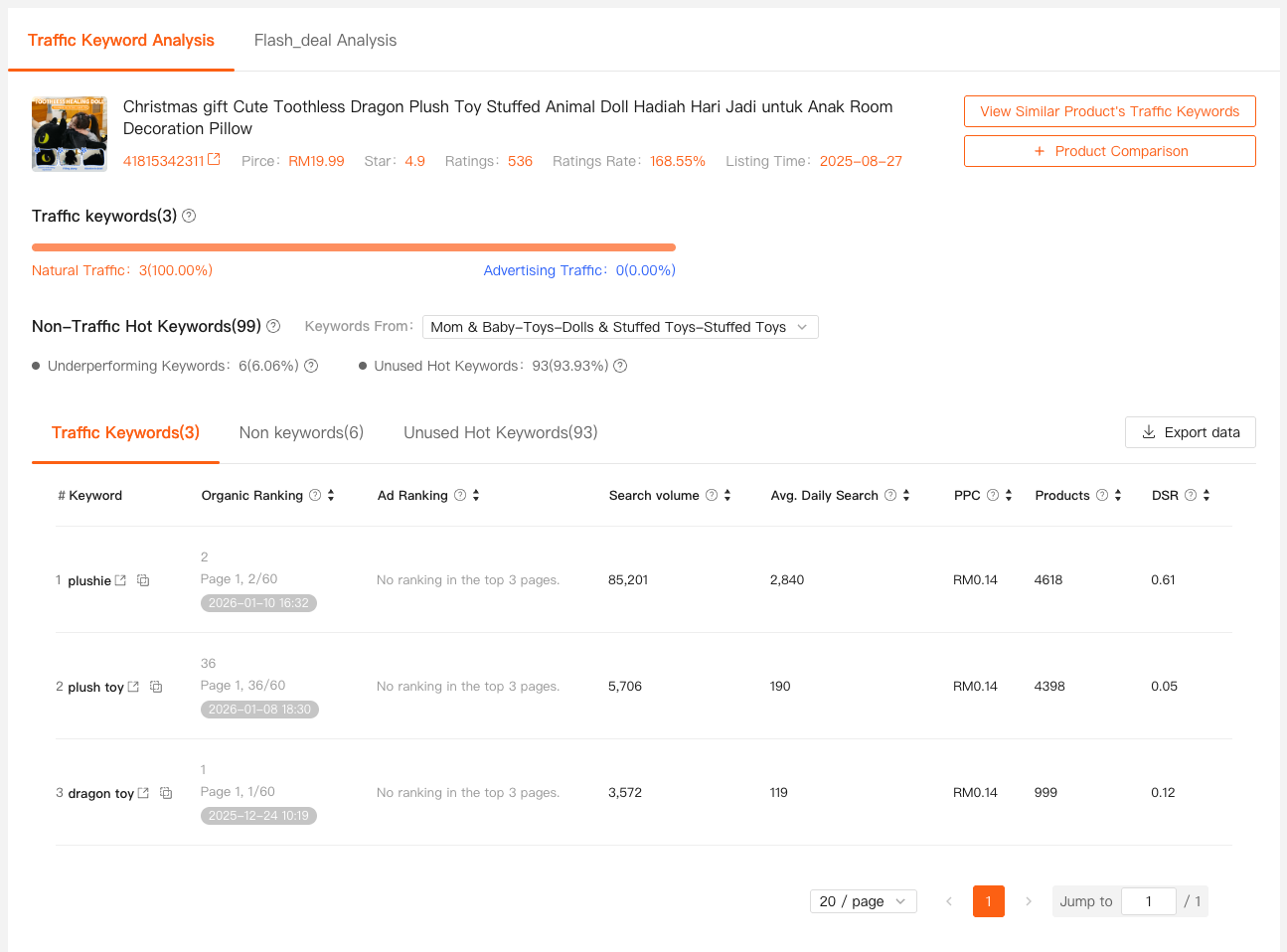
I remember reviewing a competitor’s product that ranked consistently higher than mine, even though our prices and reviews were similar. Through Shopdora’s Traffic Analysis, I discovered they were capturing organic traffic from a group of keywords I had never optimized for — keywords that didn’t appear clearly in Seller Center at all.
Action guide (how to use it):
When you want to understand why a product or category is getting traffic, open Shopdora via the web dashboard and enter the product link or SKU into Traffic Analysis. This feature is available directly on the Shopdora platform and, for faster checks, can also be triggered via the Shopdora browser plugin while browsing Shopee product pages.
From Guessing Keywords to Understanding Demand with Keywords Mining
Traffic alone isn’t enough if you don’t understand search intent.
For years, my keyword strategy was reactive. I looked at what I ranked for and tried to push those terms harder. What I wasn’t seeing were the keywords I should be ranking for.
That blind spot disappeared once I started using Keywords Mining from Shopdora.
This feature does something Shopee itself doesn’t do well:
it shows platform-level keyword data, not just store-level performance.
With Keywords Mining, I can:
- View real search volume and trends by site and category
- Identify growing keywords before they become competitive
- See how many products are already competing for the same term
- Reverse-check a product link to see which keywords it actually covers
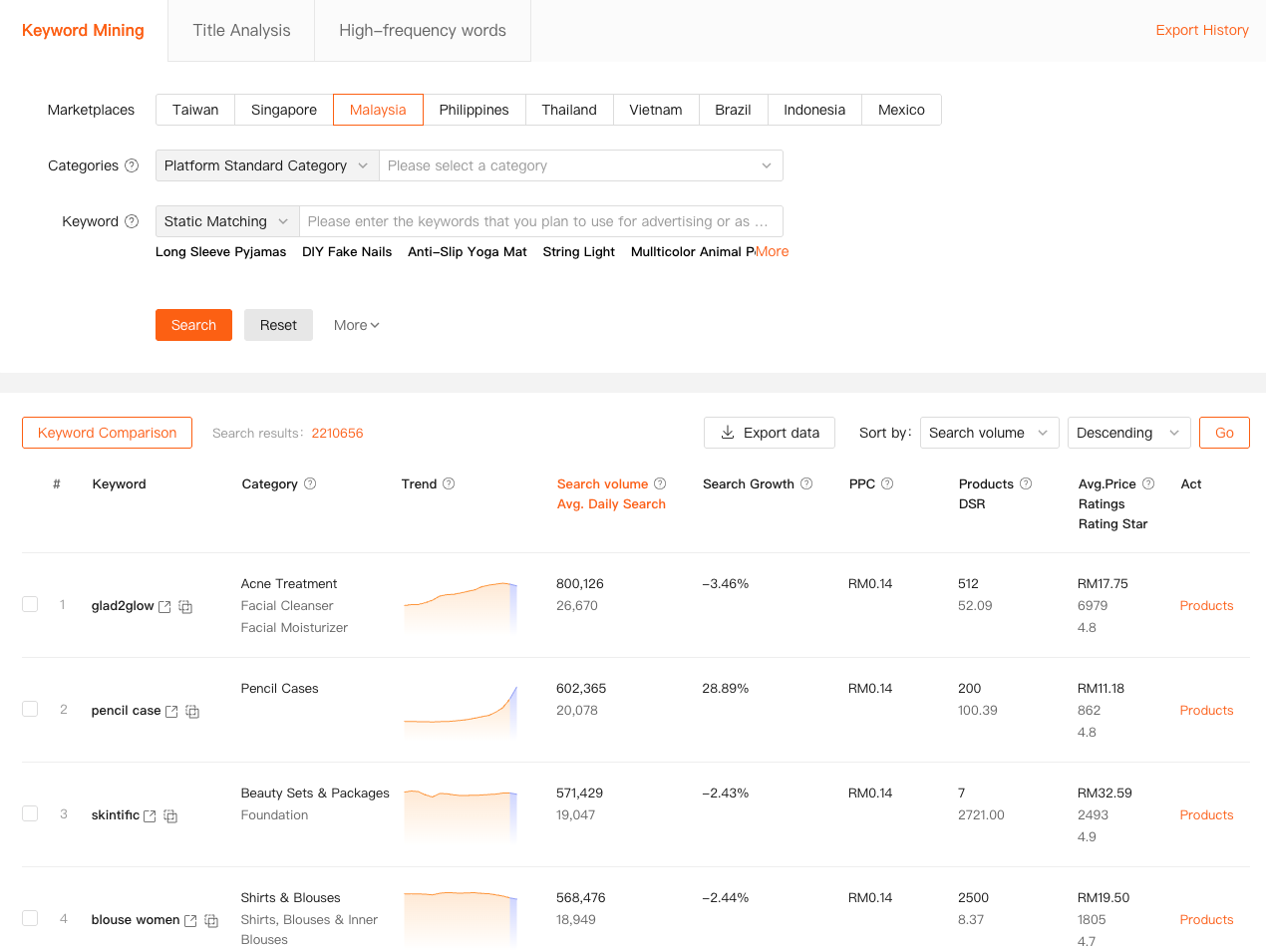
One small but important moment stands out. I pasted my own product link into Keywords Mining and realized I was missing several high-volume related terms — not because I ignored them, but because I never knew they existed.
Fixing that gap improved my organic impressions without touching ads.
Action guide:
Keywords Mining is accessed directly from the Shopdora website. Log into Shopdora, open Keywords Mining, choose your target site and category, or paste a Shopee product URL to analyze keyword coverage instantly.
Why Category-Level Shopee Insights Matter More Than Individual Products
At some point, every seller faces this question:
Is this product failing, or is the category shrinking?
Shopee Seller Center can’t answer that.
This is where Category Research becomes critical.
Category Research allows me to step back and analyze Shopee data at the category level, not the SKU level.
With it, I can see:
- Total category sales and revenue trends
- Growth or decline over time
- Number of competing products, stores, and brands
- Market concentration and competition intensity
- New product ratio and performance
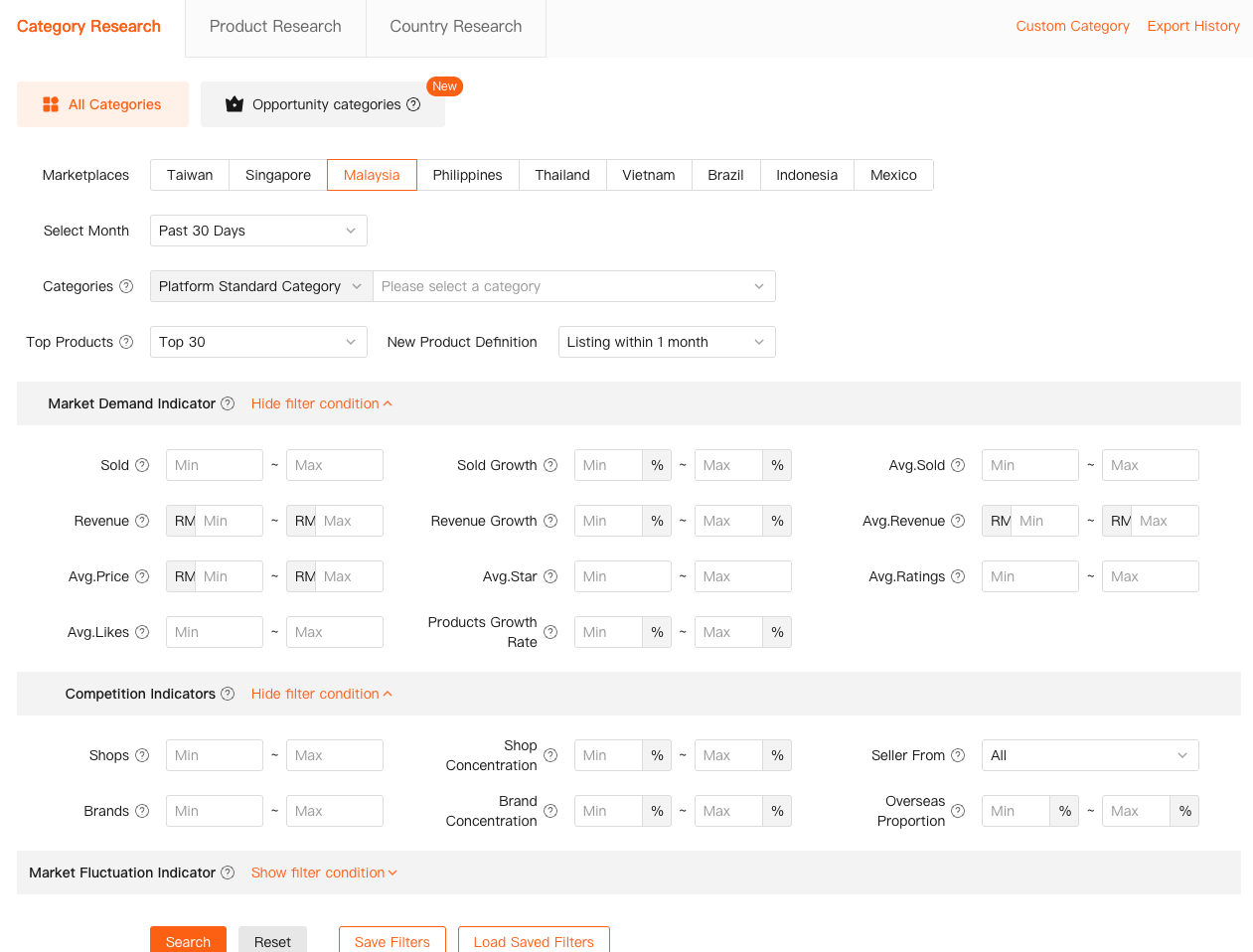
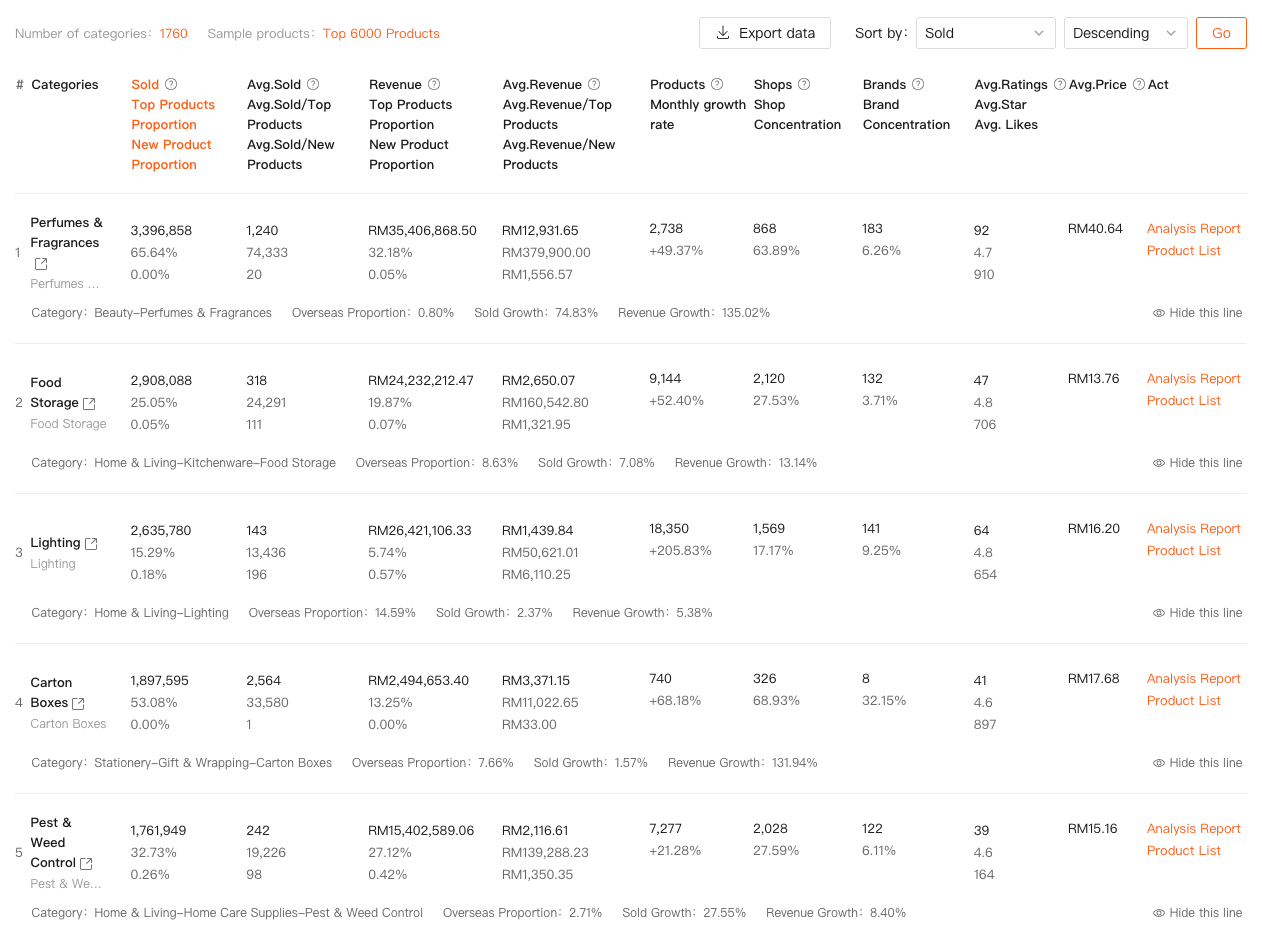
I once planned to expand a product line because my best SKU was performing well. Category Research showed me the category itself was plateauing, with growth concentrated in only a few head products. That insight saved me from scaling inventory into a slow-moving market.
Action guide:
When you’re deciding whether to enter or scale a category, visit the Shopdora web platform and open Category Research. Select your Shopee site, time range, and category to review demand, competition, and growth before committing resources.
Turning Shopee Data into Real Decisions
What changed for me wasn’t just access to more data — it was context.
I now use:
- Traffic Analysis to understand where exposure comes from
- Keywords Mining to validate demand and search intent
- Category Research to judge long-term potential
These features don’t replace Seller Center. They complete it.
Shopee tells me how my store performs.
Shopdora tells me how the market behaves.
That distinction matters more as competition increases.
How to Start Using Shopdora Without Overcomplicating Things
If you’re new to Shopdora, don’t try to master everything.
Here’s the practical path I recommend:
- Install the Shopdora browser plugin from the official Shopdora website to quickly analyze products while browsing Shopee
- Use Traffic Analysis when rankings or impressions change unexpectedly
- Use Keywords Mining before rewriting titles or launching ads
- Use Category Research before entering a new niche or scaling inventory
Each feature solves a different data blind spot, and together they form a clearer picture of Shopee’s ecosystem.

Final Thoughts from a Seller Who Learned the Hard Way
Shopee is no longer a platform where intuition alone works.
The sellers who survive aren’t necessarily the ones with the lowest prices or biggest ad budgets. They’re the ones who understand Shopee data, Shopee insights, and Shopee market behavior earlier than others.
For me, Shopdora became the bridge between “what I see in my store” and “what’s actually happening in the market.”
If you’ve ever felt confident in your execution but confused by your results, the problem probably isn’t effort. It’s visibility.
And better visibility starts with better data.