
The Shopee Extension Serious Sellers Use to Read the Market

Hi, I’m David.
I’ve been selling on Shopee for a little over three years now, running my own store, testing products, killing SKUs that didn’t work, and doubling down on the ones that did. If there’s one thing I wish I had understood earlier, it’s this: your own seller center data is never enough.
Shopee gives you visibility into your products. That’s fine. But it tells you almost nothing about what’s actually happening across the market — what competitors are selling, which SKUs are driving volume, how fast new products are growing, or where demand is quietly shifting.
That gap is exactly why many sellers start looking for a Shopee extension. Not another dashboard full of vanity numbers, but something practical — something that works inside Shopee while you browse products, categories, and competitors in real time.
In this article, I’ll walk you through how a Shopee extension powered by Shopdora solves one of the biggest operational problems sellers face: making decisions without real market-level data. I’ll focus on three extension-based capabilities I personally rely on, and why they change how you research products and competitors.

Why a Shopee Extension Matters More Than Another Backend Report
Most sellers spend their time jumping between tabs: Shopee front-end pages, spreadsheets, notes, screenshots, seller center exports. It’s slow, fragmented, and error-prone.
A Shopee extension changes the workflow entirely. Instead of exporting data after something happens, you see key market signals directly on Shopee product pages and search results, while you’re browsing like a buyer.
What makes the Shopdora extension useful is not that it adds “more data,” but that it surfaces market-facing data Shopee itself doesn’t show sellers — especially competitor sales behavior and SKU-level structure.
That difference matters when you’re making decisions like:
- Is this product actually selling, or just ranking well today?
- Which variation is driving volume?
- Is this market saturated, or just noisy?
- Are competitors winning on price, SKU design, or timing?

Reading Competitor Sales Signals Directly on Shopee Pages
One of the most practical features of the Shopdora Shopee extension is how it overlays estimated sales and trend indicators directly onto Shopee listings and search results.
When I’m browsing a category or checking a competitor’s product page, I’m not guessing anymore. I can immediately see whether a product is:
- Moving steadily over time
- Spiking because of a campaign
- Or quietly declining despite high exposure
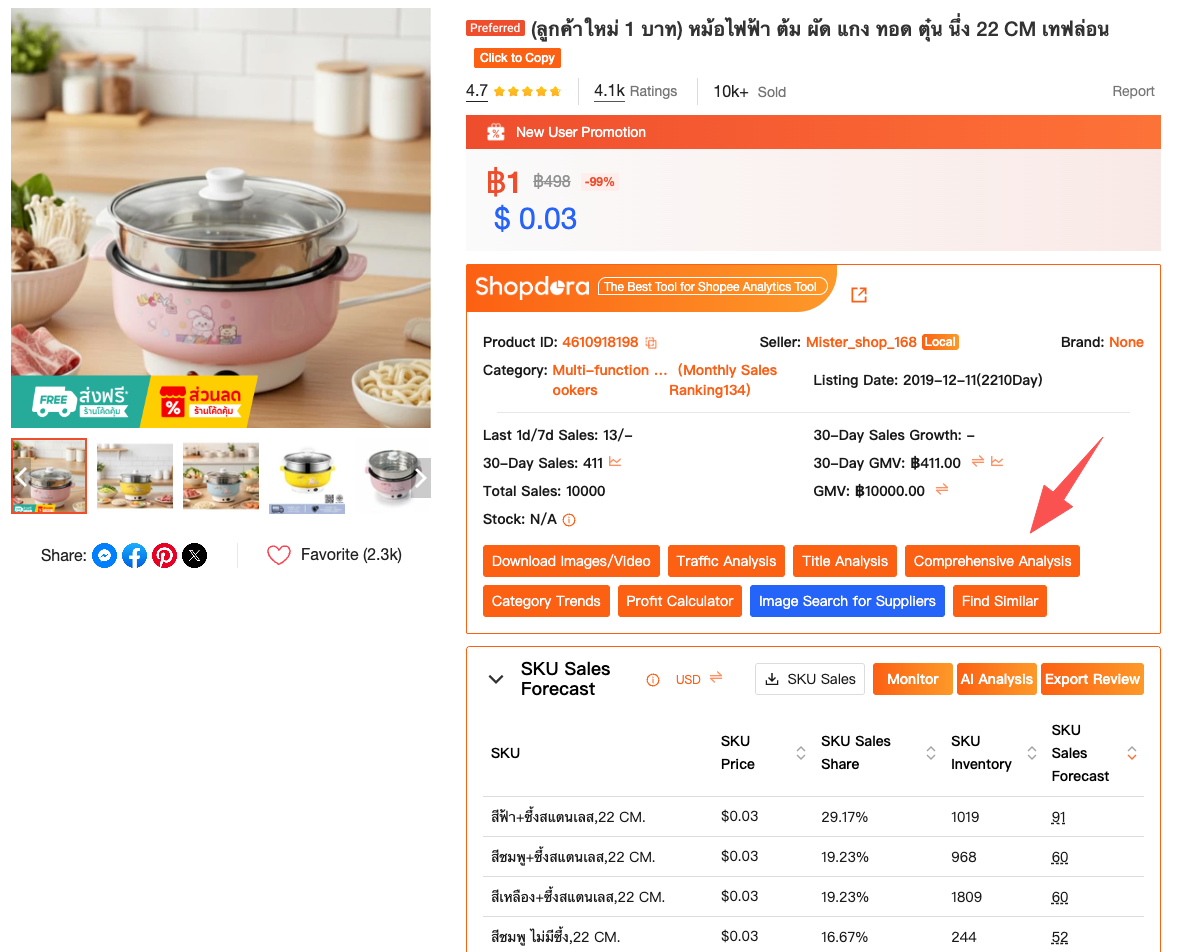
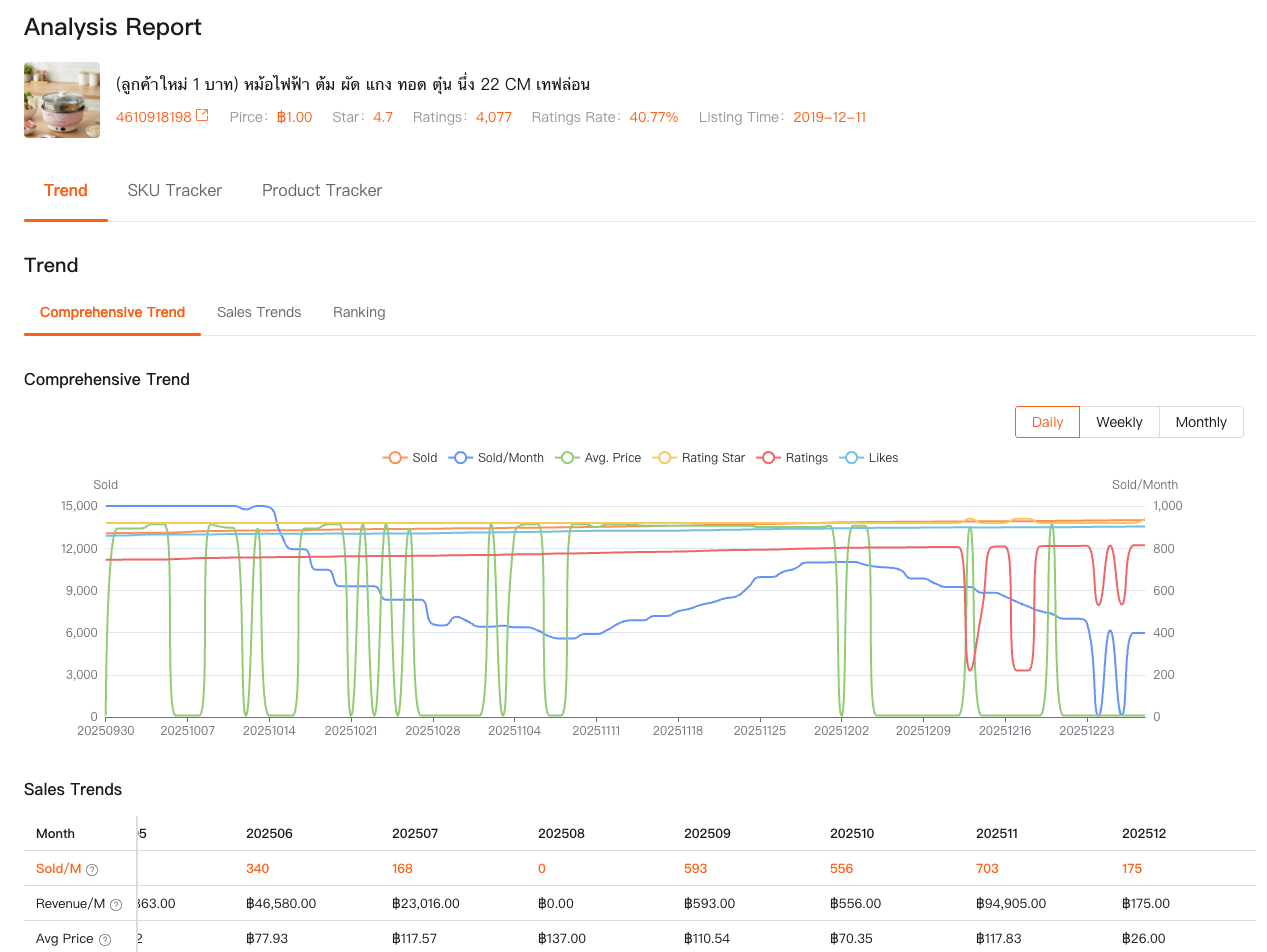
This matters because Shopee’s native interface is designed for buyers, not sellers. A product with thousands of reviews might look “hot,” but that doesn’t tell you if it’s still converting now. The extension fills that blind spot by letting you observe market momentum while you’re already inside Shopee.
Over time, this changes how you evaluate opportunities. You stop chasing products that look popular and start focusing on products that show consistent or accelerating demand, which is a very different filter.
Understanding SKU Structure Instead of Guessing What Sells
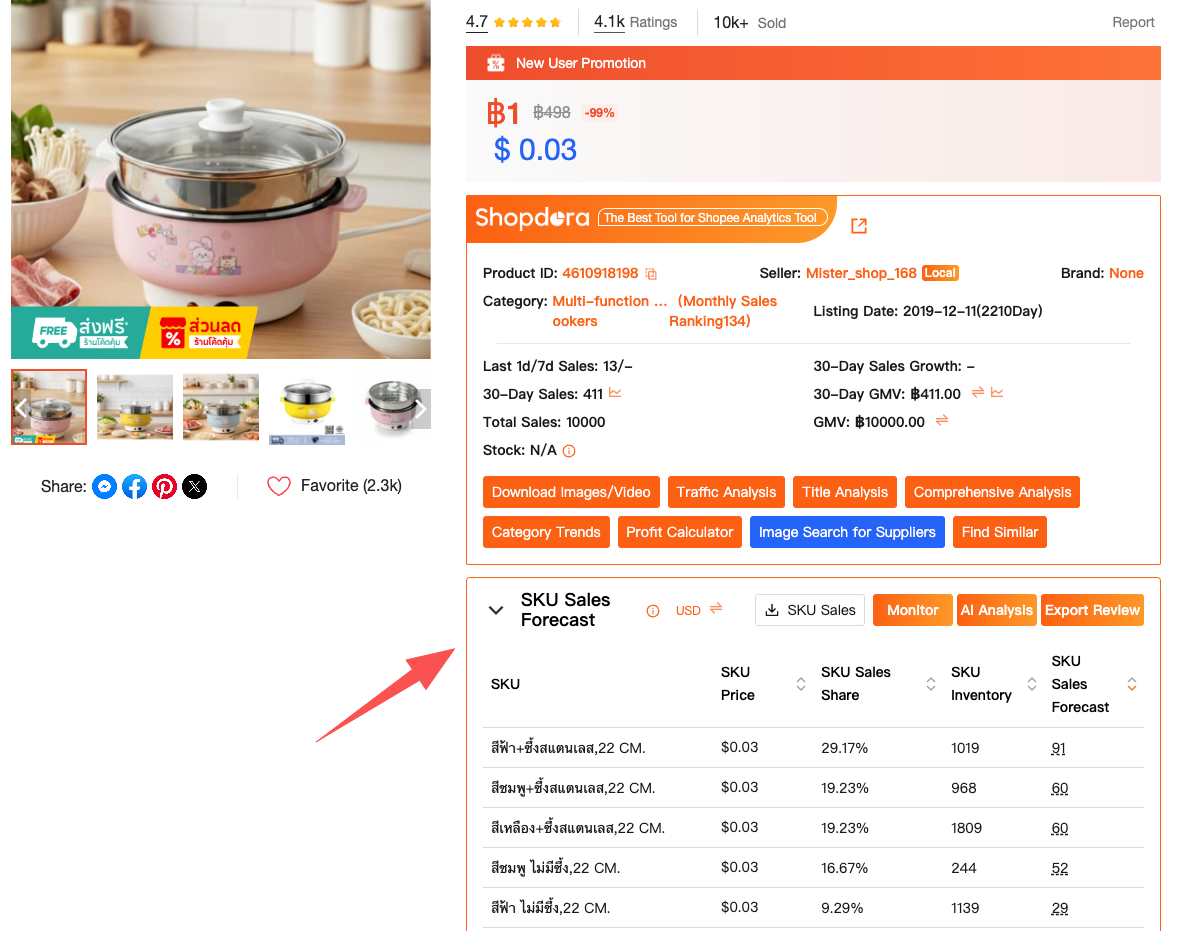
Another place where most sellers make expensive mistakes is SKU design. Shopee seller center shows your own SKU performance, but it doesn’t show how competitors structure theirs — or which variants actually drive their sales.
Through the Shopdora extension, you can inspect competitor SKU performance and structure directly on product pages. You start noticing patterns:
- Which colors or sizes account for most of the volume
- Whether sellers are using “traffic SKUs” versus “profit SKUs”
- How price tiers are distributed across variations
This is especially important when you’re planning a new listing. Instead of copying a competitor’s visible options blindly, you can make more informed choices about:
- How many SKUs to launch with
- Which variations deserve inventory depth
- Where to position your pricing without racing to the bottom
For me, this alone reduced trial-and-error costs significantly. Fewer dead SKUs. Faster feedback loops. Cleaner launches.
Faster Product Research Without Leaving Shopee
Product research usually means bouncing between tools, spreadsheets, and screenshots. The Shopdora Shopee extension streamlines this by allowing you to analyze products, compare similar listings, and collect reference data while staying on Shopee.
When I see an interesting product, I don’t bookmark it “for later” anymore. I can immediately:
- Check similar products
- Compare pricing and sales performance
- Save data points for deeper analysis later
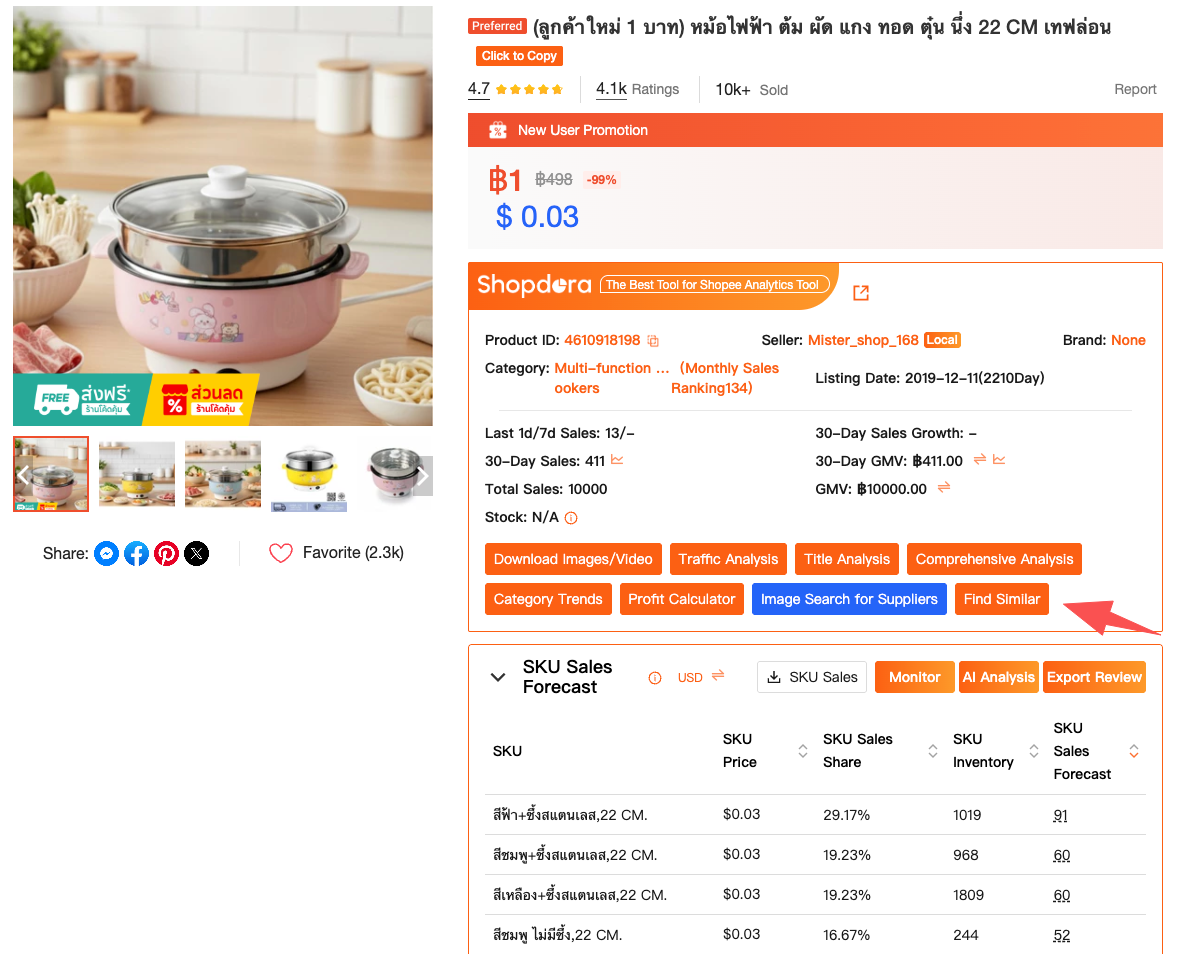
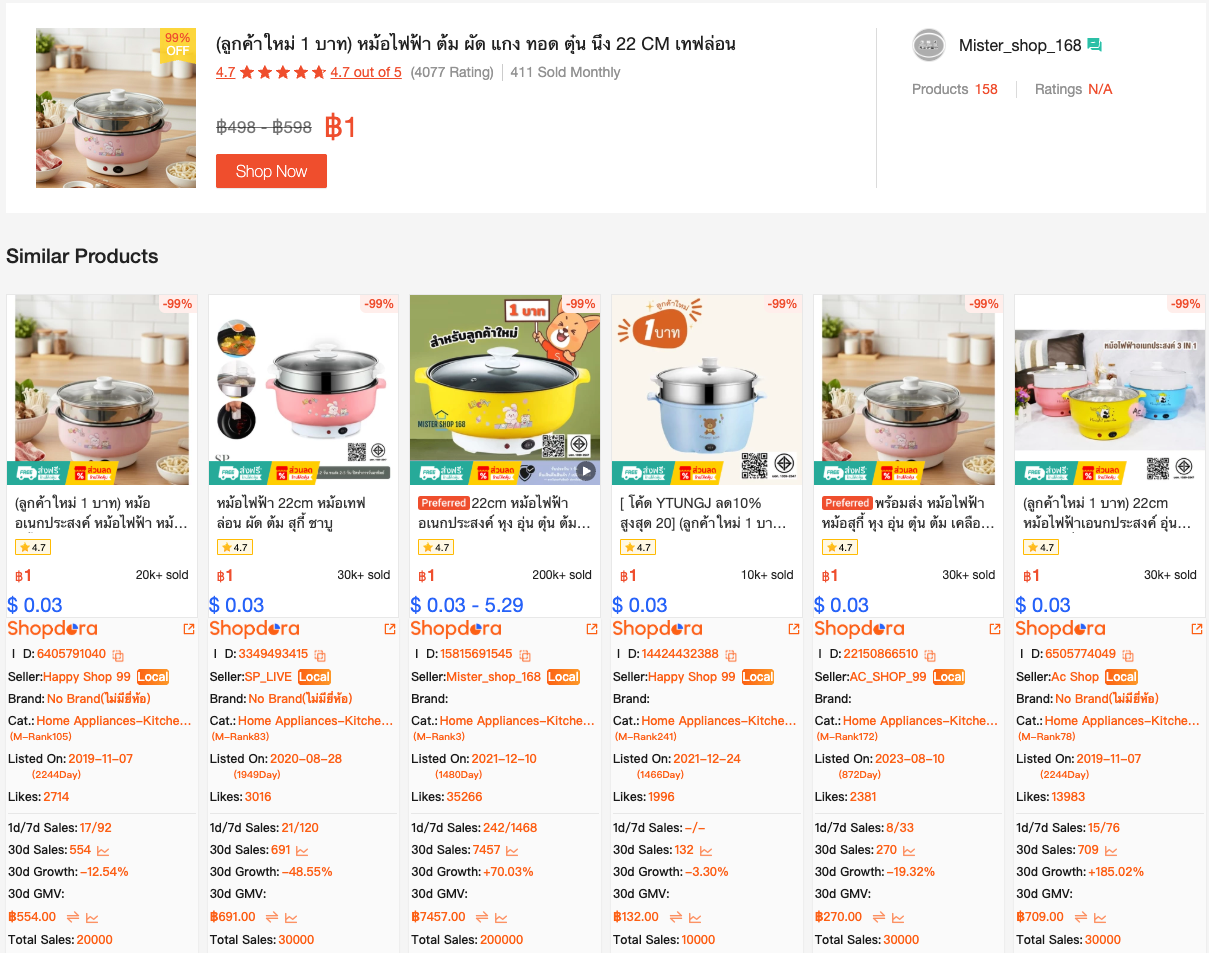
This doesn’t replace full market research — Shopdora’s platform tools still handle broader market and category-level analysis — but the extension acts as the first filter. It helps you decide quickly whether a product deserves deeper investigation or should be skipped entirely.
That speed matters, especially in competitive or trend-driven categories where timing is everything.
Why This Type of Shopee Extension Fits Real Seller Behavior
What I like about using a Shopee extension instead of relying only on reports is that it fits how sellers actually work. We browse. We compare. We scroll. We react.
A well-designed extension doesn’t force you into a “data analysis mode.” It quietly supports decision-making while you do what you were already doing on Shopee.
Shopdora’s extension is built around that idea. It doesn’t replace your judgment — it sharpens it. You still decide what to sell, but now those decisions are informed by market visibility, not assumptions.
A Note on Accuracy and Responsible Use
No third-party tool has access to Shopee’s internal seller databases. That’s important to say clearly. Tools like Shopdora rely on large-scale data modeling, trend analysis, and historical patterns to estimate market behavior.
Used correctly, this data is not about chasing exact numbers. It’s about direction, comparison, and probability. As a seller, you’re not trying to predict the future perfectly — you’re trying to make better decisions than guessing.
Cross-checking signals, validating trends over time, and combining extension insights with your own store data is how you get the most value.
Final Thoughts from a Seller, Not a Marketer
I’m not interested in tools that look impressive but don’t change how I operate day to day. A Shopee extension earns its place only if it saves time, reduces mistakes, or reveals something I couldn’t see before.
For me, Shopdora’s Shopee extension does exactly that — by showing competitor sales signals, SKU structure, and market context inside Shopee itself. It turns browsing into research, and research into clearer decisions.
If you’re serious about selling on Shopee long term, your advantage won’t come from working harder inside your own store dashboard. It comes from understanding the market you’re competing in — and seeing what others can’t.