
Why Your Shopee Ads Burn Money (and How to Fix It)
If you’ve ever run Shopee GMV MAX ads and felt like your money was going up in smoke — clicks but no orders, or sales that just don’t justify the cost — you’re not alone.
Ad “waste” happens to many Shopee sellers, and it usually comes down to two core issues: poor foundational setup, or a store profile that’s confusing the platform’s algorithm.
In this post, we’ll dig into why GMV MAX ads may be burning money and what practical steps you can take to fix it.
01. Why Shopee Ads Burn Money for No Results
There are usually two types of “ad burning”:
- You’re spending money but getting zero conversions.
- You’re getting a few orders, but your ROAS is painfully low.
Let’s look at the real reasons behind it.

1. Messy store tags confuse the algorithm
In the past, sellers could manually adjust keywords to fix targeting. Now, Shopee’s system automatically allocates ads based on store and product tags.
If your store tags are inaccurate or chaotic, the system simply doesn’t know who your target audience is — and that’s where ad waste starts.
Tag quality depends on two main things:
- Whether your product information is complete and accurately matched
- The type and quality of traffic the platform sends you
Many sellers assume that all traffic is equal. It’s not.
Some clicks are valuable; others are “junk traffic” — people who look but never buy. If the platform doesn’t understand your store positioning, it may push your ads to irrelevant audiences, wasting your budget.

2. Weak product listings that can’t convert
Even if your ads are running properly, a bad product page will kill conversions. Poor visuals, weak titles, mismatched pricing, or bad reviews all drag your performance down.
Remember: making a good product and building a good listing are two different things — don’t confuse them.
3. Your product type isn’t suited for Shopee ads
Some products just don’t belong in the Shopee ad ecosystem.
If you’re selling high-ticket items like houses or cars, don’t expect quick conversions — ad burn is natural because your customer’s buying cycle is long.
On the flip side, if you’re selling low-price, highly commoditized items where everyone looks the same except for the logo, ad burn is also inevitable. You’re in a price war.
4. Your ROAS settings are unrealistic
ROAS misconfiguration is another major culprit.
- If your ROAS goal is too high, you’re basically asking for a miracle — the system can’t find buyers that meet your unrealistic expectations, so it spends little or inefficiently.
- If your ROAS goal is too low, you’ll attract irrelevant, low-quality traffic that your listing can’t convert. The result: wasted clicks, bad data, and poor performance.

02. How to Fix Shopee Ad Burn
Here’s the step-by-step strategy I recommend to every Shopee seller struggling with ad inefficiency:
1. Stop running ads on bad or unstable products
Not every product deserves ad spend.
Focus your budget on your “A-grade” listings — products that already have sales and good reviews.
Avoid advertising too many poor performers; otherwise, the system will misread your store priorities, mess up your audience tags, and reduce ad efficiency.
👉 Regularly clean up underperforming SKUs and pause ads for weak listings.

2. Eliminate irrelevant keywords
Although Shopee now hides a lot of keyword data, irrelevant targeting still happens.
For instance, if you sell chairs but your ad is targeting “stool,” the traffic will be off, and your ad will burn budget.
To verify if your keywords are relevant, search them on the platform — if the top results don’t look like your products, you’re targeting the wrong terms.
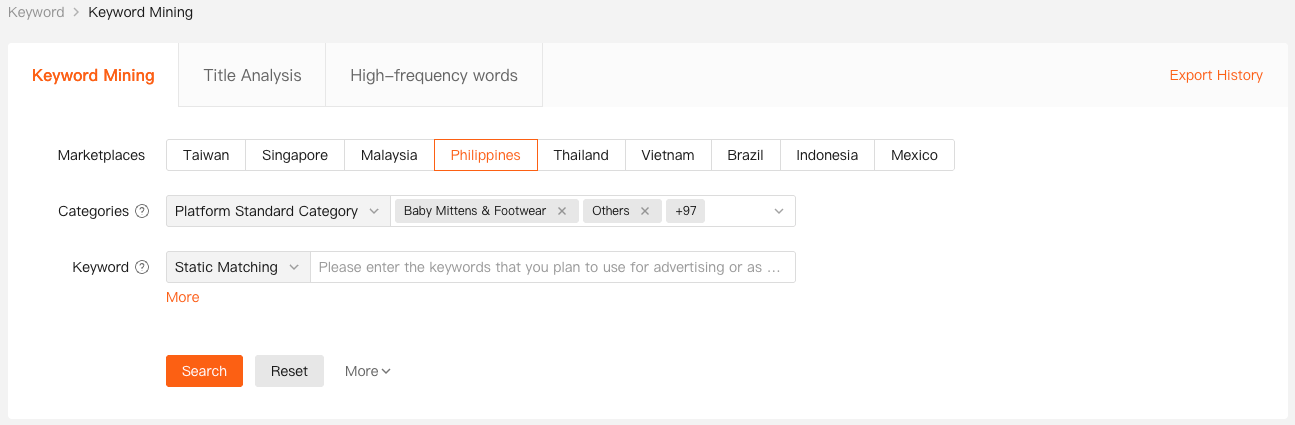
💡 Tip: Tools like Shopdora’s Keyword Mining can help you find high-precision keywords that actually convert, reducing wasted spend.

3. Set realistic ROAS goals and test weekly
There’s no universal “perfect ROAS.” It depends on:
- Market demand and click-through/conversion rates
- Product category size and competition level
- Your store’s overall authority and past performance
Track your campaigns weekly. Adjust ROAS gradually (no more than ±20% at a time), because Shopee’s algorithm needs time to relearn.
After a month, summarize your data: which product types perform best under which ROAS settings?
This will become your store-specific ROAS benchmark — something no one else can define for you.
4. Strengthen your fundamentals (“inner work”)
Even the best ad setup can’t fix bad fundamentals.
Work on your main images, videos, product details, pricing, and promotion structure.
Ads are smart, but not omnipotent — they still need good content to convert.
Don’t just chase exposure numbers; high impressions with low conversions often mean your targeting is off.
Shopee rewards sellers with strong UV value — when your traffic consistently converts, the platform gives you cheaper, higher-quality traffic over time.

Key Takeaway for Shopee Sellers
Before scaling your ads, fix your store and product quality first.
When your listings convert well, your ROAS improves naturally, your ad cost per conversion drops, and the system rewards you with better traffic.
That’s the real logic of Shopee GMV MAX advertising:
First build a solid store → then run ads to amplify good performance → then scale efficiently.
If your ads are burning money now, pause them, fix your fundamentals, and relaunch strategically — your results will change dramatically.