
How I Use a Shopee Image Downloader to Optimize Listings
Hi, I’m David.
I’ve been selling on Shopee for over three years as an independent seller, and a big part of my growth didn’t come from ads or fancy tactics—it came from fixing the basics. One of the most underestimated basics? Product images and videos.
In this post, I want to share how I use Shopdora’s Shopee image downloader feature (Download Image/Video) in real workflows to improve my listings, not just copy competitors.
Why “Shopee Image Downloader” Matters More Than Sellers Think
Most sellers know images matter, but here’s what I see every day:
- Images look blurry after screenshots
- Videos are compressed or full of watermarks
- Sellers copy layouts blindly without understanding why they convert
- No clear system to analyze competitors’ visual strategy
Shopee is a visual-first marketplace. If your main image doesn’t stop the scroll, your title and keywords won’t even get a chance.
That’s why I rely on Shopdora’s Download Image/Video feature instead of screenshots or random browser tricks.
What Shopdora’s Download Image/Video Actually Does
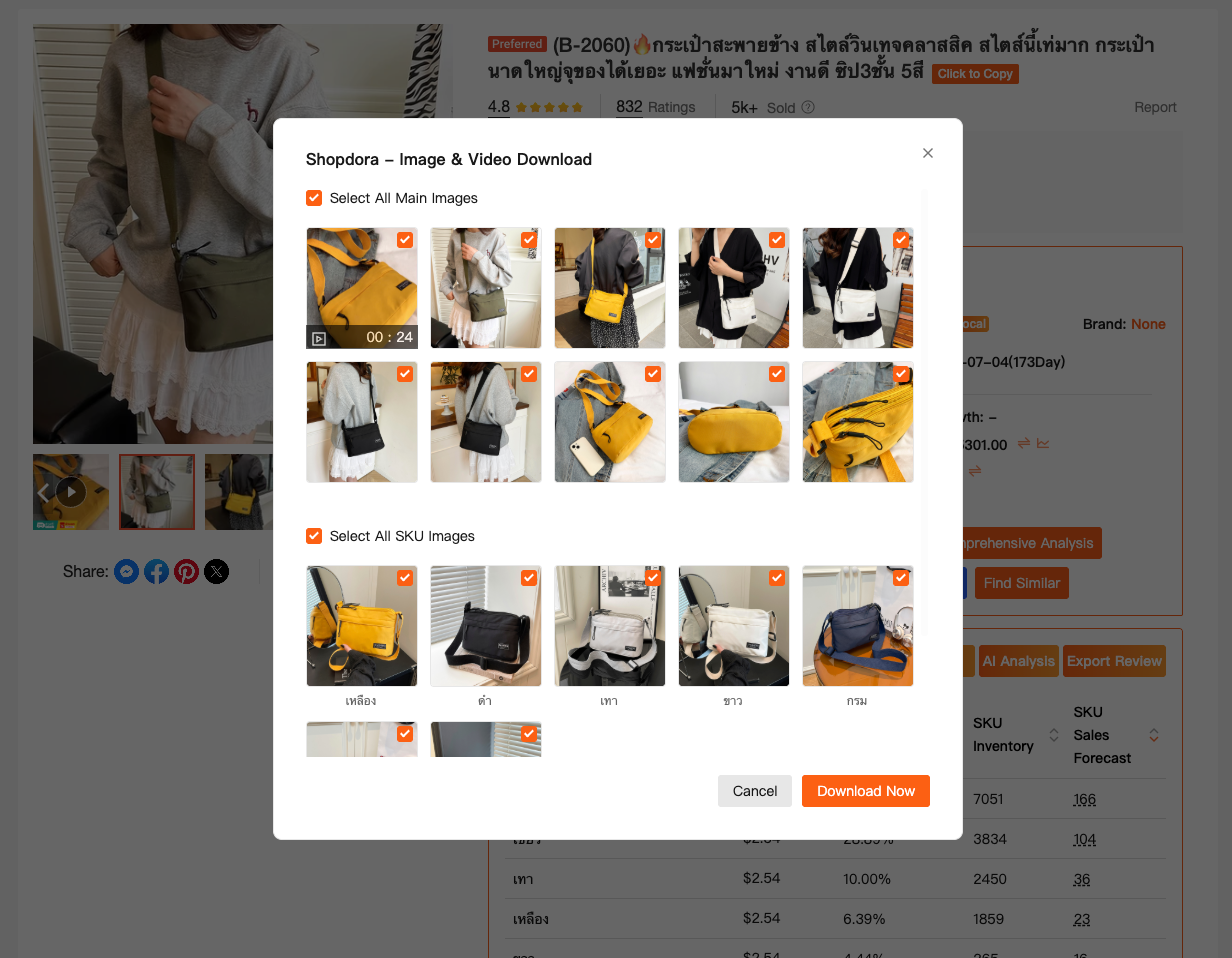
Tool used: Shopdora – Download Image / Video
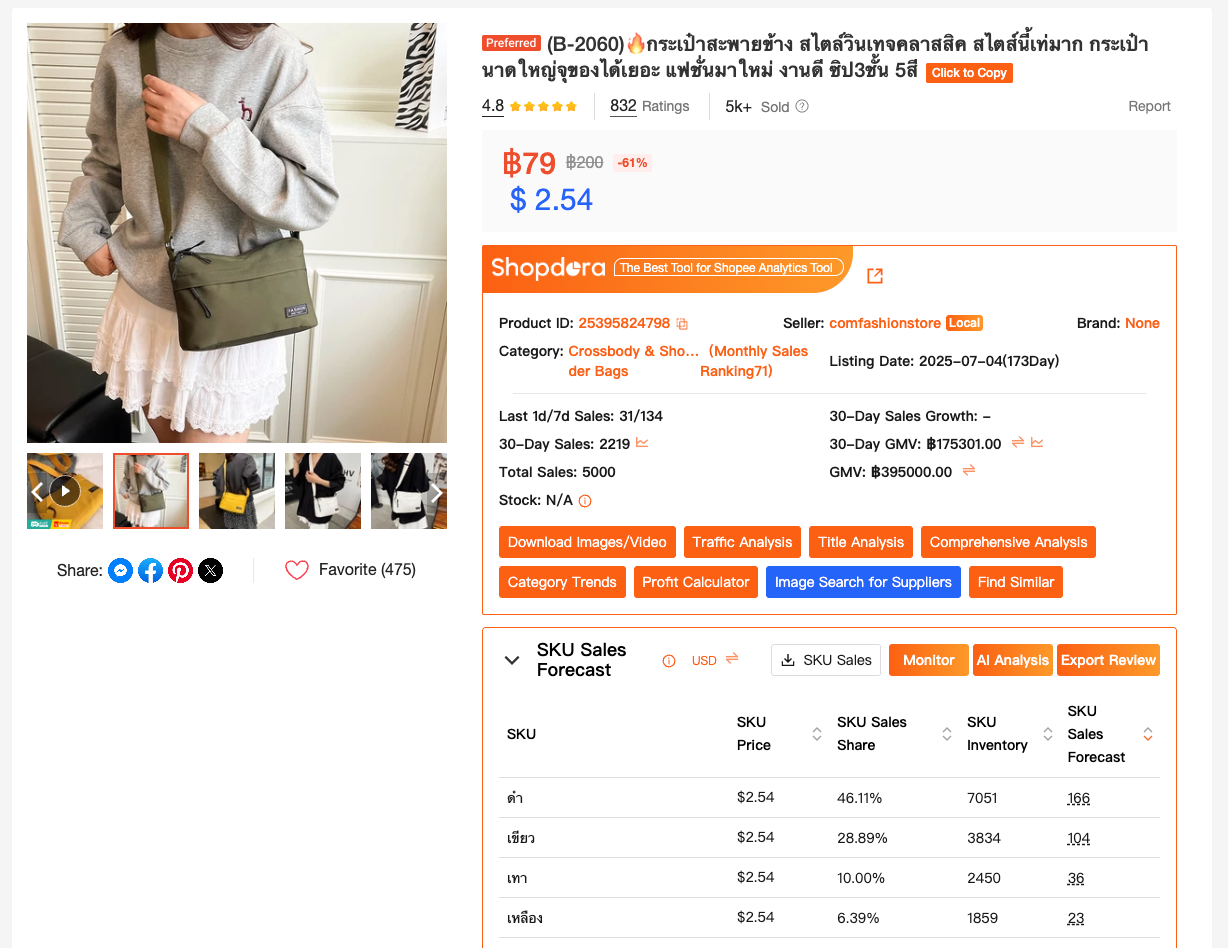
Directly on the Shopee product page, Shopdora allows me to:
- Download original-resolution product images
- Download original product videos
- No watermark
- No compression
- No quality loss
This sounds simple, but it changes how you analyze and optimize listings.
This is not about copying. It’s about reverse-engineering what works.
How I Use a Shopee Image Downloader for Real Optimization
1. Main Image Optimization (The Scroll Test)
When I download competitor images using Shopdora, I look at:
- Image ratio and framing
- Text size and placement
- Color contrast against Shopee’s background
- What’s visible at thumbnail size
By comparing multiple top-selling products side by side, patterns appear quickly:
- Some niches favor clean white space
- Others rely on bold text and usage scenarios
- Some products convert because of what they remove, not what they add
Without original-quality images, these details are easy to miss.
2. Finding Visual Selling Points You Didn’t Think Of
This is where image analysis connects with product differentiation.
By downloading images and videos, I can clearly see:
- Which features are repeatedly highlighted
- Which angles sellers prioritize
- What problems are visually emphasized
I often discover:
- A usage scenario I never thought to show
- A feature that deserves its own image
- A visual promise customers respond to more than specs
This helps me plan new images, not clones.

3. Video Breakdown: Why Some Listings Feel “Premium”
Videos are even more important—and harder to analyze without proper downloads.
Using Shopdora’s Shopee image downloader for videos, I can:
- Pause frame-by-frame
- Study pacing and transitions
- Analyze opening 3 seconds (the most important part)
- Understand how sellers demonstrate value without text
This is especially useful when planning:
- New video scripts
- UGC-style content
- Before/after demonstrations
Screenshots simply don’t work for this
Combining Image Downloads With Other Shopdora Insights
I rarely use image downloading alone.
A common workflow for me looks like this:
- Find Similar
Identify top-performing competitors in the same niche. - Download Image/Video (Shopdora)
Pull original visuals to analyze structure and messaging. - AI Review Analysis
Cross-check visuals with what users actually mention in reviews.
This ensures my image optimization is not just “pretty,” but aligned with real buyer expectations.
Common Mistakes Sellers Make With Image Downloading
From experience, these are traps to avoid:
- Copying layout without understanding intent
- Reusing images directly (risking IP and brand issues)
- Ignoring mobile thumbnail visibility
- Overloading images with text
A Shopee image downloader is a research tool, not a shortcut.
Shopdora gives you clean data; the strategy still needs thinking.
Final Thoughts
If your Shopee listing isn’t converting, don’t immediately blame price or ads.
Often, the problem is that your images don’t communicate value fast enough.
A proper Shopee image downloader helps you see what top sellers are doing right—and more importantly, why it works.
I’m David, a Shopee seller who believes good visuals are not about design talent, but about understanding buyers.
Shopdora helps me see clearly, analyze calmly, and optimize with purpose.