
How I Use a Shopee Image Downloader With Real Data
Hi, I’m David.
I run my own Shopee store and have been doing this solo for over three years now. No team. No outsourced analysts. Just me, my laptop, and a lot of trial and error. If you’ve been selling on Shopee long enough, you’ll probably agree with this: most seller mistakes don’t come from laziness, but from making decisions with incomplete data.
For a long time, I thought my biggest problem was pricing. Later, I realized it was product selection. And eventually, I figured out the real issue—I didn’t truly understand what customers were responding to on a product page, especially when it came to visuals, positioning, and real buyer feedback.
That’s where a proper Shopee analytics tool started to matter for me. Not just surface-level numbers, but tools that helped me break down why a product worked. In my case, that tool was Shopdora.

Why Shopee Images Matter More Than Most Sellers Admit
Let me start with something simple but often overlooked: product images.
On Shopee, buyers scroll fast. They don’t read your description first. They don’t analyze specs. They react to images. Yet most sellers I talk to still “borrow” images blindly—downloading competitor photos without understanding which visuals actually drive conversions.
I used to do the same.
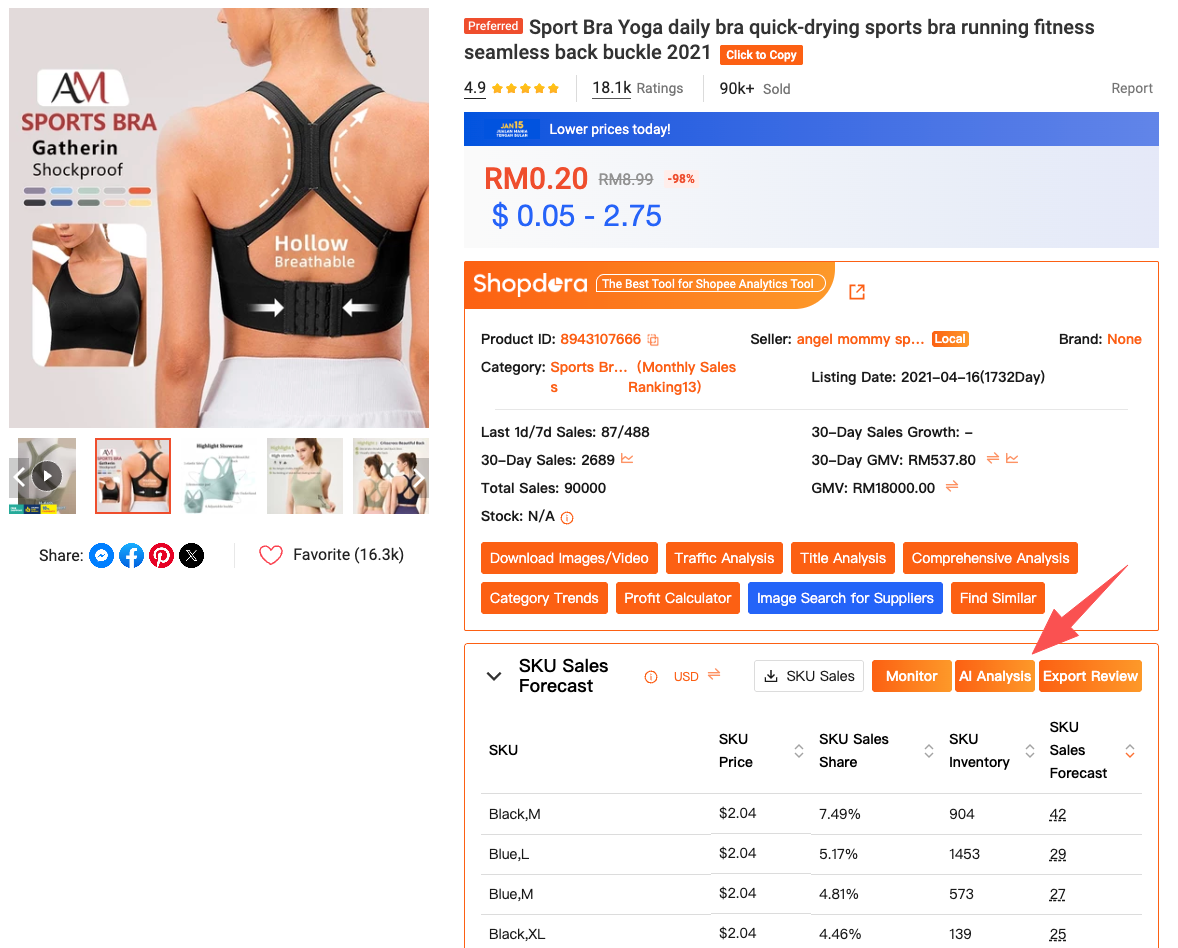
The turning point came when I started using Shopdora’s Download Image/Video feature. This is not just a random Shopee image downloader. It’s integrated directly into the product analysis workflow.
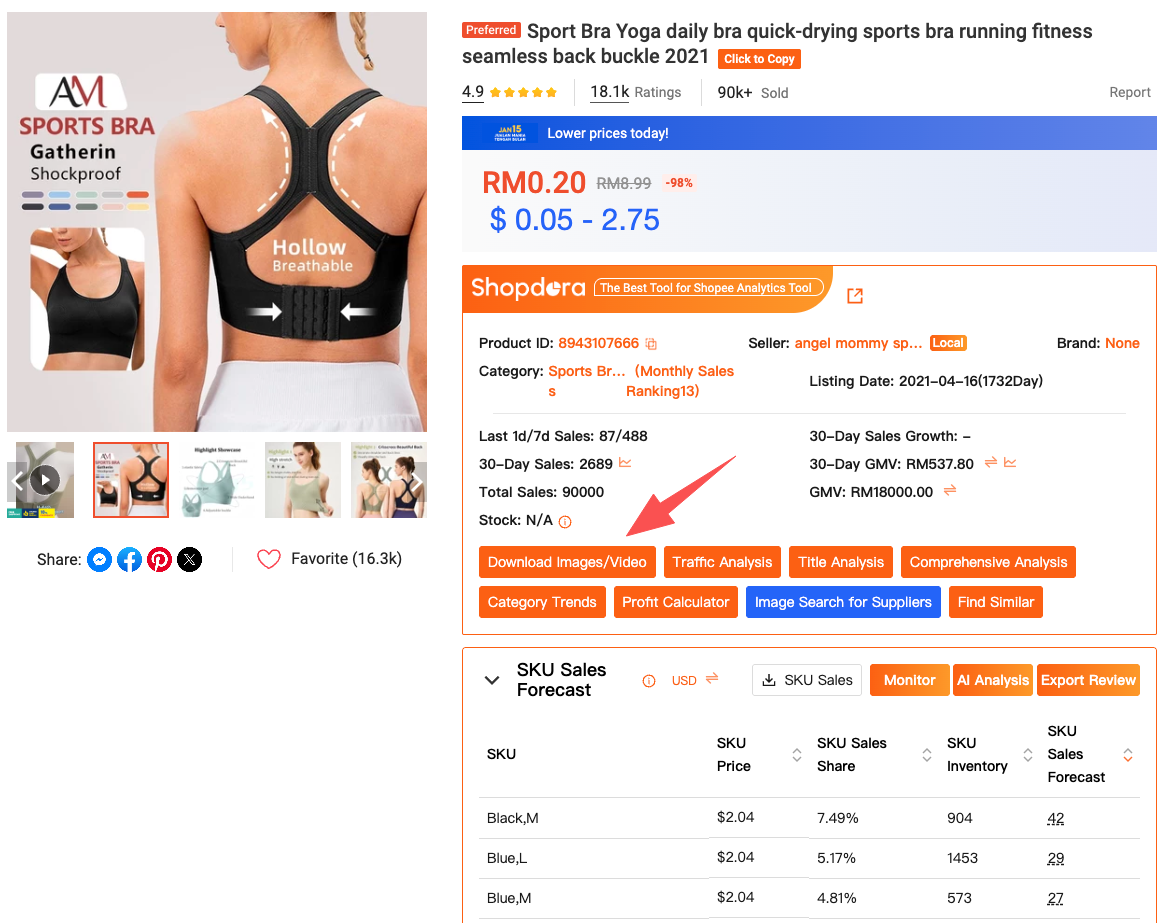
How I use it in practice:
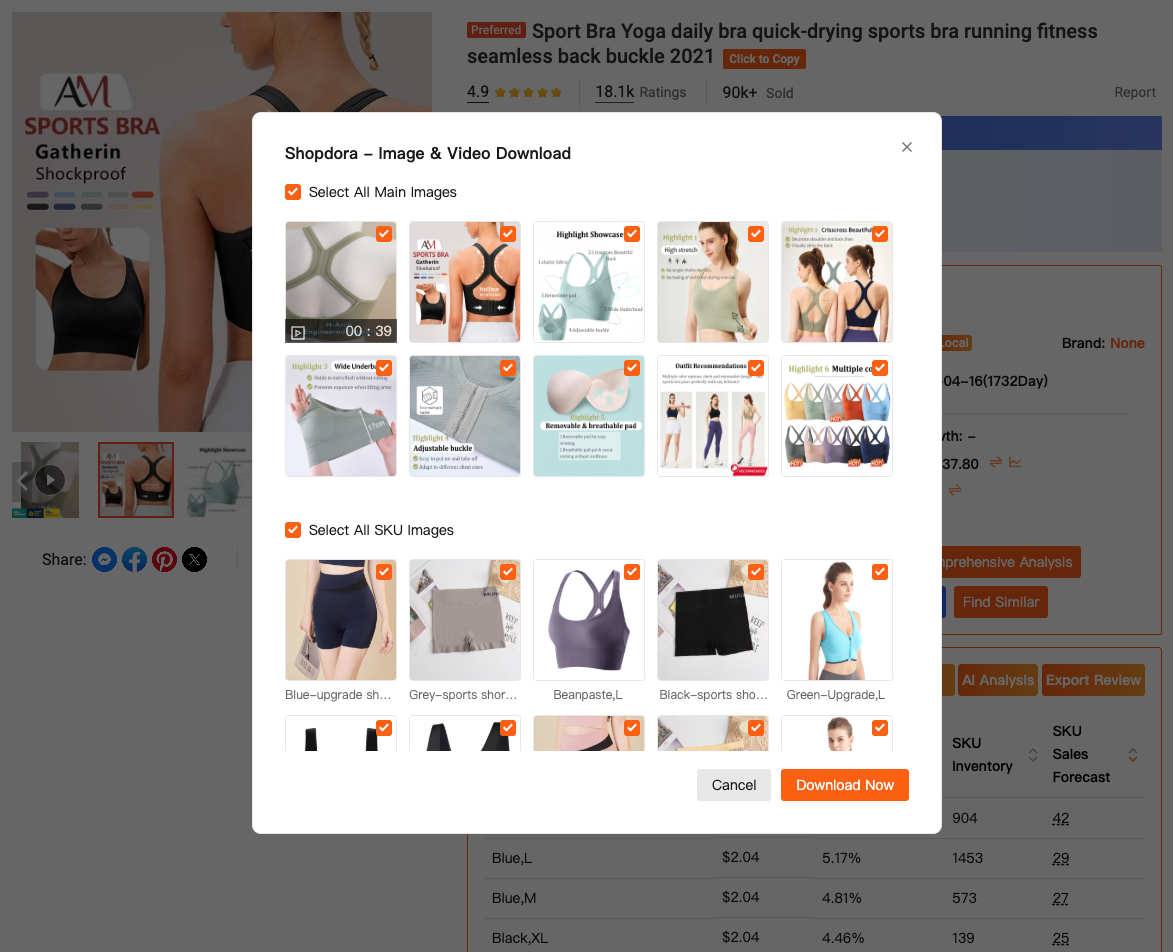
When I’m browsing Shopee and find a product that’s selling well, I activate the Shopdora browser plugin. Right on the product page, I can download all product images and videos with one click—no watermarks, no manual saving, no third-party tools.
But here’s the key difference: I don’t download images to copy them. I download them to study patterns—angles, lifestyle shots, text overlays, color schemes. Later in the process, these visuals become data points, not assets.
This is where most generic “shopee image downloader” tools stop. Shopdora doesn’t.
Turning Images Into Decisions With Shopee Data
Images alone don’t tell the full story. A clean photo doesn’t automatically mean strong sales. That’s why the next step for me is always Comprehensive Analysis inside Shopdora.
After identifying a product visually, I click into Comprehensive Analysis directly from the plugin or by pasting the product link into the Shopdora web dashboard. This gives me structured Shopee data I simply can’t get from the seller backend.
I can see:
- Sales trends over time
- Revenue changes
- Ranking movement
- How stable or volatile the product performance is
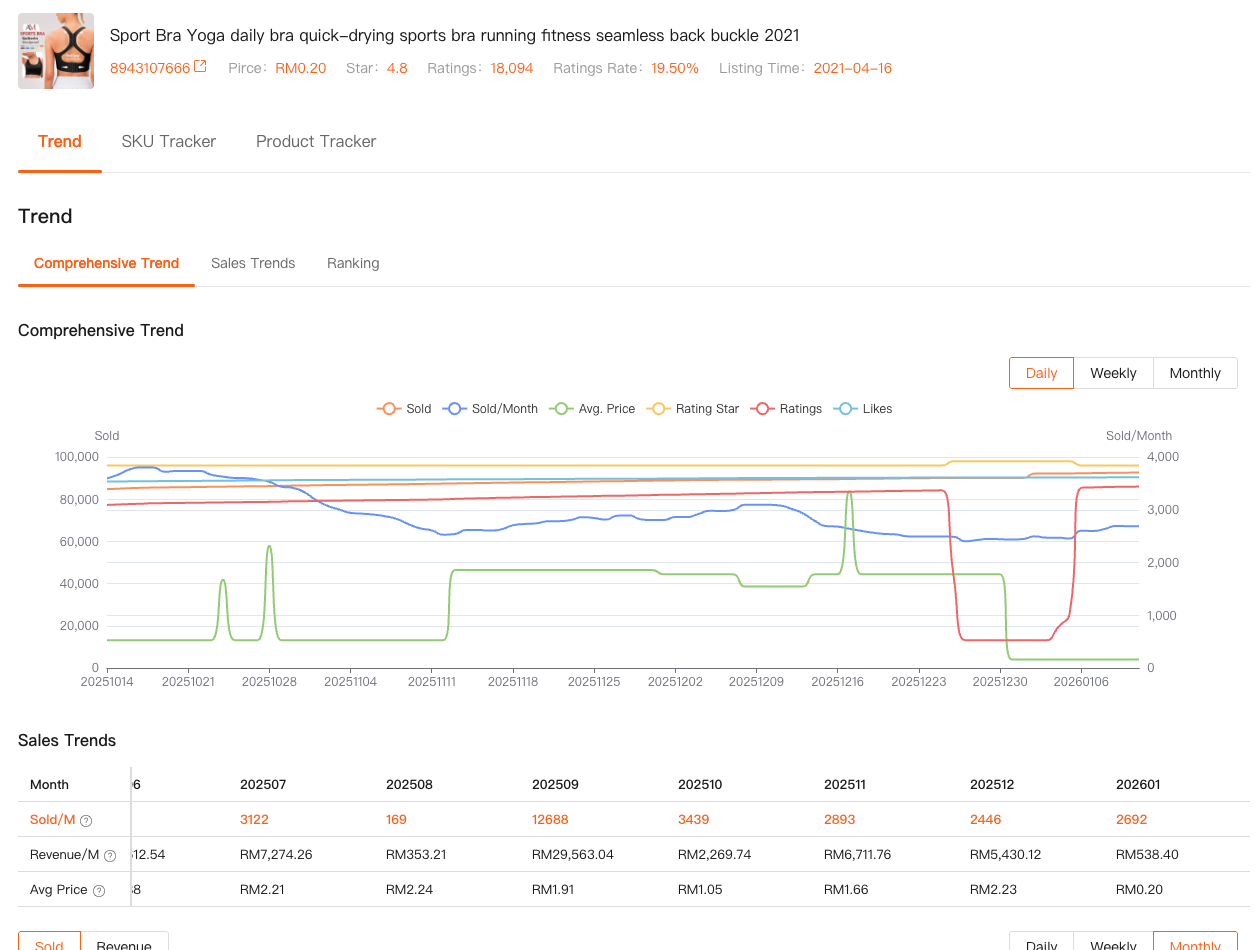
This is where I often realize something uncomfortable: some “good-looking” products are actually declining, while others with very basic images are quietly growing.
I remember one case clearly. I was convinced a competitor’s polished product page was crushing it. After checking the comprehensive data, I saw sales flattening for three months straight. I didn’t touch that niche.
That one decision alone saved me weeks of wasted effort.
Actionable takeaway:
If you’re evaluating a product purely by images, you’re gambling. If you pair downloaded visuals with Shopdora’s Shopee data, you’re making an informed choice.
Listening to Buyers, Not Just Looking at Numbers
Numbers explain what is happening. Reviews explain why.
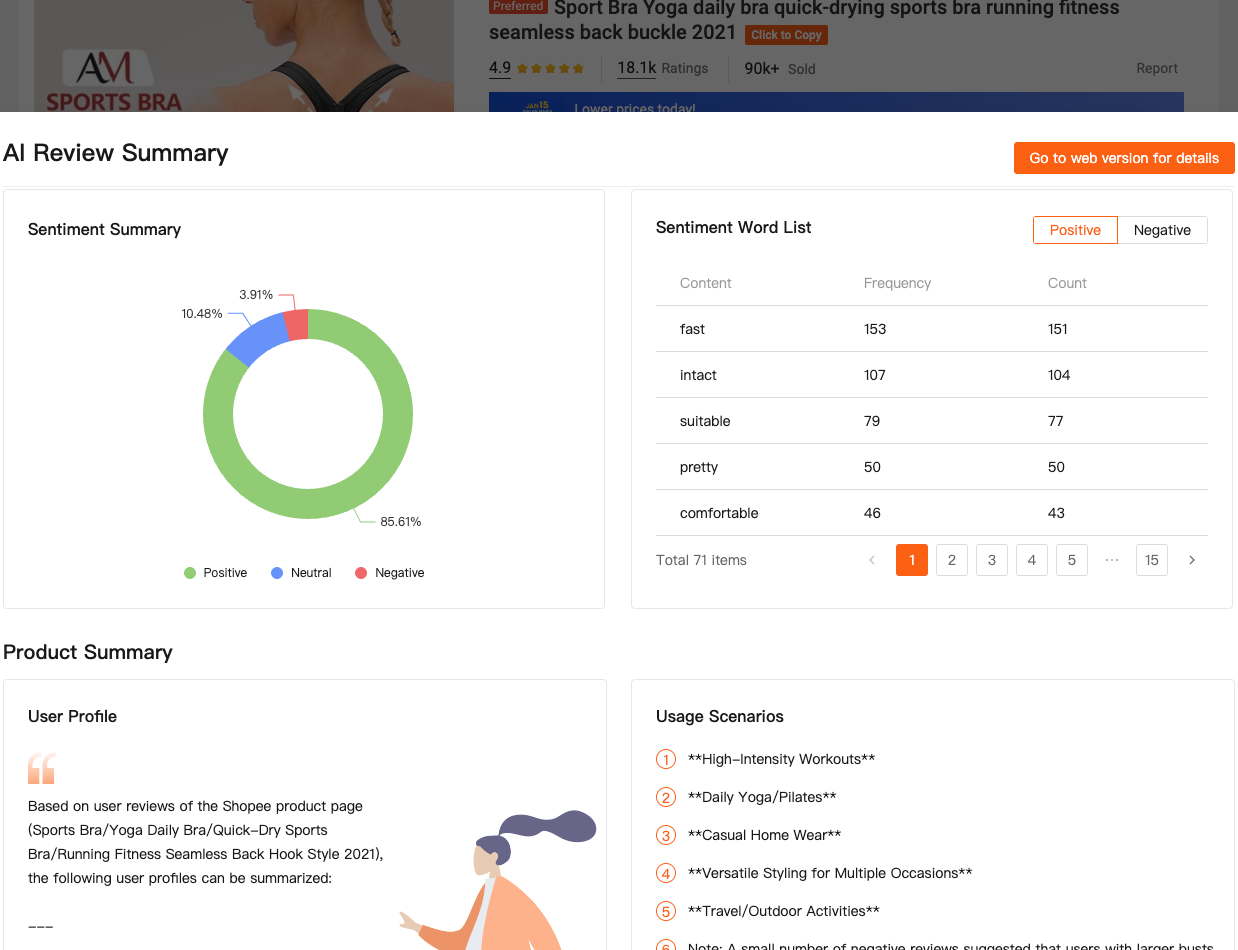
This is where Analisis AI (AI Review Analysis) became non-negotiable for me.
Inside Shopdora, once I’m analyzing a product, I switch to AI Review Analysis. The system processes large volumes of real buyer reviews and summarizes recurring themes—complaints, praise, unmet expectations.
This is not sentiment guessing. It’s structured extraction.
For example, while analyzing one kitchen product, sales data looked solid. Images were decent. But AI Review Analysis highlighted repeated complaints about size mismatch and misleading photos.
That insight changed how I approached my own listing. I redesigned my images to include scale references and added comparison shots. When I later launched, my return rate was noticeably lower than the category average.
How These Tools Work Together in Real Life
This is my actual workflow now, and it’s simple:
- Browse Shopee normally and spot a product with traction
- Use Shopdora plugin → Unduh Gambar/Video to collect visuals
- Open Analisis komprehensif to verify sales, trends, and stability
- Check Analisis AI to understand buyer pain points
- Decide whether to enter, improve, or avoid the niche
No guessing. No assumptions.
And importantly, this workflow doesn’t require a data team or technical skills. Everything is accessible either through the
Shopdora browser plugin (https://chromewebstore.google.com/detail/fbkkmbebblifoifknelgfijhbpodmlmo?utm_source=item-share-cb )
or the Shopdora web platform (https://www.shopdora.com/?s=FIBLFgwG).
Why I Rely on Shopdora as My Shopee Analytics Tool
Shopee’s seller center tells you what’s happening in your store. It tells you nothing about the market.
Shopdora fills that gap.
It gives me:
- A reliable Shopee image downloader tied to real context
- Market-level Shopee data instead of isolated numbers
- A practical Shopee analytics tool built for decision-making, not vanity metrics
I don’t use every feature every day. But when I’m researching, validating, or optimizing, these three tools—image download, comprehensive analysis, and AI review analysis—are always part of the process.
Final Thoughts From a Solo Seller
If there’s one thing I’ve learned after three years, it’s this: the difference between struggling sellers and stable sellers isn’t effort—it’s clarity.
Clarity comes from seeing what others can’t see.
Shopdora doesn’t magically make you money. What it does is remove blind spots. And in Shopee, avoiding the wrong product is often more valuable than finding the “perfect” one.
If you’re serious about improving how you research products, analyze competitors, and understand buyers, start treating images, data, and reviews as one connected system—not separate tasks.
That shift changed how I sell. And honestly, it made the whole process a lot less stressful.
— David