
How to Download Shopee Images and Videos: Complete Guide 2026
Introduction
As a Shopee seller or market researcher, you've probably encountered situations where you need to save product images or videos from competitor listings for analysis, inspiration, or market research. Whether you're conducting product research, analyzing competitor strategies, or gathering visual references for your own listings, having the right Shopee image downloader tool can save you hours of manual work.
In 2026, with Shopee's continued growth across Southeast Asia and Latin America, the ability to efficiently download and analyze product visuals has become essential for competitive sellers. High-quality product images and engaging videos are critical factors in conversion rates, and understanding what works in your niche requires systematic visual research.
This comprehensive guide will show you exactly how to download Shopee images and videos legally and efficiently, using both automated tools and manual methods. You'll learn about the best Shopee video downloader options available, understand the legal considerations, and discover best practices for organizing your downloaded content.
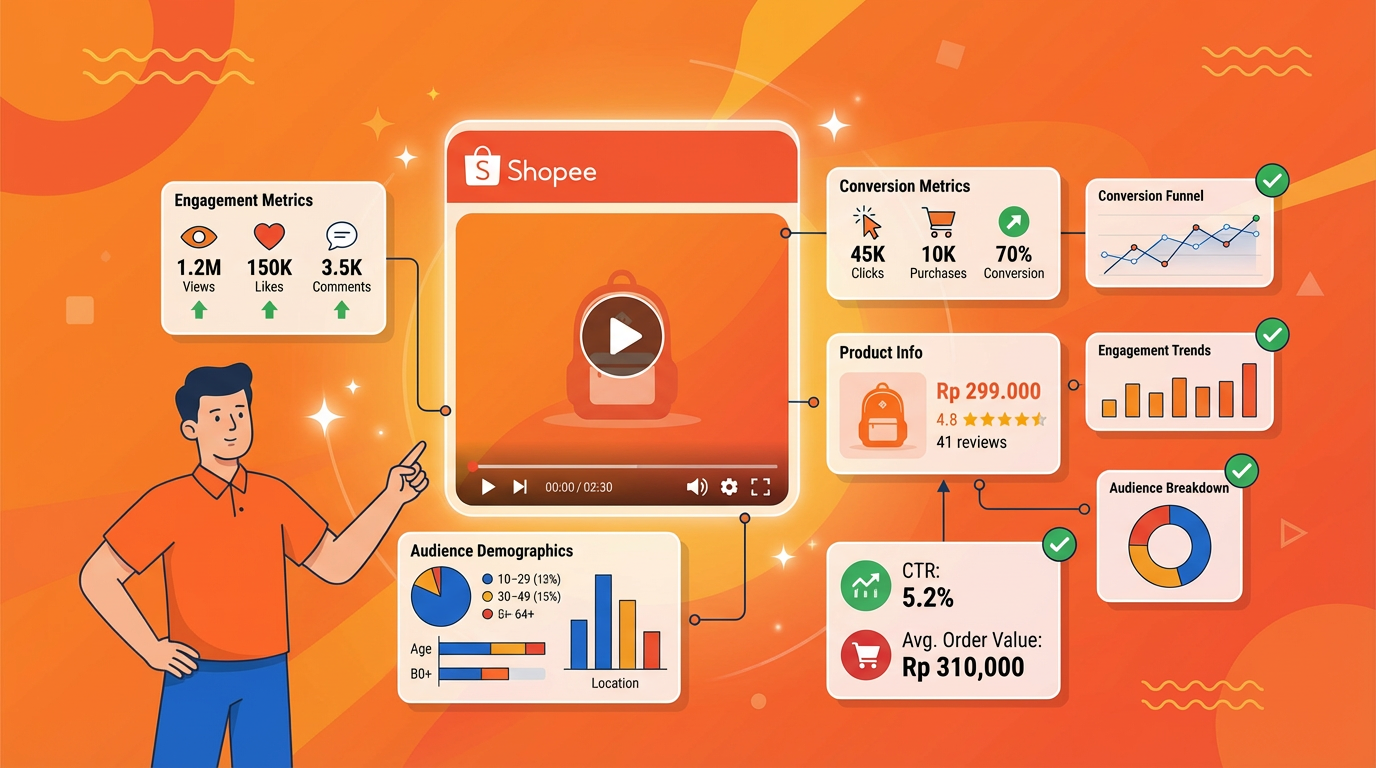
What you'll learn:
- Why downloading Shopee images and videos matters for your business
- Legal and ethical considerations you must know
- The best Shopee image downloader tools in 2026
- Step-by-step methods to download images and videos
- Best practices for organizing and using downloaded content
- Common issues and how to solve them
Important Note: This guide focuses on downloading content for legitimate business purposes such as market research, competitive analysis, and product development. Always respect intellectual property rights and use downloaded content ethically.
Why Download Shopee Images and Videos?
1. Product Research and Validation
Before investing in new inventory, successful sellers analyze what's already working in the market. Downloading product images allows you to:
Visual Trend Analysis: Collect images from top-selling products to identify visual patterns, styling trends, and presentation techniques that resonate with buyers.
Product Comparison: Create side-by-side comparisons of similar products to understand differentiation strategies and identify gaps in the market.
Supplier Verification: Save product images to cross-reference with supplier catalogs, ensuring you're getting authentic products and accurate representations.
According to seller surveys, businesses that conduct systematic visual research report 30-40% better product selection success rates compared to those who rely on intuition alone.
2. Competitive Intelligence
Understanding your competition requires more than just looking at their listings—you need to analyze and document their strategies:
Visual Strategy Documentation: Track how competitors present their products, including image angles, backgrounds, lifestyle shots, and infographic styles.
Seasonal Changes: Monitor how top sellers update their product images for different seasons, holidays, or promotional periods.
Video Content Analysis: Study competitor product videos to understand their messaging, demonstration techniques, and production quality.
A/B Testing Insights: By collecting images over time, you can identify when competitors change their visuals and correlate those changes with ranking or sales performance.
3. Creating Better Listings
Downloaded images serve as inspiration and reference for improving your own listings:
Benchmark Quality Standards: Understand the image quality bar in your category by examining top-ranking listings.
Layout and Composition Ideas: Learn effective ways to showcase product features, dimensions, and use cases.
Infographic Inspiration: Collect examples of effective infographics that highlight product benefits, specifications, and comparisons.
Video Script Development: Analyze successful product videos to develop better scripts and storyboards for your own content.
4. Market Reports and Presentations
If you're working with a team, investors, or partners, visual documentation is essential:
Trend Reports: Create visual market trend reports showing popular styles, colors, and product types.
Competitive Analysis Presentations: Build comprehensive competitor analysis decks with actual product images.
Training Materials: Develop training resources for your team showing examples of effective product photography and videography.
5. Supplier Communication
When working with manufacturers or suppliers:
Reference Images: Share examples of desired product photography styles, packaging, or presentation.
Quality Standards: Provide visual benchmarks for the quality level you expect.
Customization Requests: Show specific visual elements you want to incorporate into your products.

Legal and Ethical Considerations
Before downloading any content from Shopee, it's crucial to understand the legal and ethical boundaries.
Copyright and Intellectual Property
Important: Product images and videos on Shopee are copyrighted material owned by the sellers or their photographers. Downloading this content does not grant you ownership or unlimited usage rights.
Permitted Uses (Generally Acceptable):
- ✅ Personal market research and analysis
- ✅ Internal competitive intelligence (not published)
- ✅ Product development reference (inspiration, not copying)
- ✅ Supplier communication (showing examples)
- ✅ Educational purposes within your organization
Prohibited Uses (Illegal or Unethical):
- ❌ Using downloaded images in your own product listings
- ❌ Republishing images on your website or marketing materials
- ❌ Claiming downloaded content as your own
- ❌ Selling or distributing downloaded images
- ❌ Using images to create counterfeit or misleading listings
Fair Use Principles
In most jurisdictions, downloading images for research and analysis falls under "fair use" or "fair dealing" provisions, provided:
- Purpose: The use is for research, analysis, or education—not commercial reproduction
- Amount: You're downloading a reasonable amount for your research needs
- Effect: Your use doesn't harm the original seller's market
- Transformation: You're analyzing the content, not simply republishing it
Best Practices for Ethical Use
Document Your Purpose: Keep records of why you downloaded specific images and how you used them for research.
Don't Republish: Never use downloaded images in your own listings or public marketing materials without explicit permission.
Respect Watermarks: If images contain watermarks or branding, don't remove or obscure them.
Create Original Content: Use downloaded images as inspiration to create your own original, better content.
When in Doubt, Ask: If you want to use an image beyond research purposes, contact the original seller for permission.

Best Shopee Image Downloader Tools in 2026
Shopdora - Most Comprehensive Solution
Website: shopdora.com
Best For: Sellers who need bulk downloading with data analysis
Shopdora offers the most efficient Shopee image downloader and Shopee video downloader functionality as part of its comprehensive analytics platform. Unlike standalone download tools, Shopdora combines visual content downloading with product data analysis.
Key Features:
Bulk Image Download
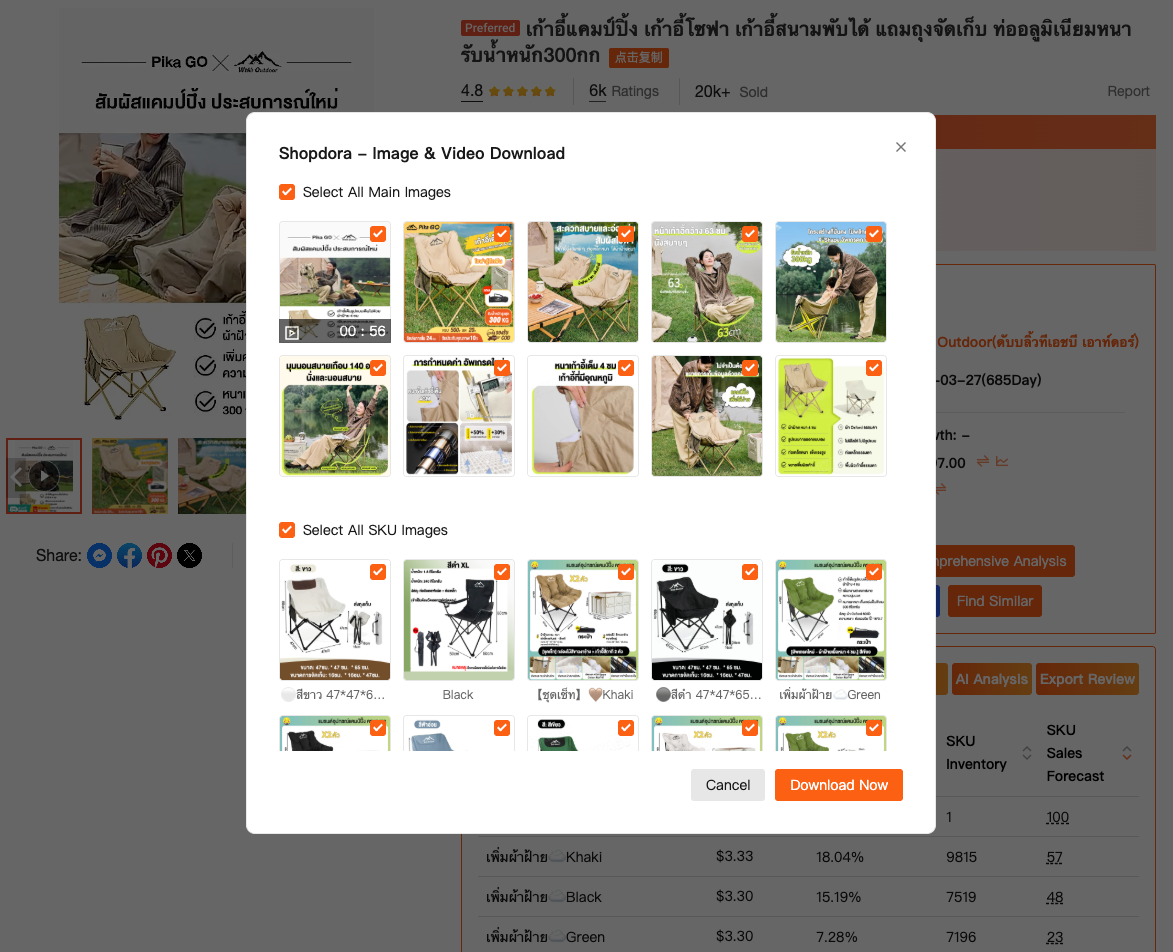
- Download all product images from any Shopee listing with one click
- Batch download images from multiple products simultaneously
- Automatic organization by product ID and SKU
- High-resolution image preservation (no quality loss)
Video Download Capability
- Download product videos in original quality
- Support for all Shopee video formats
- Automatic video metadata extraction
Integrated Data Analysis
- View product sales data while downloading images
- Analyze competitor visual strategies alongside performance metrics
- Export images with associated product data (price, sales, reviews)
- Track which visual styles correlate with higher sales
Chrome Extension Integration
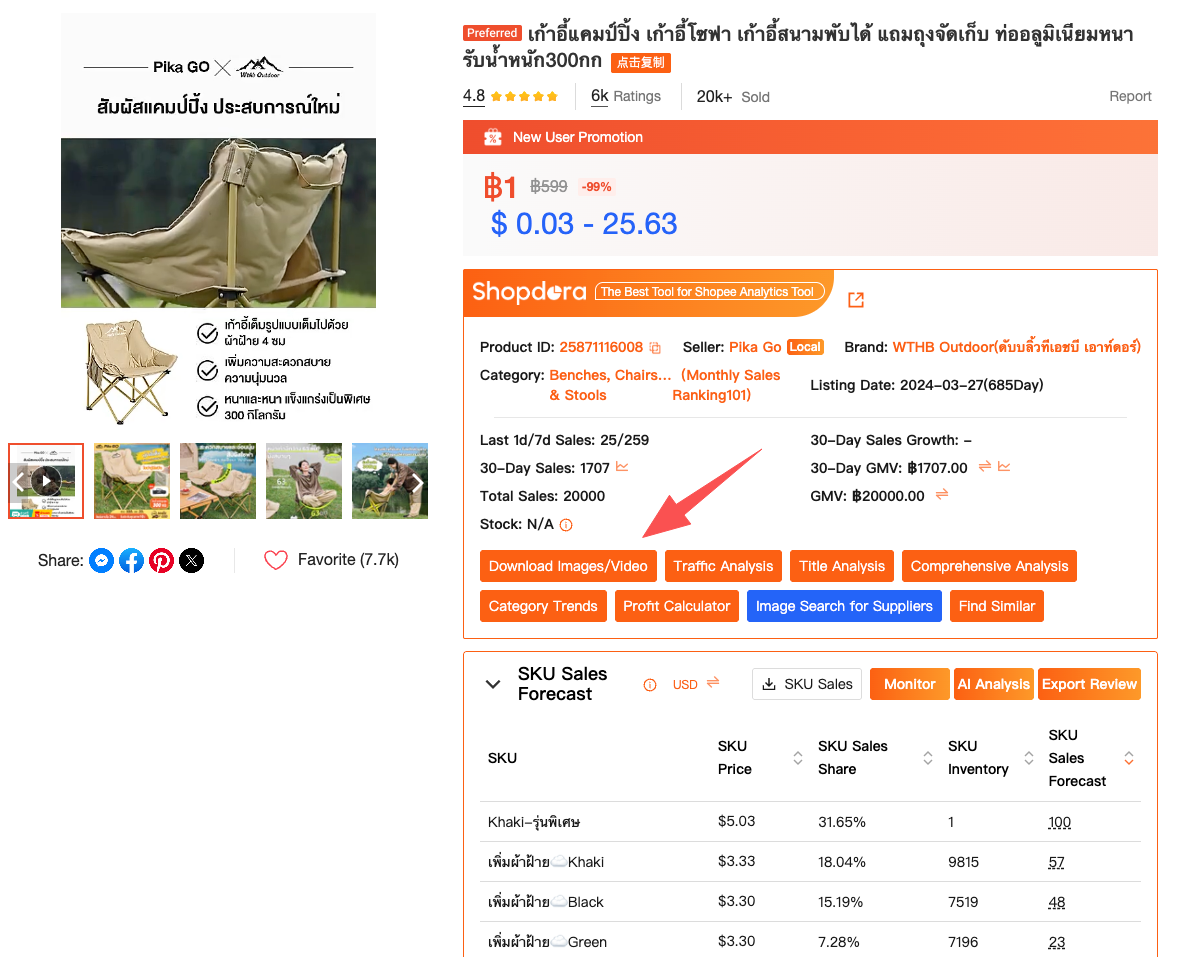
- Download images directly from Shopee product pages
- One-click download button on every listing
- Real-time preview before downloading
- Automatic filename generation with product details
Multi-Market Support
- Download content from all 9+ Shopee markets
- Unified interface for cross-market research
- Automatic market tagging for organization
Why Shopdora Stands Out: Unlike basic image downloaders, Shopdora provides context. You're not just downloading images—you're downloading images with the data that tells you whether those visual strategies actually work. This makes it invaluable for data-driven sellers who want to understand what visual approaches drive sales.
How to Download Shopee Images: Step-by-Step Guide
Step 1: Install Shopdora Chrome Extension
- Visit shopdora.com and sign up for a free account
- Download and install the Shopdora Chrome extension
- Log in to the extension with your account credentials
Step 2: Navigate to Target Product
- Go to Shopee and find the product whose images you want to download
- Open the product listing page
- You'll see the Shopdora extension icon activate
Step 3: Download Images
- Click the Shopdora extension icon in your browser
- Select "Download Images" from the menu
- Choose whether to download all images or select specific ones
- Click "Download" - images will be saved to your designated folder
- Images are automatically organized with product ID and timestamp
Step 4: Batch Download (Premium Feature)
- Use Shopdora's product research tool to find multiple products
- Select all products you want to download images from
- Click "Batch Download Images"
- All images from selected products will be downloaded and organized by product

Best Practices for Downloaded Content
1. Organize Your Files Systematically
Folder Structure:
Shopee_Research/
├── By_Category/
│   ├── Electronics/
│   ├── Fashion/
│   └── Home_Living/
├── By_Competitor/
│   ├── Competitor_A/
│   └── Competitor_B/
└── By_Date/
    ├── 2026-02/
    └── 2026-01/
Naming Convention:
- Use descriptive filenames:
ProductID_Category_Date.jpg - Include key information:
12345_PhoneCase_20260210.jpg - Keep names consistent for easy searching
2. Document Your Research
Create a spreadsheet tracking:
- Product ID and name
- Download date
- Purpose of download
- Key observations
- Action items based on analysis
3. Respect Storage Limits
- Regularly review and delete unnecessary files
- Use cloud storage for long-term archiving
- Compress videos if storage is limited
- Keep only the most relevant images
4. Maintain Ethical Standards
- Never republish downloaded content
- Use only for internal research
- Respect copyright and intellectual property
- Create your own original content inspired by research
Common Issues and Solutions
Issue 1: Images Won't Download
Possible Causes:
- Browser extension not properly installed
- Shopee page not fully loaded
- Internet connection issues
Solutions:
- Refresh the page and wait for full load
- Reinstall the browser extension
- Check your internet connection
- Try a different browser
Issue 2: Low Image Quality
Possible Causes:
- Downloading thumbnail instead of full-size image
- Original image is low quality
- Compression during download
Solutions:
- Use Shopdora to download original quality images
- Open image in new tab before downloading manually
- Check if higher quality version exists
Issue 3: Video Download Fails
Possible Causes:
- Video format not supported
- File size too large
- Browser restrictions
Solutions:
- Use Shopdora's dedicated video downloader
- Ensure sufficient storage space
- Update your browser to latest version
Conclusion: Streamline Your Shopee Research
Downloading Shopee images and videos is an essential skill for competitive sellers in 2026. Whether you're conducting product research, analyzing competitors, or gathering inspiration for your own listings, having the right Shopee image downloader and Shopee video downloader tools makes the process efficient and organized.
Key Takeaways:
- ✅ Use automated tools like Shopdora for bulk downloading and data integration
- ✅ Always respect copyright and use downloaded content ethically
- ✅ Organize your downloads systematically for easy reference
- ✅ Combine visual research with data analysis for better insights
- ✅ Create original content inspired by your research, never copy
Ready to streamline your Shopee research?
Visit Shopdora.com to access the most comprehensive Shopee image downloader and Shopee video downloader tools available in 2026. Start with the free plan—no credit card required—and begin downloading product images and videos with integrated data analysis.
Transform your visual research process and make data-driven decisions that drive sales.
Shopdora
The Best Shopee analytic tool
Free trial
Article last updated: February 2026
Related Resources: