
Shopee Analytics Made Simple With a Smarter Price Tracker
Hi, I’m David.
I run my own Shopee store and have been selling full-time for a little over three years. No team, no analysts—just me, a laptop, and a lot of trial and error. If there’s one thing I’ve learned the hard way, it’s this: guessing is expensive, especially when pricing and traffic decisions are involved.
For a long time, I relied on instinct. I checked competitor prices manually, adjusted my own prices based on “feel,” and tried to read traffic signals from the seller center. Sometimes it worked. Often, it didn’t. What I really needed—but didn’t have—was clear shopee analytics and a reliable shopee price tracker that showed what was actually happening in the market, not just inside my own shop.
That’s where Shopdora quietly changed how I operate.

Why Shopee Sellers Struggle With Pricing and Analytics
Most Shopee sellers face the same invisible wall. The seller center only shows your own data—your traffic, your conversions, your sales. But pricing is never a solo game. Every price change you make exists in a competitive context.
You don’t know:
- Whether a competitor just dropped their price yesterday
- Which SKU variation is actually driving their volume
- If their sales spike comes from organic traffic or ads
Without this context, pricing decisions become reactive. You lower prices because sales drop. You raise prices and hope margins improve. Neither is strategy.
What sellers really need is:
- Market-level shopee analytics
- A historical shopee price tracker that follows competitors over time
- SKU-level clarity, not just product-level summaries
Shopdora focuses exactly on this blind spot.

Using Shopdora as a Practical Shopee Price Tracker
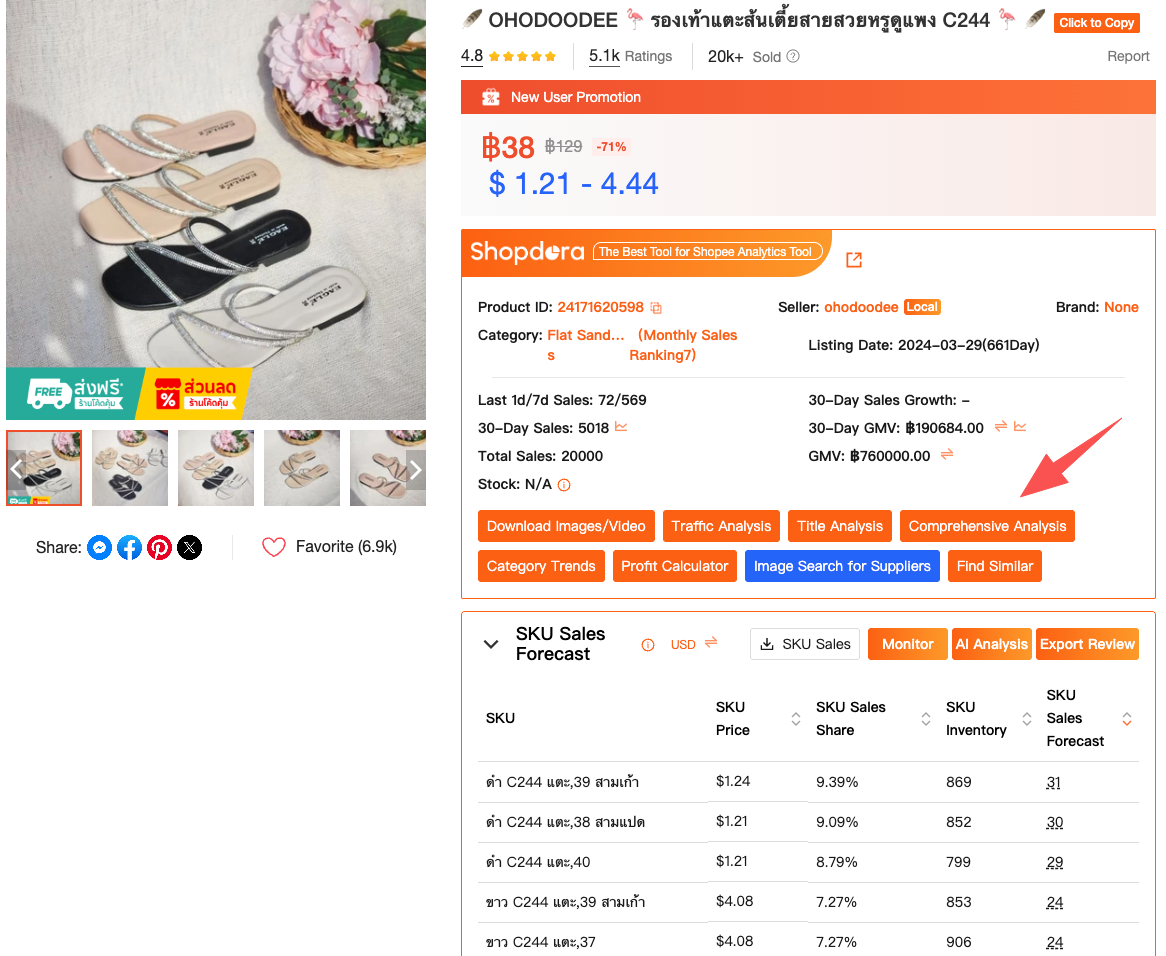
The first Shopdora feature that changed my workflow was Comprehensive Analysis (Product Tracker).
This is not something you access inside Shopee. You use it by installing the Shopdora Chrome plugin, which integrates directly into Shopee product pages. Once installed, you simply open any product listing on Shopee and click the Shopdora plugin icon.
From there, you can open Comprehensice analysis and add that product to Product Tracker.
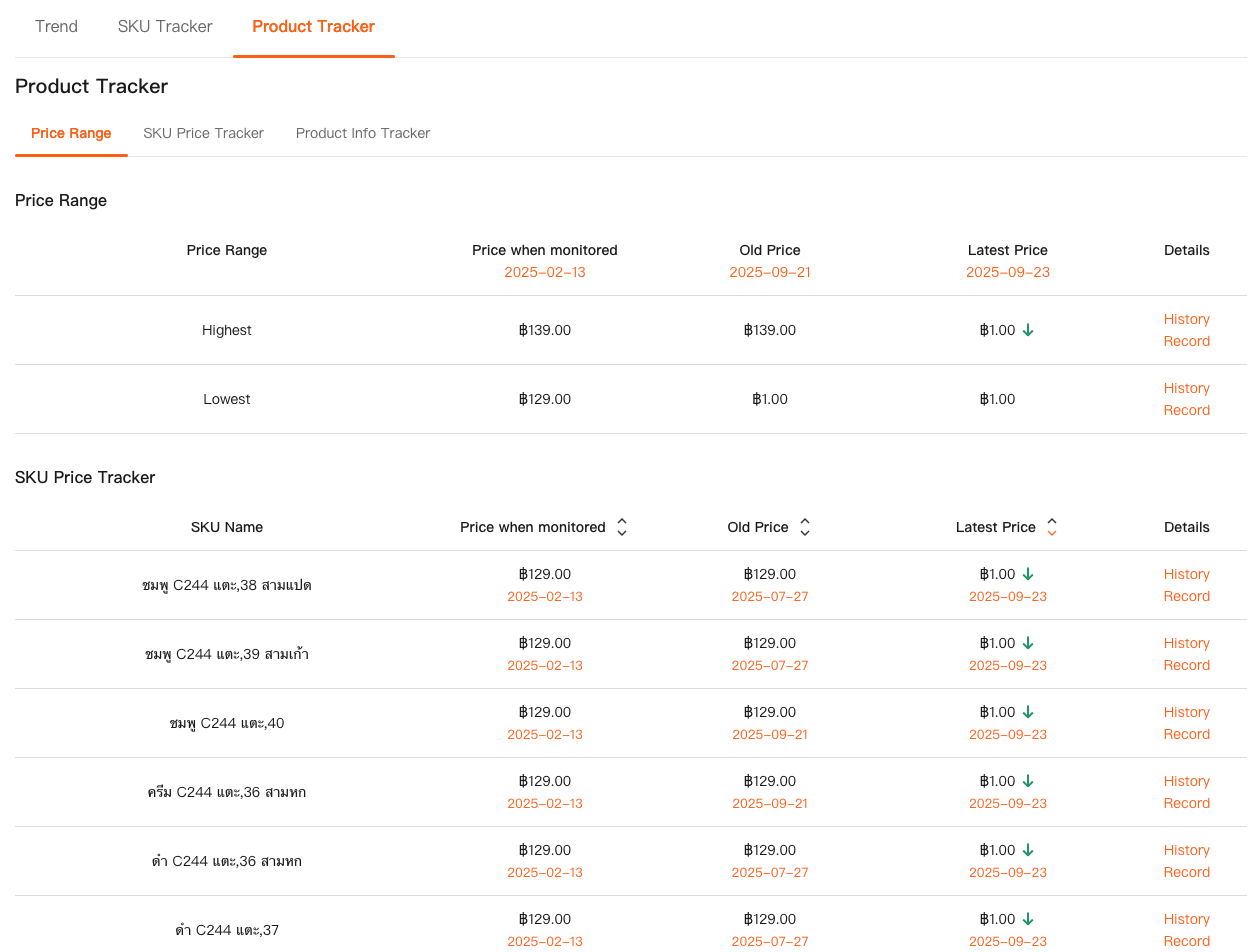
What this does, in practice, is turn Shopdora into a living shopee price tracker:
- It records historical price changes
- Tracks sales volume trends over time
- Shows ranking movement and lifecycle signals
I remember tracking a competitor product that looked “stable” on the surface. Same price, same photos, same title. But once I tracked it for two weeks, the data told a different story: they were rotating discounts across SKUs, not the main product price. That explained why my price matching never worked.
This kind of insight is impossible without an external tracker. And importantly, Product Tracker lives on the Shopdora web dashboard, so after adding products via the plugin, you can monitor them anytime by logging into your Shopdora account.
SKU Insight: The Missing Layer in Shopee Analytics
Pricing mistakes often happen at the SKU level, not the product level. Shopee itself doesn’t make this easy to see for competitors. That’s where SKU Insight became essential for me.
SKU Insight is accessed from the Shopdora product detail page after you open a tracked product. It breaks down:
- Sales contribution by SKU
- Price differences between variations
- Which SKUs are carrying the majority of revenue
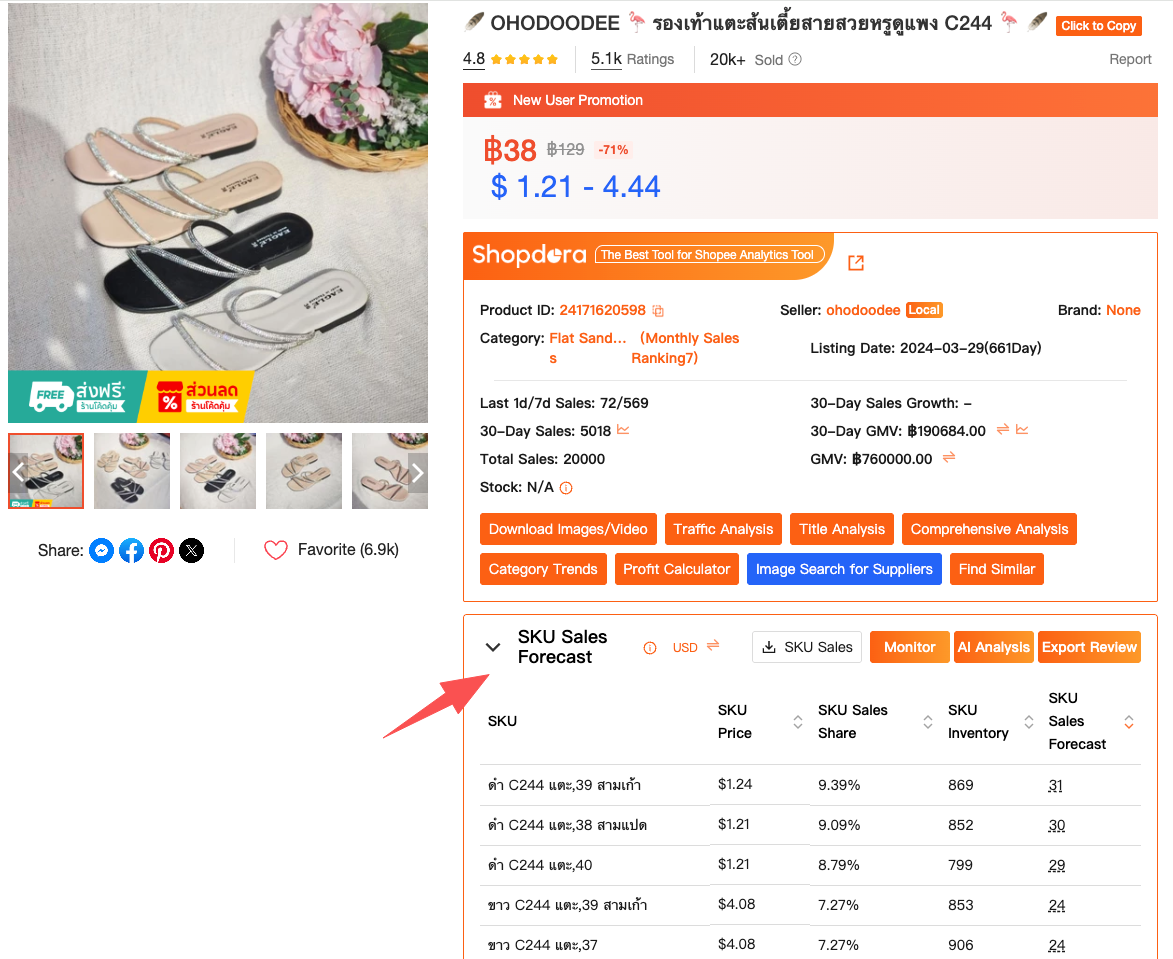
I once assumed a competitor was winning because their overall product price was lower. SKU Insight showed me the truth: their best-selling SKU was actually priced higher than mine—but had better availability and stronger keyword coverage.
That single realization changed how I priced bundles and variations. Instead of blanket discounts, I adjusted only the SKUs that mattered. This is actionable shopee analytics, not abstract charts.
Understanding Traffic Before Touching Price
Another mistake I used to make was changing prices without understanding where traffic was coming from.
Shopdora’s Traffic Analysis solved this problem for me.
- Organic vs paid traffic distribution
- Traffic-driving keywords
- Keywords bringing traffic without conversions
- Hot keywords not yet used by the product
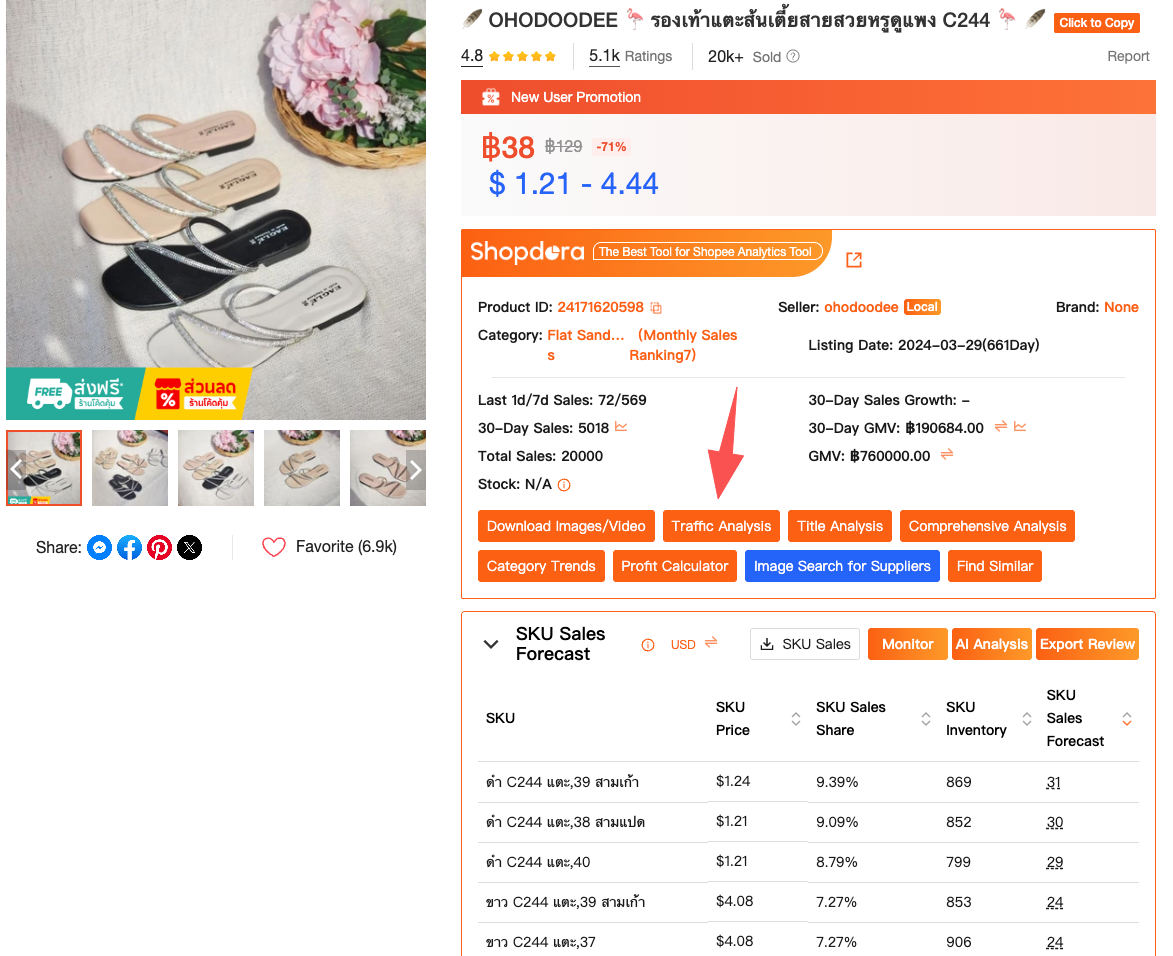
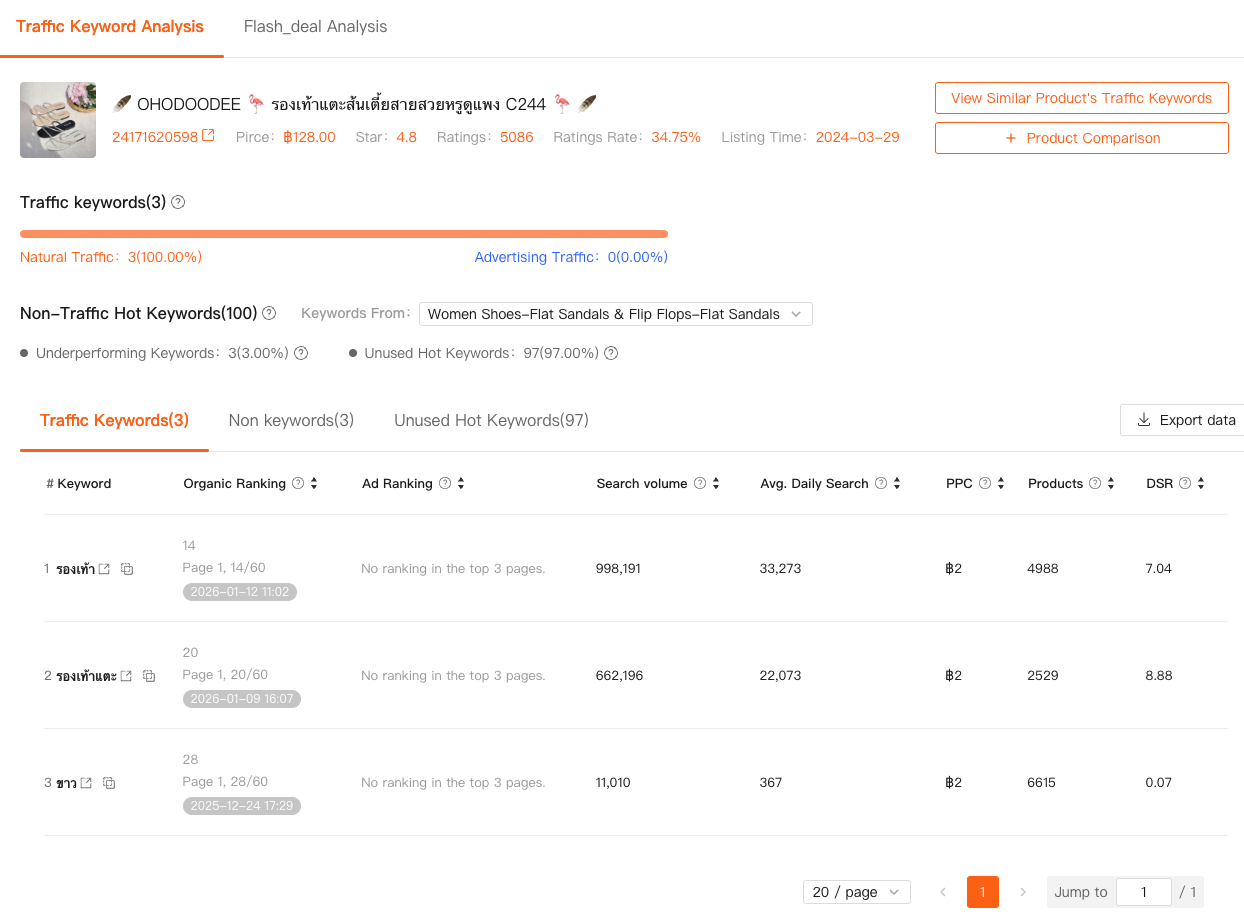
Here’s why this matters for pricing.
If a competitor’s sales are driven mainly by ads, their low price might be temporary. If sales are driven by organic keywords, price stability matters more. I’ve avoided several unnecessary price wars simply by realizing that a competitor’s traffic spike was ad-driven and short-lived.
Traffic Analysis helped me decide when not to lower prices, which might be the most underrated skill in Shopee selling.
Turning Shopee Analytics Into Real Decisions
When you combine:
- Product Tracker (price & sales trends)
- SKU Insight (variation-level performance)
- Traffic Analysis (traffic sources & keywords)
You get a complete loop.
This is how I now make decisions:
- Track competitors with the Shopdora plugin
- Monitor price and sales behavior over time in Product Tracker
- Identify revenue-driving SKUs using SKU Insight
- Check traffic sources before adjusting price
This workflow lives partly in the browser plugin (data capture) and partly on the Shopdora web dashboard (analysis). There’s no guessing, no spreadsheet gymnastics.

How to Start Using These Features (Without Overthinking)
If you’re new, don’t try to use everything at once.
Start with this:
- Install the Shopdora Chrome plugin
- Open 3–5 competitor product pages on Shopee
- Add them to Product Tracker
- Review data after 7 days
Once patterns appear, move deeper:
- Open SKU Insight from product detail pages
- Use Traffic Analysis on products where pricing feels “off”
Everything mentioned above is clearly labeled inside Shopdora using standard feature names. There’s no hidden setup. If you can browse Shopee, you can use Shopdora.
Final Thoughts From a Solo Seller
I don’t use Shopdora because it’s flashy. I use it because it removes emotional decision-making from pricing and analytics.
Good shopee analytics don’t tell you what to do. They tell you what’s actually happening. A real shopee price tracker doesn’t force you to compete on price—it shows you when price even matters.
For me, that clarity was worth more than any discount strategy.
If you’re tired of adjusting prices blindly and reacting too late, start by understanding the market outside your own shop. That’s what Shopdora was built for—and why it’s now part of my daily workflow.