
Shopee Keywords: How Top Sellers Find, Fix, and Scale Traffic That Actually Converts
Ask any Shopee seller what they’re struggling with, and you’ll hear some version of this:
“I have traffic, but it’s not converting.”
Or worse:
“I don’t even know which keywords are supposed to bring traffic.”
On Shopee, keywords are not just about visibility. They decide:
- Who sees your product
- Whether Shopee’s algorithm keeps testing your listing
- And if your traffic turns into real orders
After working with dozens of Shopee stores — from single-SKU sellers to full catalogs — one pattern is clear:
Most keyword problems aren’t caused by missing keywords. They’re caused by misunderstood ones.
That’s where a proper Shopee keyword workflow matters — and where tools like Shopdora make a real difference.

Why “Shopee Keywords” Are Harder Than They Look
Shopee doesn’t tell sellers:
- Which keywords should be driving traffic
- Which keywords are already in your listing but doing nothing
- Which high-volume keywords you’re completely missing
As a result, many sellers:
- Stuff titles blindly
- Copy competitors without understanding relevance
- Run ads on keywords that never convert
What’s missing isn’t effort — it’s clarity.

Shopdora: Turning Shopee Keywords Into Actionable Data
Shopdora is built specifically for Shopee sellers who want keyword decisions based on evidence, not assumptions.
Inside its keyword analysis features, Shopdora focuses on one thing:
How your listing actually interacts with high-traffic keywords in your exact subcategory.
This is where two features stand out.
1. Non-Keywords: When Your Listing Uses Keywords That Bring Zero Traffic
One of the most common keyword blind spots is something sellers rarely check.
With Shopdora’s Non-Keywords feature, you can see:
- The Top 100 keywords by search volume in your listing’s subcategory
- Keywords that already appear in your listing
- But aren’t bringing any measurable traffic
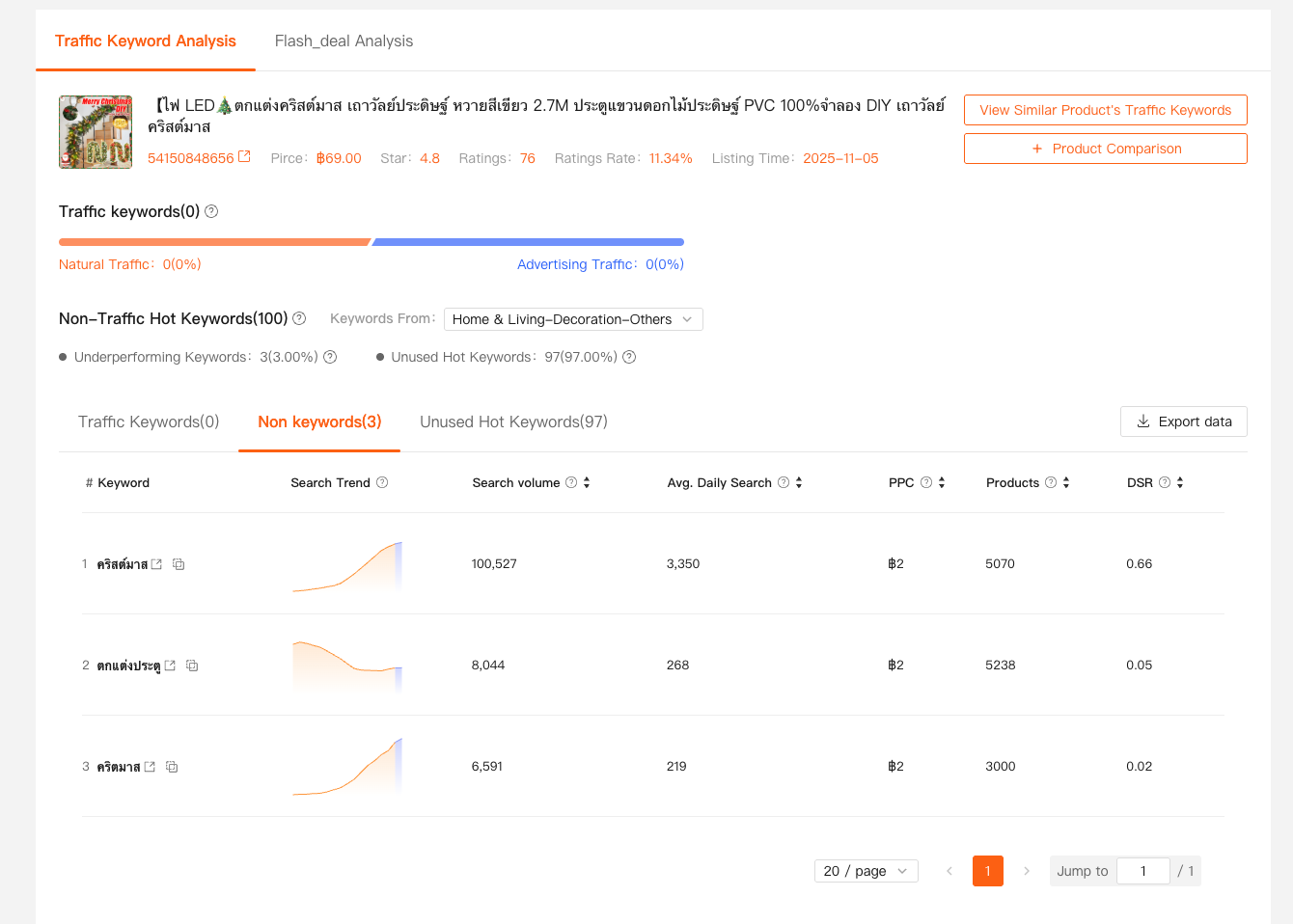
This immediately answers an uncomfortable question:
“Why am I using this keyword if it’s not working?”
From here, sellers typically take one of two actions:
- Remove or down-weight low-impact keywords in titles and descriptions
- Or test them deliberately via ads, based on their search volume
Instead of guessing which keywords deserve budget or space, decisions are prioritized by real demand.
2. Unused Hot Keywords: High-Volume Terms You’re Not Even Competing For
The second issue is even more damaging:
keywords you’re not using at all.
Shopdora’s Unused Hot Keywords feature shows:
- High-search-volume keywords in your subcategory
- Keywords your listing does not currently use
- Their search volume and relevance score to your product
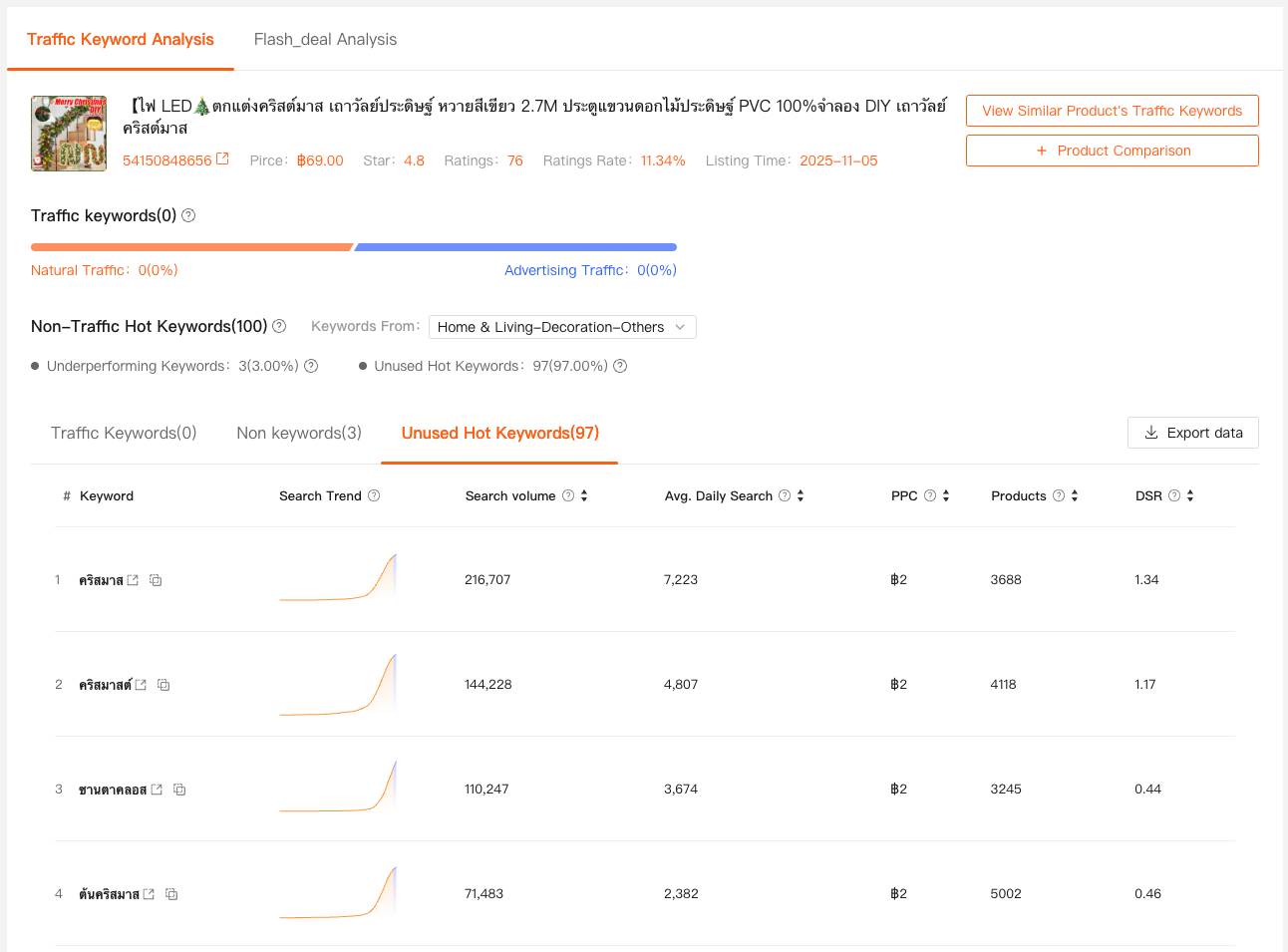
This is where sellers often discover:
- Entire keyword clusters they’ve ignored
- Title structures that are too narrow
- Missed opportunities competitors are quietly benefiting from
Instead of copying random competitor titles, sellers can now:
- Select keywords that match both volume and relevance
- Optimize titles without sacrificing clarity or conversion
It’s keyword expansion — without keyword stuffing.
Connecting Keywords to Real Performance with Comprehensive Analysis
Keywords don’t exist in isolation.
That’s why Shopdora’s Comprehensive Analysis matters so much.
From the product page, sellers can enter Comprehensive Analysis to view:
- Traffic trends
- Sales performance over time
- Ranking changes
- Price and inventory movement
When keyword changes are paired with this data, patterns become visible:
- Traffic increases after adding relevant unused hot keywords
- Rankings improve when non-performing keywords are removed
- Conversion stabilizes when titles become clearer instead of longer
This is where Shopee keyword optimization becomes a system — not a one-time edit.
A Practical Keyword Workflow Used by Experienced Sellers
Here’s how many sellers use Shopdora in practice:
- Open a listing
- Check Non-Keywords
- Identify keywords with volume but zero impact
- Review Unused Hot Keywords
- Select high-relevance terms worth testing
- Optimize title structure
- Add only keywords that fit naturally
- Monitor results in Comprehensive Analysis
- Watch traffic, ranking, and sales trends
No guesswork. No endless revisions.

Why This Matters More Than Ever on Shopee
Shopee’s competition is no longer about who has more keywords.
It’s about:
- Keyword relevance
- Listing clarity
- Algorithm confidence
Shopee rewards listings that:
- Attract the right searches
- Convert consistently
- Show stable performance signals
Random keyword stuffing does the opposite.
Tools like Shopdora help sellers work with the algorithm instead of fighting it.
Final Thoughts: Shopee Keywords Are a Strategy, Not a List
The biggest shift successful sellers make is this:
They stop thinking in keywords and start thinking in keyword performance.
If you’re serious about improving traffic quality — not just traffic volume — then understanding:
- Which keywords are wasted
- Which keywords are missing
- And how keyword changes affect real data
is no longer optional.
With Shopdora, Shopee keyword optimization becomes something you can measure, test, and repeat — confidently.