
Shopee Tools That Actually Help Sellers Make Better Decisions

Hi, I’m David.
I’ve been running my own Shopee store for a little over three years now. I’m not an agency, not a “guru,” and definitely not someone selling courses. I’m just a solo seller who has gone through the usual Shopee cycles: chasing hot products, rewriting titles, testing ads, killing SKUs too late, and sometimes realizing—painfully—that my competitors seemed to know the market better than I did.
If there’s one thing I’ve learned the hard way, it’s this: most Shopee sellers don’t fail because they work less, but because they make decisions with incomplete information.
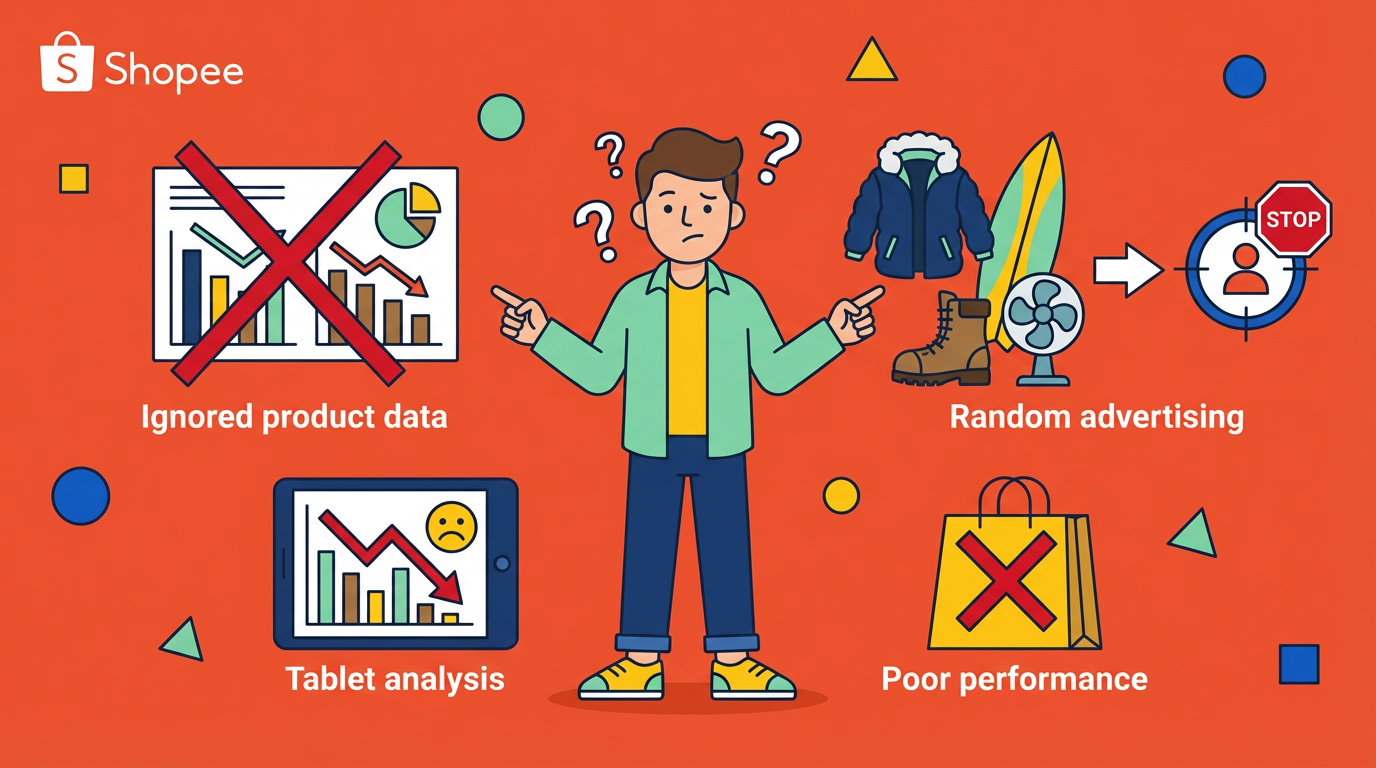
The Shopee Seller Center shows you your data. Your sales, your SKUs, your ads. That’s fine—but it tells you almost nothing about what’s actually happening in the wider market. And that gap is exactly where the right Shopee tools start to matter.
In this article, I want to talk about a very specific problem most sellers face, and how a small set of Shopee tools—particularly a few features from Shopdora—can help solve it in a practical, non-hype way.

The Real Problem: Sellers Operate Blind Outside Their Own Store
Most Shopee sellers think their problem is traffic, or ads, or low conversion. But those are usually symptoms, not the root cause.
The real issue is this: we’re making market decisions while only seeing our own slice of the data.
You can’t see how many units your competitors are selling. You can’t clearly tell which SKUs are driving their revenue. You don’t know whether a product category is actually growing or just looks busy. You don’t know which keywords are already overcrowded, or which ones are quietly gaining traction.
Without market-level visibility, sellers tend to:
- Enter saturated niches too late
- Copy competitors’ listings without understanding why they work
- Kill products that are actually aligned with market trends
- Scale products that are already peaking
This is where Shopee tools that focus on market and competitor analysis—not just store management—become critical.

Using Market-Level Product Research Instead of Guesswork
One of the first Shopdora features that genuinely changed how I operate is Product Research.
To be clear, this isn’t about looking at my own SKUs. I already have that in Seller Center. What Product Research does is let me see what’s happening across the market, by site, by category, and by multiple conditions at the same time.
Instead of asking “What should I sell?”, I can ask much better questions:
- Which products are actually selling consistently across the market?
- Are sales growing, flat, or declining?
- How long have these products been listed?
- Is revenue coming from many sellers or just a few dominant ones?
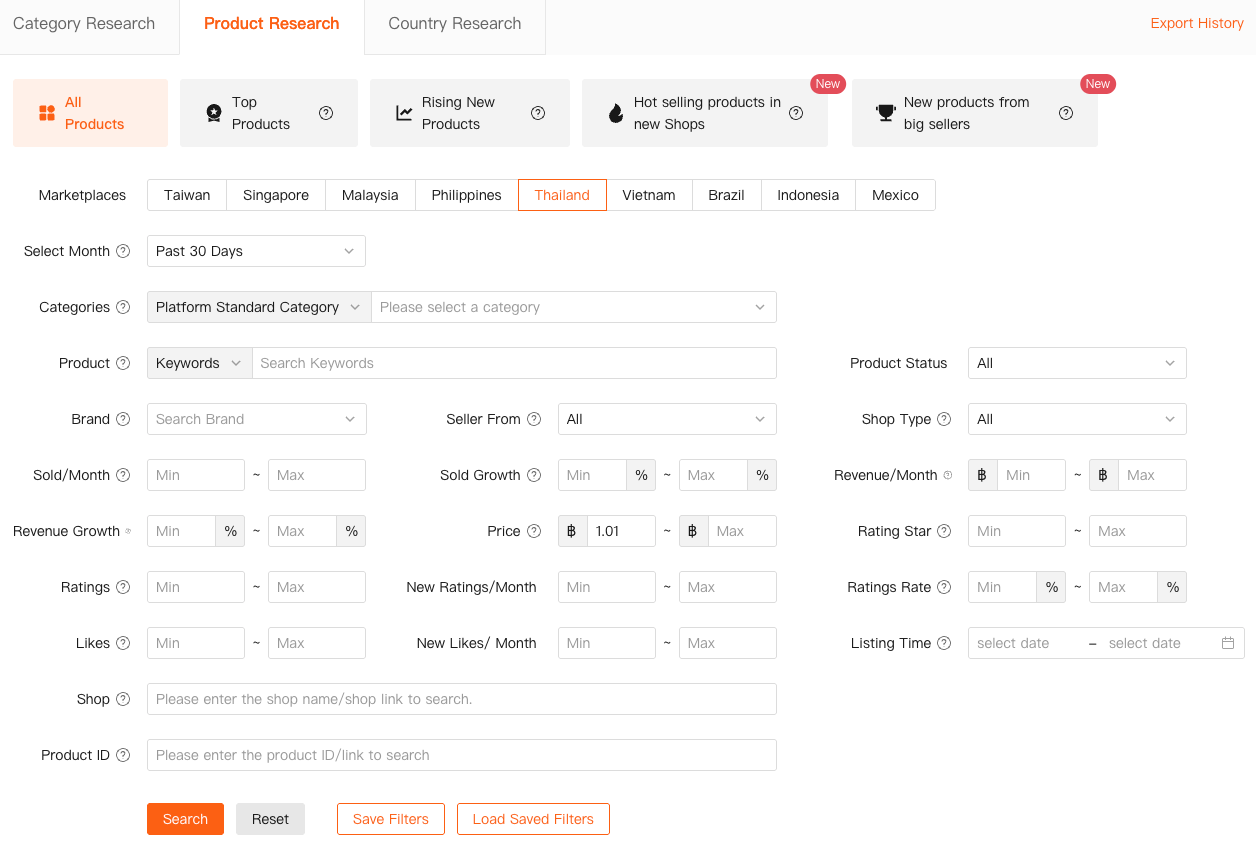
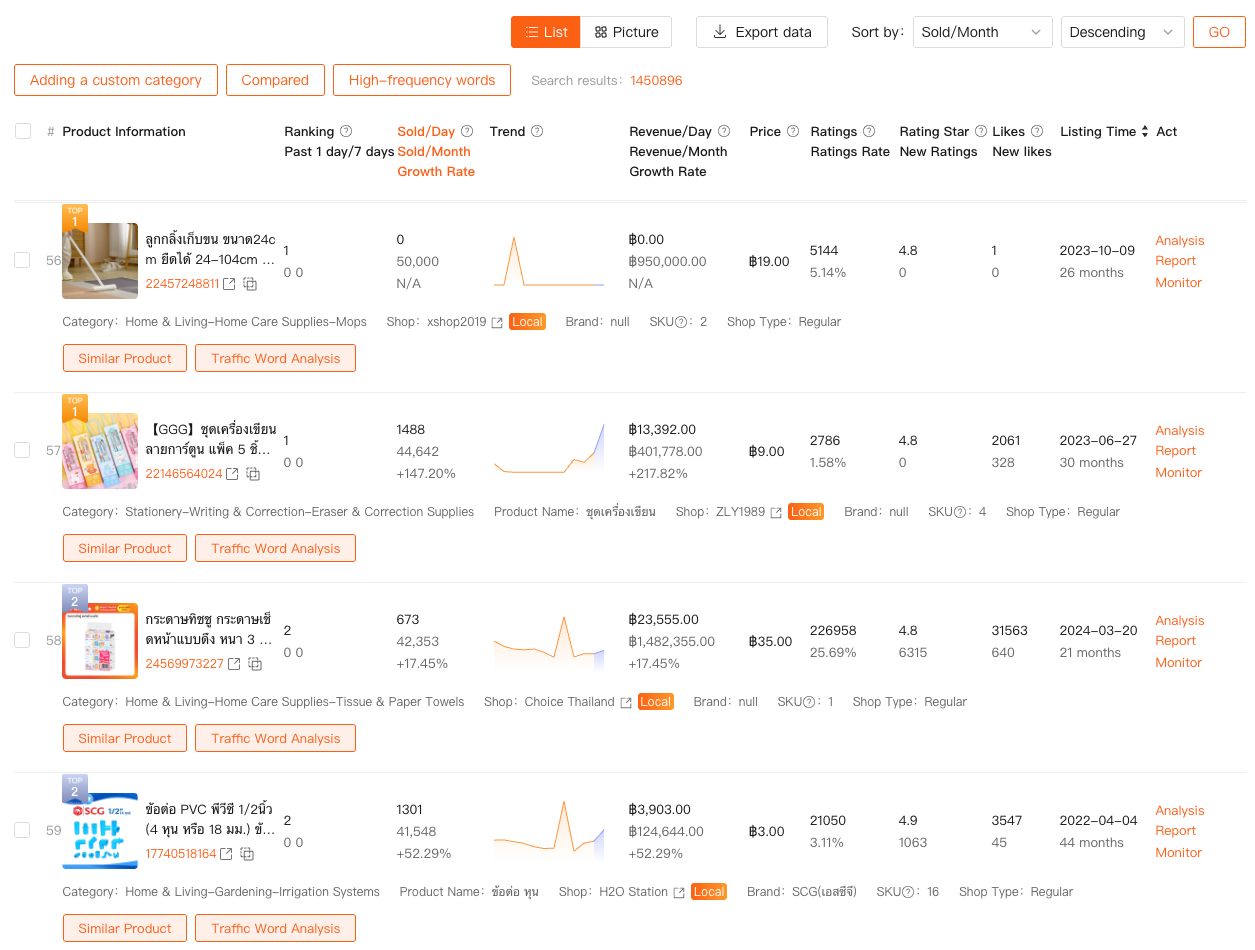
Because Product Research supports multi-site and multi-category filtering, I can compare patterns across regions instead of assuming one market behaves like another. The results page doesn’t just dump products—it shows sales trends, revenue, growth rate, and time on market, which helps me judge whether a product is early, mature, or already fading.
This alone filters out a huge amount of noise. I’m no longer reacting to screenshots or viral posts—I’m responding to measurable market behavior.
As a Shopee tool, this kind of visibility is something Seller Center simply doesn’t offer, because it’s not designed to show competitor data at scale.
Keyword Decisions Without Guessing or Copying Blindly
Keywords are another area where most Shopee sellers struggle—not because keywords are “hard,” but because reliable keyword data isn’t visible inside Shopee itself.
This is where Keywords Mining, a Shopdora feature accessed from its web dashboard, becomes extremely useful—especially for sellers doing SEO-style optimization or planning ads more rationally.
Instead of guessing keywords based on autocomplete or copying competitors’ titles word for word, I can see platform-level keyword data filtered by site and category. This includes actual search volume, trend direction, growth, PPC competitiveness, and how many products are already competing for that keyword.
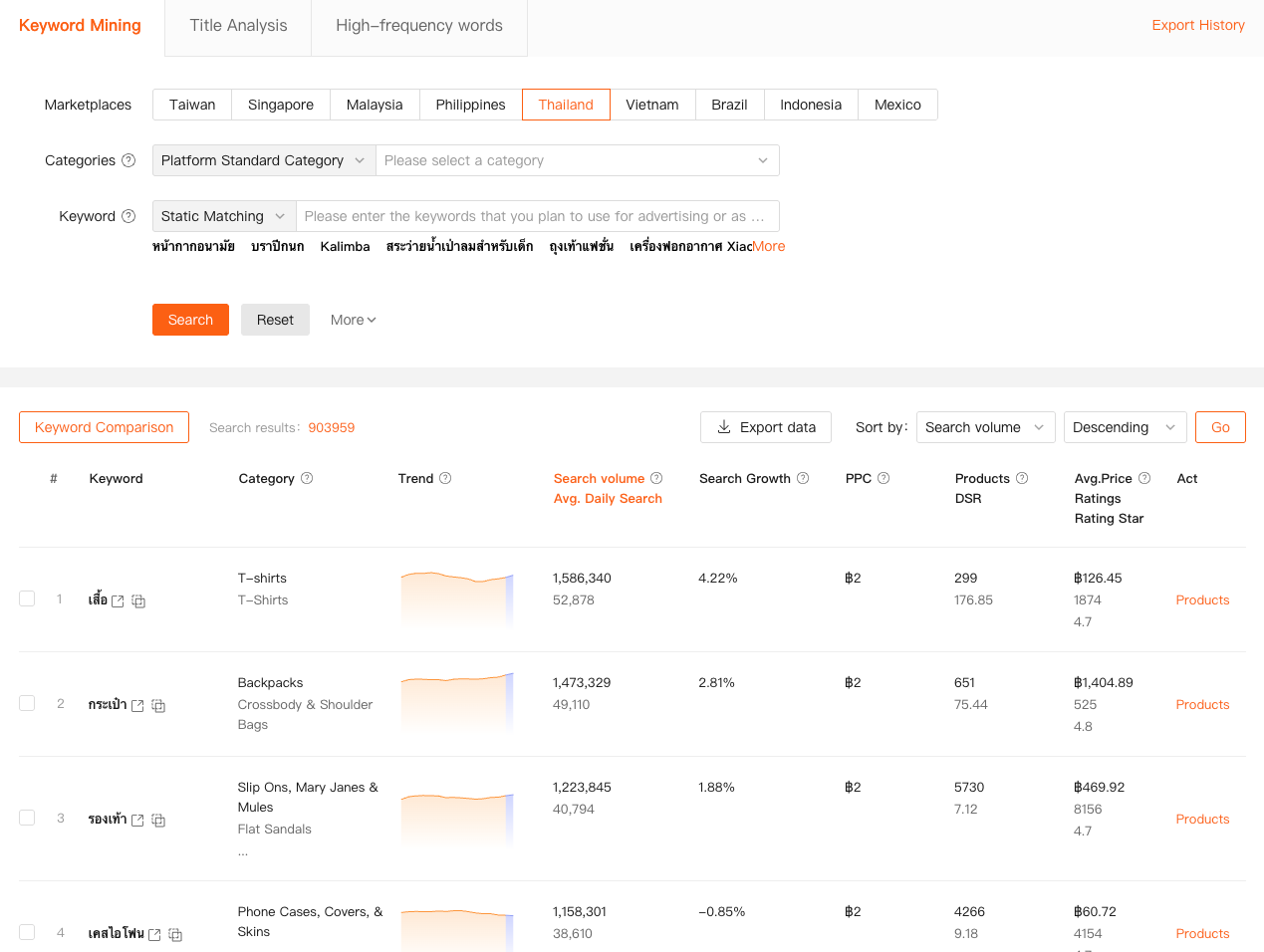
Even more importantly, I can paste a Shopee product link and reverse-check which keywords that product is currently covering. That’s huge. It tells me whether a competitor is ranking because of strong keyword coverage or because of other factors like price and conversion.
For me, keyword tools aren’t about finding “magic words.” They’re about risk control. If a keyword already has massive competition and flat growth, I know not to build my listing around it. If I see a keyword with rising search volume but relatively low product count, that’s where I test.
This approach turns keyword optimization from guesswork into measured positioning.
Understanding Traffic Beyond “It Went Up or Down”
Traffic is another area where sellers often misread signals.
Seeing traffic increase doesn’t always mean you’re winning. And seeing traffic drop doesn’t always mean something is broken.
Shopdora’s Traffic Analysis helps me understand why traffic behaves the way it does, not just that it changed. It breaks traffic down into natural and paid sources and connects it to keywords, including:
- Keywords that are bringing traffic
- Hot keywords that are trending but not yet driving traffic
- Keywords your product hasn’t captured at all
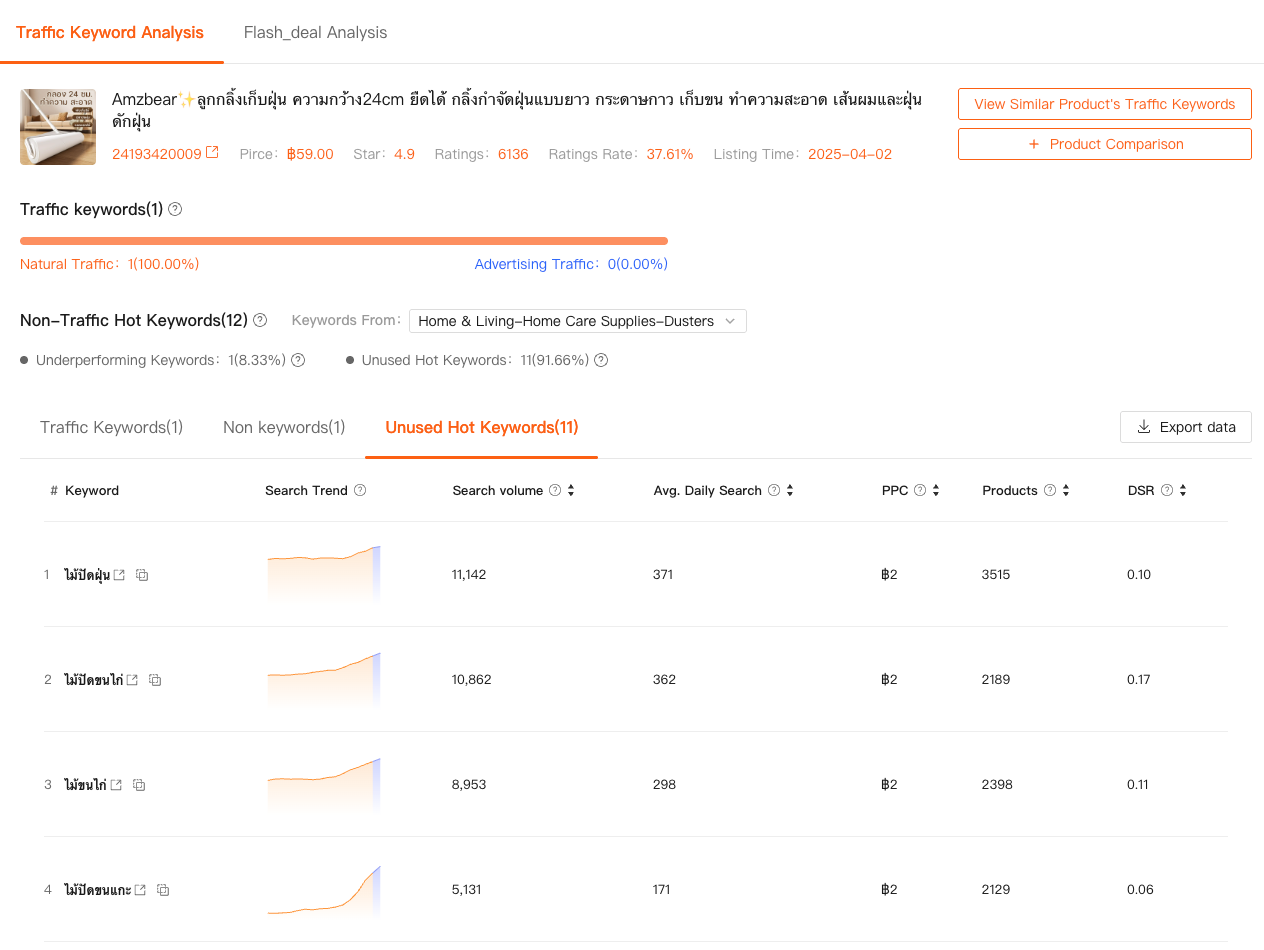
This is especially helpful when diagnosing underperforming listings. Sometimes the problem isn’t conversion—it’s that the product is aligned with keywords that are no longer active in the market.
By looking at Unused Hot Keywords and Non-Traffic Hot Keywords, I can decide whether a listing needs title restructuring, content adjustment, or whether the product itself is misaligned with current demand.
Again, this isn’t data I can get from Seller Center alone. It’s market-context data layered on top of my product.
Why These Shopee Tools Change Decision Quality, Not Just Efficiency
What I appreciate about these tools isn’t that they “automate” my work. They don’t.
They make my decisions more defensible.
Instead of:
“I think this product might work.”
I’m saying:
“Market data shows stable sales, keyword demand is growing, competition is manageable, and traffic trends support a test.”
That’s a completely different operating mindset.
And importantly, Shopdora doesn’t replace Shopee’s backend—it complements it. I still use Seller Center for execution. But I use tools like Product Research, Keywords Mining, and Traffic Analysis to decide what deserves execution in the first place.
Final Thoughts
If you’re looking for Shopee tools just to save time, you might be disappointed.
But if you’re looking for tools that help you stop making decisions in the dark, then market-focused tools like the ones I’ve mentioned are worth serious consideration.
I don’t believe in “winning formulas.” I believe in seeing more than your competitors see, and acting a little earlier, a little more calmly, and with fewer emotional swings.
That’s what these tools have helped me do.
I’m David—a Shopee seller who still tests, still fails sometimes, but now fails with reasons, not confusion. And in this business, that difference matters more than most people realize.